BootIt Collection: Boot Manager and Partition Manager for BIOS and UEFI PCs
The BootIt Collection from TeraByte is a boot manager and partition manager that runs from its own USB stick or disc, before Windows loads, so you can multi-boot Windows and Linux, resize and move partitions, and convert disks between MBR and GPT. It covers older BIOS PCs (BootIt Bare Metal) and current UEFI PCs (BootIt UEFI), and adds PartWork for the same partition work inside Windows. It costs $39.95 on TeraByte's own store. The Buy Now button on this page sells the TeraByte Bundle for $59.98: the full BootIt Collection plus TeraByte's Drive Image Backup and Restore Suite (Image for Windows and Image for Linux).
If you've ever wanted Windows 11 and Linux on one PC without letting either installer rewrite the other's boot loader, or needed to grow a full C: drive by taking space from the partition next to it, this is the kind of job BootIt was built for. TeraByte has made multi-boot software since the mid-1990s.
Quick facts
- What's in the BootIt Collection: BootIt UEFI, BootIt Bare Metal, PartWork for Windows, Image for UEFI and Image for DOS, and the OSD Tool Suite Professional for BootIt (paid version)
- Version: BootIt UEFI and BootIt Bare Metal 2.13, released September 21, 2026. PartWork for Windows 2.13.1, released October 13, 2026
- Developer: TeraByte, Inc. (TeraByte Unlimited), Las Vegas, Nevada
- Runs on: its own boot media on x64 UEFI PCs (Secure Boot supported) and BIOS PCs. PartWork runs on Windows 7 SP1 to 11 and Windows Server 2008 R2 SP1 or later
- Price: BootIt Collection alone $39.95 on terabyteunlimited.com. Through the Buy Now button: the TeraByte Bundle, $59.98, which also includes the Drive Image Backup and Restore Suite
- License: one-time purchase, free updates within version 2. A home license covers up to 5 computers in one household
- Trial: free for 30 days, no reinstalling to restart it
- Refunds: none. All sales are final
- What we checked: the 12.1 MB trial zip downloaded from terabyteunlimited.com (BootIt UEFI and Bare Metal program files dated September 19, 2026, separate boot files for the Microsoft 2011 CA, Microsoft 2023 CA and TeraByte Secure Boot certificates, and no OSD Tool Suite scripts), the 69 MB PartWork trial installer, the $39.95 price on TeraByte's purchase page, and $59.98 for "TeraByte Bundle 2" on the order page with no discount line, all on October 30, 2026. We didn't boot BootIt on a test PC or resize a real partition.
Download Free TrialBuy Now
What the Buy Now button sells
The Buy Now button on this page sells the TeraByte Bundle ($59.98), not the BootIt Collection on its own. You get the complete BootIt Collection plus the Drive Image Backup and Restore Suite: Image for Windows (disk imaging from the running Windows), Image for Linux with its graphical boot media, the Windows PE/RE boot-disk builder, and PartWork for Linux, which neither package has alone.
If you only want BootIt, TeraByte sells the BootIt Collection by itself for $39.95 on its own website. The bundle costs $20.03 more and is worth it if you'd also like a Windows backup program, since the Drive Image Suite alone is $49.98.
Overview
BootIt isn't a Windows program you click through. You run TeraByte's MakeDisk tool once to write BootIt to a USB stick or disc, boot the PC from it, and install BootIt to the drive. From then on BootIt is the first thing the PC shows: a boot menu with your operating systems, and a Maintenance Mode desktop with the partition tools, the imaging tool and the boot settings. Because none of it runs inside Windows, nothing has the system partition locked, which is why it can move or shrink a partition Windows itself refuses to touch.
The two editions split the hardware. BootIt Bare Metal is for traditional BIOS PCs and anything booted in legacy mode. BootIt UEFI is for current PCs and laptops that boot through UEFI, including with Secure Boot turned on. One BootIt Collection license covers both, so an old desktop and a new laptop in the same house are both covered.
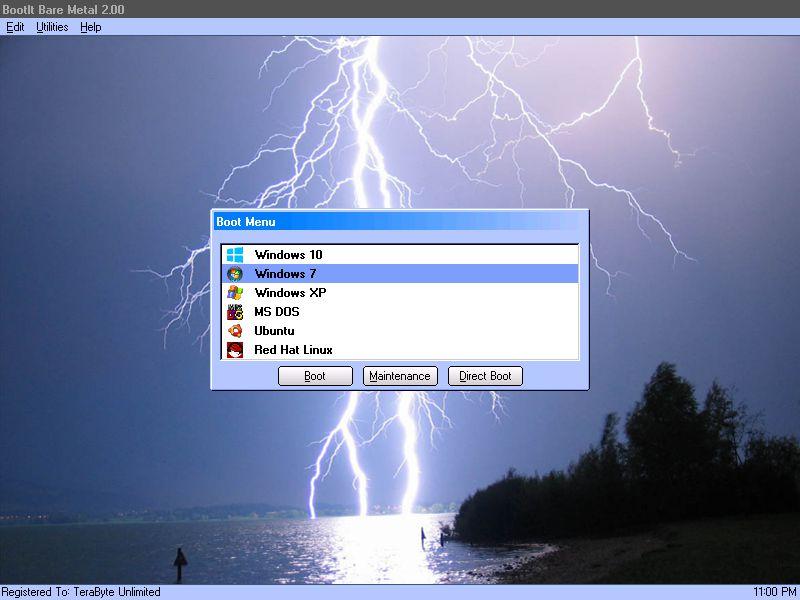
BootIt Bare Metal 2.00 with a custom background: one boot menu offering Windows 10, Windows 7, Windows XP, MS-DOS, Ubuntu and Red Hat Linux, with the Boot, Maintenance and Direct Boot buttons.
Features
One boot menu for every operating system
The BootIt Collection's boot manager finds the operating systems already on your drives when you install it and adds them to its menu. Each menu item boots from any partition on up to 16 drives and can hide or unhide other partitions, so two copies of Windows never see each other's drives. Bare Metal can also swap drive order, set the partition table order per item and boot several systems from one partition, while BootIt UEFI boots any UEFI boot loader on any partition. A Direct Boot menu skips the normal menu for a one-off boot, and menu items can be locked behind user IDs and passwords.

BootIt UEFI 2.00's plain boot menu with Windows 10, Windows 7 and Ubuntu x64 on a UEFI PC.
Partition work outside Windows
The BootIt Collection's partition manager creates, moves (slides), copies, deletes and undeletes partitions, and resizes FAT/FAT32, exFAT, NTFS and Linux Ext2/3/4 partitions without losing data. It converts disks between MBR, EMBR and GPT, aligns partitions, can wipe a partition when deleting it, edits small text files on partitions Windows can't see, and handles drives beyond 16 exabytes. EMBR is TeraByte's own extension of MBR: Bare Metal can create over 200 primary partitions on an EMBR disk.

BootIt UEFI's Work with Partitions screen: resizing the 60,873 MiB Win10 partition on a GPT disk to 40,960 MiB, with the Slide, Copy, Change Disk Type and BCD Edit actions alongside.
PartWork: the same partition tool on the Windows desktop
PartWork for Windows, part of the BootIt Collection, brings BootIt's Partition Work screen into a normal Windows program. On top of the BootIt actions it can shrink or expand the running Windows NTFS partition through Windows Resize, change cluster sizes without reformatting, defragment NTFS metadata and securely wipe a partition or a whole drive. PartWork isn't sold separately: its full version needs a BootIt Collection license.
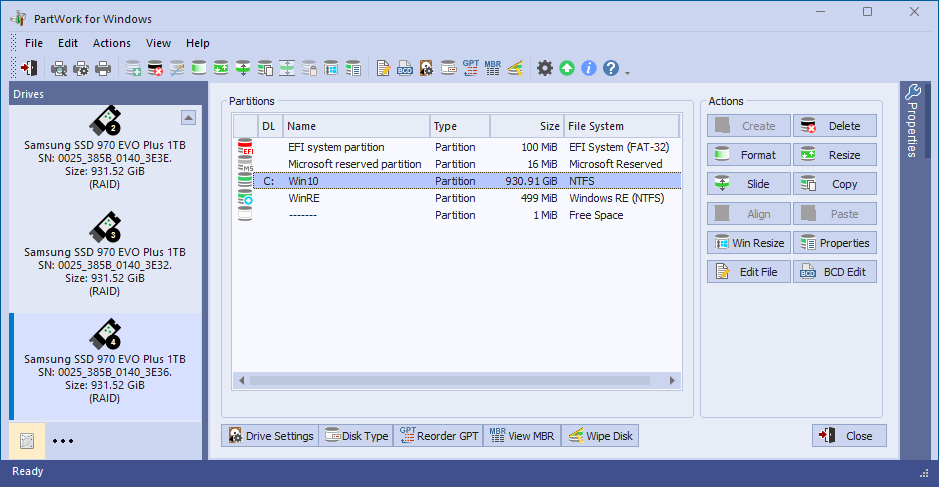
PartWork for Windows listing the EFI system, Microsoft reserved, Win10 (930.91 GiB NTFS) and WinRE partitions on a 1 TB Samsung SSD, with Resize, Slide, Win Resize and BCD Edit buttons.
Boot repair without a Windows DVD
The BootIt Collection edits the Windows BCD store directly, in BootIt and in PartWork, so you can fix the boot entry that points Windows at the wrong partition after a move or a clone. In Maintenance Mode this works on a PC that won't start Windows at all, from the BootIt USB stick.
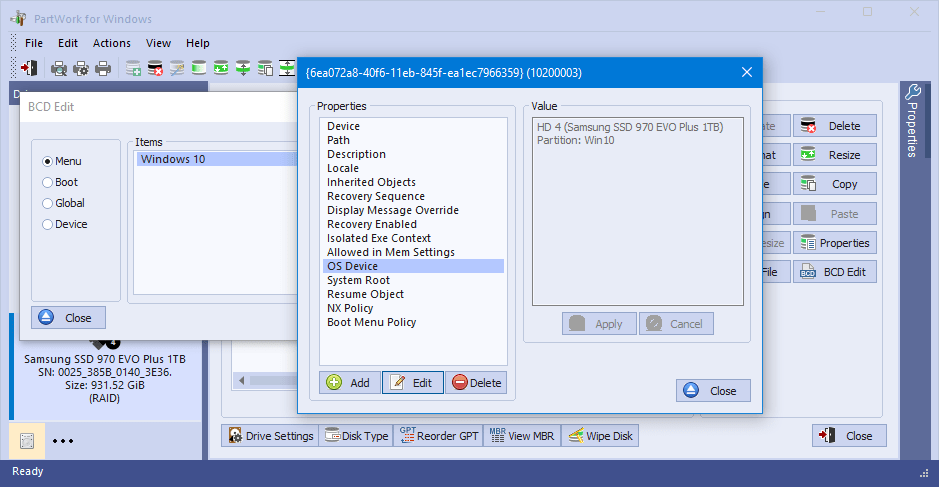
PartWork for Windows' BCD Edit: the Windows 10 entry's properties, with OS Device set to the Win10 partition on HD 4.
Disk images and scripting built in
The BootIt Collection includes the full Image for UEFI (in BootIt UEFI) and Image for DOS (in Bare Metal), started from the BootIt desktop with one click. They back up single partitions or whole drives, restore them, and clone a drive to a bigger one while expanding the partitions, and their image files are compatible with TeraByte's Image for Windows. The paid version adds the OSD Tool Suite Professional for BootIt, a TBScript engine that automates partition creation, sliding and resizing, runs backups and restores unattended, and comes with scripts that prepare Windows to run on different hardware.
Benefits
- No reinstalling to fix a layout. Moving free space from one partition to another takes minutes in BootIt, instead of wiping and reloading a PC.
- Operating systems that stay out of each other's way. Per-item partition hiding means a Windows update on one system can't touch the other system's drive.
- Old and new hardware on one license. Bare Metal and UEFI together cover a BIOS-era PC and a Secure Boot laptop, and a home license covers five machines.
Real-World Uses
- Adding Linux to a Windows laptop: shrink the Windows partition in BootIt UEFI, install Linux in the free space, and choose either system from the BootIt menu.
- A C: drive that's full: take 30 GB from the data partition next to it and add it to C:, without reformatting.
- Moving to a GPT disk: convert the disk type and repair the BCD entry, instead of reinstalling Windows.
- A PC that won't boot: start BootIt from USB, check the partitions, fix the BCD store or restore an Image for UEFI backup.
Who It's For, and Who Should Skip It
The BootIt Collection fits enthusiasts, developers, testers and PC technicians who multi-boot or rearrange partitions regularly and are comfortable reading a manual before touching a disk.
Skip it if you only need to shrink one partition once (Windows' own Disk Management can often do that), if you want a polished one-click wizard, or if you're on a Mac (there's no macOS version). If you only need a boot menu for two Windows installs on a UEFI PC, the menu Windows already provides may be enough. And if you mainly want backups of a single-OS PC, a dedicated imaging program fits better; that's the other half of the TeraByte Bundle.
Usage Guide
- Download and extract the trial zip (about 12 MB) from terabyteunlimited.com to a folder.
- Prepare a way back: TeraByte's manual asks you to create a Windows recovery drive first, and a full disk image is a good idea before any partition change.
- Run makedisk.exe, choose BootIt UEFI (or BootIt Bare Metal for a BIOS PC), pick the Secure Boot certificate option that matches your PC, and write it to a USB flash drive or an ISO.
- Boot from the stick and install BootIt to the hard drive (BootIt UEFI goes into the EFI System Partition). It detects your operating systems and builds the boot menu.
- Enter Maintenance Mode from the boot menu and open Partition Work to resize, slide, copy or convert, or start Image for UEFI (Image for DOS on Bare Metal) to make an image.
- For work inside Windows, install PartWork from its own trial installer and activate the trial.
- After buying, enter your registration in MakeDisk's BootIt License screen and recreate the boot media, since trial media isn't upgraded in place.
Before you buy
- No refunds. TeraByte treats the 30-day trial as its guarantee, so boot BootIt from the USB stick on your own PC before paying.
- The trial is nearly complete. The OSD Tool Suite scripts come only with the paid version, and PartWork's Windows Resize doesn't work in its trial.
- Home vs business. The five-PC allowance is for non-business use. Businesses buy one license per computer, from $39.95 down to $6.15 each at 1,000 or more.
- Version 3 will cost extra. Updates within version 2 are free, and a new major version is a paid upgrade.
Where it falls short
- A dated, technical interface. BootIt's interface is old-fashioned and uses terms like EMBR and Direct Boot without explanation. A wrong move with a partition tool can leave a PC unbootable.
- BootIt UEFI boots fewer kinds of systems than Bare Metal. It can't boot legacy (BIOS-mode) systems, MBR and EMBR drives are supported only as non-booting drives, and Bare Metal's Multi-OS feature was dropped.
- UEFI firmware bugs show up. TeraByte's manual lists boot entries that get reordered or duplicated by the firmware, Direct Boot not working on PCs without BootNext support (such as the Surface Pro 4), and an "Unable to open BOOTIT.DAT" error on some older UEFI implementations.
- Secure Boot needs the right media. You choose between Microsoft 2011 CA, Microsoft 2023 CA or TeraByte's own certificate, and the last one requires installing TeraByte's DB certificate first.
- EMBR is TeraByte-only. On an EMBR disk without the Limit Primaries option, other partitioning tools such as Windows Disk Management or DISKPART must not be used, or you risk losing data.
What Users Say
The BootIt Collection has no Trustpilot, Capterra or G2 profile and few press reviews. The user reviews that exist are on download and deal sites and in long-running forum threads, and they come mostly from people who have used BootIt for years.
ColorMango: 4.5 out of 5 from 13 votes
ColorMango's BootIt Collection page has 11 written reviews (undated), and its 13 votes break down as ten 5-star, two 4-star and one 1-star. Most are about BootIt Bare Metal:
Hassan: "I'm an IT worker. I often use Bootlt Bare Metal to test my software on many different operating systems. I keep the whole testing setup on one computer. Bootlt Bare Metal is excellent. Even when my C drive is full, I don't need to reformat or reload my development computer. I just need to take 30GB from the second partition and add to the first partition. Very good!"
Keegan Carlton: "Bootlt Bare Metal can boot various operating systems with ease. It can arrange multiple partition tables. It works like a charm for drive imaging and restoring."
Chussets: "I use BootltBare Metal on my dual-boot Windows XP and Windows Vista systems. It works very well. It helps me a lot for partition management. I think it is better than Powerquest's Partition Manager."
Fülep: "It can help me manage partitions and create backup images. It is inexpensive. I can choose to boot into any operating system I want. It can work well even when Partition Magic informs there are bad sectors in the hard disc to stop PM from running."
Deepak Xavier: "Bootlt Bare Metal provides many solutions for partitioning, multi-boot, imaging, etc. It can also manage partitions for Windows Server system. The price of this program is cheap, and it can save almost $1,000 for me compared to buying a specialized partition manager for Windows Server."
iesjefel1: "Bootlt Bare Metal can be used for partitioning, bakcup, imaging/restoring, MBR manipulation, boot management, BCD editing etc. The support team is very helpful."
Letalis: "It is a good boot manager. It is just what I need. Though I have never seen Bootlt Bare Metal being recommended on any computer magazines, it is truly good. It is especially ideal for multiple or dual booting."
Eto Ramani gives the most common caveat: "For a novice, it may be a little complicated at first, but soon you will find it powerful and work perfectly."
FileHorse and AlternativeTo
FileHorse lists BootIt Collection 2.13 with an 8 out of 10 user rating from 3 votes. Its review by Michael Reynolds gives the pros as "All-in-One Boot Manager", "Comprehensive Disk Imaging Tools", "User-Friendly Interface", "Advanced Partitioning Features" and "Flexible Boot Configuration", and the cons as "May Require Technical Knowledge", "Potential Compatibility Issues" and "Requires Purchase for Full Features". Its verdict: "BootIt Collection is an excellent package for disk management".
On AlternativeTo, the only comment on BootIt Bare Metal is a 5-star one from jasonbrown1965 (November 10, 2018): "Works good. Real good." He used it to recover a 32 GB SD card that other recovery tools, TestDisk included, couldn't fix, and noted that the free 30 day trial "does not appear to have any limits".
Wilders Security Forums: mixed on BootIt UEFI
The Wilders Security Forums have a BootIt UEFI thread running since June 2018, and it's less glowing than the download sites. Some long-time users call BootIt their favourite software and use it on both UEFI and MBR systems. Others were disappointed that it can't boot an MBR partition and find it a step down from BootIt Bare Metal, one user found the EFI System Partition had room for the boot files of only two Windows installations (enlarging it was the suggested fix), and another preferred Ventoy for booting from removable drives. Owners of Bare Metal were advised that BootIt UEFI is mainly worth buying if you want to install it on the PC rather than run it from USB.
On TeraByte's testimonials page
M. Williams: "An extremely powerful partition and boot management tool which should run on just about any PC."
D. Teeth: "This software is brilliant as indeed is its stable-mate Image for Windows. Support is top notch and there are frequent updates."
P. Schrama: "As I like to experiment with al kinds of software, my system sometimes becomes unstable or crashes. With BootIt BM I then simply boot from another partition so I can inspect the problem. If needed, I can clone or restore a clean install to the stricken partition and start again. It's a tool I can't live without."
The pattern: users like BootIt's flexibility for multi-boot and test setups, its ability to fix partitions without reinstalling, the low one-time price and TeraByte's support. The complaints are the learning curve, an interface that hasn't changed in years, and, for BootIt UEFI specifically, fewer boot options than the older Bare Metal edition.
Editions and Pricing
There's one BootIt Collection license, covering both BootIt editions and PartWork. You can buy it alone from TeraByte, or as part of the TeraByte Bundle through the Buy Now button on this page. Both are one-time purchases.
| Included | BootIt Collection ($39.95, TeraByte's store) | TeraByte Bundle ($59.98, Buy Now) |
|---|
| BootIt UEFI and BootIt Bare Metal | Yes | Yes |
| PartWork for Windows | Yes | Yes |
| Image for UEFI and Image for DOS | Yes | Yes |
| OSD Tool Suite Professional for BootIt | Yes | Yes |
| Image for Windows and Image for Linux | No | Yes |
| PartWork for Linux | No | Yes |
| Windows PE/RE and Linux boot media | No (BootIt's own UEFI/DOS media) | Yes |
| Home license | Up to 5 PCs in one household | Up to 5 PCs in one household |
FAQs
Can I buy the BootIt Collection without the Drive Image Suite?
Yes. TeraByte sells the BootIt Collection alone for $39.95 on its own website. The Buy Now button on this page sells it only as part of the $59.98 TeraByte Bundle, which adds Image for Windows, Image for Linux and PartWork for Linux.
Does BootIt UEFI work with Secure Boot on a Windows 11 PC?
Yes. BootIt UEFI supports Secure Boot on 64-bit PCs with UEFI 2.1 or later. When you build the boot media you pick the Microsoft 2011 CA, Microsoft 2023 CA or TeraByte certificate files to match the certificates your PC's firmware trusts.
Which BootIt do I need, Bare Metal or UEFI?
The BootIt Collection includes both, so you don't have to choose when buying. Use BootIt UEFI on a PC that boots in UEFI mode and BootIt Bare Metal on an older BIOS PC or one set to legacy boot.
Can BootIt Collection convert a disk from MBR to GPT without losing data?
Yes. The BootIt Collection's partition manager converts disks between MBR, EMBR and GPT, and PartWork does the same from Windows. A Windows installation also needs matching boot files and firmware settings to start afterwards, so make a full image first.
Can I use BootIt from a USB stick without installing it?
Yes. BootIt Collection's boot media runs the partition tools and Image for UEFI or Image for DOS straight from the USB stick or disc. Installing it to the drive is only needed for the permanent boot menu.
System Requirements
- BootIt UEFI: x64 (AMD64/EM64T) PC with 64-bit UEFI 2.1 or later and a UEFI-accessible hard drive or SSD
- BootIt Bare Metal: IBM-compatible PC with a 386 or later CPU, 16 MB RAM, VGA and a BIOS-accessible hard drive
- Boot media: a USB flash drive or CD/DVD, made with MakeDisk on Windows (or by hand on Linux)
- PartWork for Windows: Windows 7 SP1 (with SHA2 support), 8.1, 10 or 11, 32- or 64-bit, or Windows Server 2008 R2 SP1 or later, about 30 MB of disk space
- Disks: MBR, EMBR or GPT
Conclusion
The BootIt Collection is worth buying if you multi-boot or rearrange partitions more than once in a while. For $39.95 on TeraByte's store, once, you get a boot manager and partition manager for both BIOS and UEFI PCs, a Windows version of the partition tool, and an imaging tool on the same USB stick, for up to five home PCs. Its users have relied on it for years, and few current tools still manage multi-boot at this level of control. The main reason not to buy it is the learning curve: it's a technical tool with a dated look, no refunds, and a UEFI edition that's less flexible than the old Bare Metal one. Try it for 30 days first. If you'd also like a Windows backup program, the TeraByte Bundle behind the Buy Now button adds the full Drive Image Backup and Restore Suite for $59.98, which is the better value.
Download Free TrialBuy Now