PDF Candy Desktop: 35+ PDF Tools That Run Offline on Your Windows PC
PDF Candy Desktop is a Windows app from Icecream Apps that puts the PDF Candy toolset (convert, edit, OCR, merge, split, compress, protect and unlock) on your own computer, so your files never leave it. The PRO license on our order page is a $99.90 one-time lifetime license, and the free download works for a few tasks so you can try it first.
Most people meet PDF Candy as a website: you upload a file, wait, and download the result, and the free plan soon starts counting your files per hour. The desktop version is for the person who is tired of that, or who isn't allowed to upload contracts, payslips or patient letters to someone else's server. You pick a tool from a grid, drop in a stack of files, and get the results in a folder on your own drive.
Quick facts
- Developer: Icecream Apps (Icecream Apps Ltd, Limassol, Cyprus)
- Version: 3.21
- Runs on: Windows 11, 10, 8.1, 8 and 7. There's no Mac version.
- Tools: more than 35, including PDF editor, OCR, PDF to Word/DOCX/RTF/ODT, PDF to JPG/PNG/TIFF/BMP, Office, HTML and e-book files to PDF, merge, split, compress, crop, rotate, delete pages, protect, unlock, extract images and text, edit metadata
- Internet: not needed to process files (only to activate the license)
- Price: $99.90 for PDF Candy Desktop PRO, a one-time lifetime license
- Free mode: a small task allowance and limited batch size
- Refund: 30-day money-back guarantee if you keep hitting errors the support team can't fix
- What we checked: the installer (pdfcandy_setup.exe, 156 MB, product version 3.21, digitally signed by ICECREAM APPS LTD) downloaded from the vendor, and the $99.90 lifetime price for PDF Candy Desktop PRO on the order page, both on November 4, 2026. We didn't install the app or time any conversions.
Before you buy
- "Lifetime" means this major version. PDF Candy defines its lifetime license as permanent access to a specific version with all of its minor updates. A future major upgrade isn't included.
- Windows only. The desktop app doesn't exist for macOS, Linux, iPhone or Android. On those, only the PDF Candy website works.
- Use the free tasks well. The free mode stops after a couple of jobs, so test it on the file type you actually struggle with (a scanned PDF for OCR, or a complex layout for PDF to Word) before paying.
- It's a toolkit, not Acrobat. The editor changes text and images on a page, but there are no form-building, e-signature or review-and-comment workflows.
Download Free Trial Buy Now
Overview
PDF Candy started in 2016 as a free website of PDF tools, and Icecream Apps (the company behind Icecream Screen Recorder and Icecream PDF Editor) later packaged the same tools as a Windows program. The home screen is a grid of tool tiles with a search box, and a left-hand menu groups them into Edit PDF, Convert from PDF, Convert to PDF and Other tools. Every tool works the same way: add files, set a page range or password if needed, choose a save folder, press the big green button.
That sameness is the point. You don't learn an editor; you pick a job. Batch processing is built into most tools, so converting forty invoices to Word is the same effort as converting one.
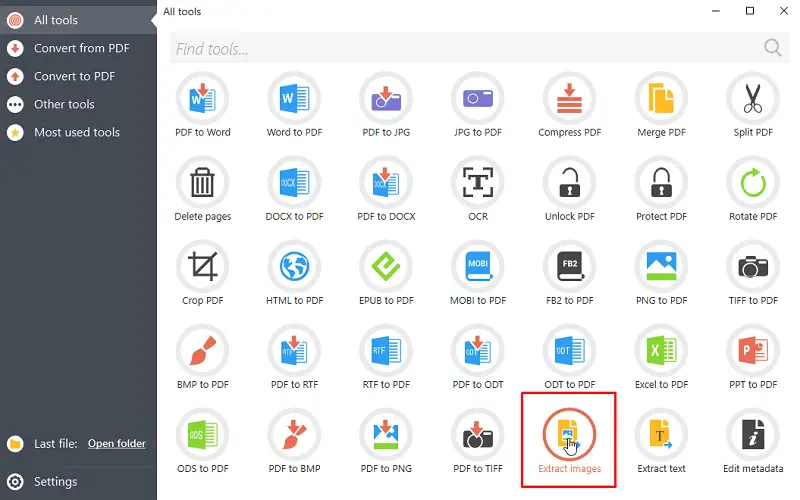
The All tools screen: 35 tiles, a search box, and the Extract images tool highlighted.
Features
Turn PDFs back into editable files
PDF Candy Desktop converts PDFs to DOC, DOCX, ODT and RTF for editing in Word or LibreOffice, and to JPG, PNG, TIFF and BMP images. Each file in the list gets its own page range, output format, a "split" option (one image per page) and a password field for protected files, so a mixed batch can go out in one run.

Convert from PDF: the output menu lists DOC, DOCX, ODT, RTF, JPG, BMP, TIFF, GIF, EPS, WMF and PNG, with Pages, Split and Password columns per file.
Make PDFs from almost anything
PDF Candy Desktop creates PDFs from Word (DOC, DOCX), Excel, PowerPoint, ODT, ODS, RTF, HTML, CSV, e-books (EPUB, MOBI, FB2) and images (JPG, PNG, TIFF, BMP). A "Merge all into one PDF file" checkbox turns a folder of scans or chapters into a single document in the same step.

Convert to PDF in the PRO version: two .doc files queued, with the "Merge all into one PDF file" option at the bottom.
OCR for scanned documents
PDF Candy Desktop recognizes text in scanned PDFs, so a photocopied contract becomes a searchable, editable document. You set the OCR language in Settings, which matters for accented or non-Latin text.
Edit text and images on the page
The PDF Candy Desktop editor lets you change existing text, replace or add images and move other objects on a page, which covers the typical fix: a wrong date, a misspelled name, an outdated logo. It isn't a layout tool, and big rewrites are still easier in Word after a conversion.
Organize, shrink and secure
- Merge several PDFs and split one into single pages, groups of pages or ranges
- Delete pages, rotate by 90, 180 or 270 degrees, and crop margins
- Compress large PDFs for email
- Protect a PDF with a password and limit printing, editing and copying, or unlock one you have the password for
- Extract all images or all text, and edit metadata (title, author, subject, keywords, dates)
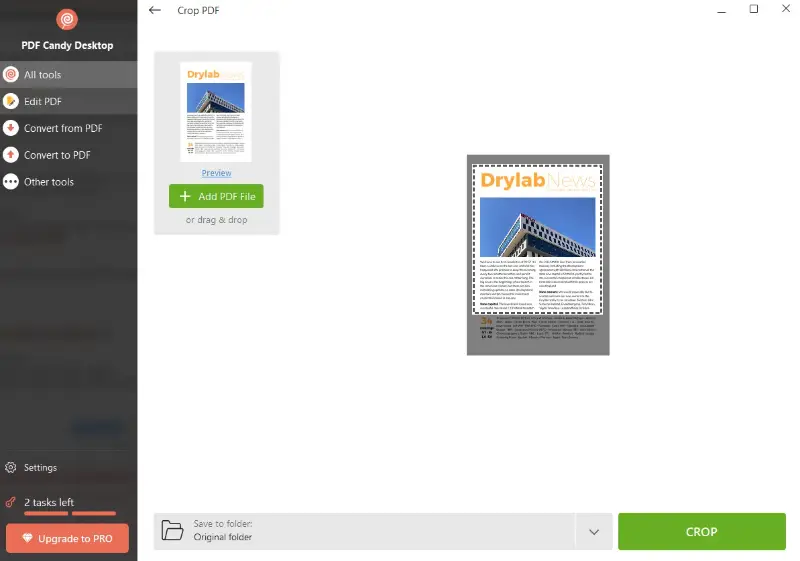
The Crop PDF tool in free mode. Note the "2 tasks left" counter and "Upgrade to PRO" button at the bottom left.
Benefits
- Privacy by default. Nothing is uploaded, which is the difference between allowed and not allowed for many HR, legal and medical offices.
- No hourly limits or queues. Once activated, the desktop app doesn't ration files the way the free website does, and it works on a train or a laptop with no Wi-Fi.
- Pay once. If you only need PDF tools now and then, a single payment beats years of $4-a-month web plans.
- Little to learn. Every tool follows the same add-files, choose-folder, press-button pattern.
Real-World Uses
- The accounts clerk who gets a monthly pile of supplier PDFs converts the whole folder to editable Word files in one batch, without uploading financial data.
- A student turns photographed lecture handouts into one merged, OCR-searchable PDF before exams.
- An e-book reader converts EPUB and MOBI files to PDF for a tablet app that only reads PDF.
- A small law office splits a long bundle of scanned exhibits, deletes blank pages, and password-protects the parts it emails.
- A designer pulls every image out of a client's brochure PDF instead of screenshotting them one at a time.
Who It's For, and Who Should Skip It
Good fit: Windows users who handle PDFs regularly, care where their files go, and want a one-time purchase. It suits home offices, students and small businesses whose PDF work is mostly converting, combining and tidying documents.
Skip it if:
- you're on a Mac or Chromebook (no desktop version),
- you need fillable forms, e-signatures, redaction or comment-and-review with colleagues (look at a full PDF editor such as Acrobat or PDF-XChange Editor),
- you convert a file twice a year (the free PDF Candy website is enough),
- you want every future major version included (that takes a subscription plan, not this license).
Usage Guide
- Install. Download the installer (about 156 MB), run it, and follow the wizard. The app opens on the All tools screen.
- Activate PRO. After buying, open Settings, click Activate PRO Version, paste the key from your email and click Activate. Activation needs an internet connection; a firewall or office proxy that blocks it causes an "Internet connection error".
- Pick a tool from the grid or type its name in the search box.
- Add files with the plus button or by dragging them in. Set page ranges, passwords or output formats per file.
- Choose where to save (the original folder, a sub-folder, or a folder you pick) and press the green button.
- Check Settings once to set the default save folder, image quality and OCR language.
Where it falls short
- Big image-heavy files can be slow. Windows Report found that tasks "might take a while", though the app didn't slow the rest of the PC.
- Editing is basic. Reviewers, including The Business Dive, rate the editing features as basic next to dedicated PDF editors.
- The free mode is a taste, not a tool. Reviewers report a 2- or 3-task allowance and no more than 4 files at once, so it won't carry you through a real project.
- Two price lists. The vendor's own Desktop + Web lifetime plan is priced in euros (99 EUR) and also includes the website, while our order page sells PDF Candy Desktop PRO in US dollars. Pick the one that matches what you need.
What Users Say
PDF Candy Desktop has far fewer public reviews than the PDF Candy website, so we gathered the desktop-specific reviews we could find and kept the website reviews separate.
Windows Report (Elena Constantinescu, review of version 2.87, updated October 4, 2023)
Pros listed: "Easy interface and options", "Rich PDF tools", "Great results". Con listed: "No forever-free version".
"It carried out jobs fast and delivers quality results. No previous experience is needed to use this application."
FileHorse (Juan Garcia, review of version 3.21)
Pros include "Offline functionality enhances privacy" and "Supports OCR and batch processing". Cons:
- "Limited features in free version"
- "No support for macOS or mobile platforms"
- "Advanced PDF editing is somewhat basic"
The Business Dive (Aron Kantor, March 2026, updated June 2026)
The reviewer found that "the desktop version has a cleaner and more polished interface" than the website and called local processing "a safer option" for sensitive files. Cons listed: "Desktop app is Windows-only" and "Editing features are fairly basic compared to advanced PDF editors". (The site carries ads and offers for other PDF products.)
Trustpilot: PDF Candy as a whole (4.4 out of 5, 262 reviews)
These reviews are mostly about the PDF Candy website, which shares its tools with the desktop app. 71% are 5-star and 18% are 1-star.
- Harvey Schoenman (5 stars, May 2026): "I love PDF Candy. It works exactly as advertised and faithfully converts files to PDFs."
- Brenda (5 stars, August 2026): "Really easy interface, with editing done within your file, right on the screen, no prompts to enter personal information."
- Nathaniel James (4 stars, August 2026): "you can't make the font size smaller than ten, and there are some bugs regarding undo and redo."
- Michael (3 stars, September 2026), on the free website plan: "I only need this service once every month or so and it is not worth it to pay $4.00."
- Ed (1 star, October 2026): "the text extractor is a useless failure that takes forever to load and doesn't work."
The pattern: people like how simple it is and how many formats it handles, and desktop reviewers value the offline privacy. The complaints are about limits (the free allowance, Windows only), basic editing, and slow or failed jobs on heavy files. Test the tools you care about on your own files during the free tasks.
Comparisons
PDF Candy Desktop vs the PDF Candy website
The website runs in any browser, including on a Mac or phone, and has extra AI tools (summarize, chat, translate). The free web plan has page and hourly limits and no batch processing, and the paid web plans are subscriptions. PDF Candy Desktop runs only on Windows but keeps files on your PC, works offline and, with the lifetime license, has no monthly fee.
PDF Candy Desktop vs the Icecream Apps PRO package
Both come from Icecream Apps, which sells PDF Editor as a separate app. If you want both, plus the company's screen recorder, video and e-book apps, the Icecream Apps PRO 11-in-1 package on the vendor's store (131 EUR, one-time) includes PDF Candy Desktop. If PDF tools are all you need, PDF Candy Desktop on its own is the simpler buy.
Editions and Pricing
| Plan |
Price |
Term |
What you get |
| Free | $0 | No time limit | All tools, a small task allowance, small batches |
| PDF Candy Desktop PRO (our order page) | $99.90 | One-time, lifetime | The desktop app without task limits, minor updates of this version |
| Desktop + Web Lifetime (vendor store) | 99 EUR | One-time | Desktop app plus PDF Candy website access |
| Desktop + Web Yearly (vendor store) | 4 EUR a month, billed yearly | Subscription | Desktop app, website with no hourly limits, 500 MB files, Video Candy and Image Candy web |
FAQs
Does PDF Candy Desktop need an internet connection?
PDF Candy Desktop processes every file locally and works fully offline. You only need a connection once, to activate the PRO key.
Will my PDF Candy Desktop license cover version 4?
The PDF Candy Desktop lifetime license covers the version you buy and all its minor updates. The vendor says future major upgrades aren't included, so a new major version could need a new purchase.
Is there a Mac version of PDF Candy Desktop?
No. PDF Candy Desktop is Windows only. Mac users can use the PDF Candy website in a browser.
Can I get a refund on PDF Candy Desktop?
PDF Candy offers a full refund within 30 days if you regularly run into errors that its support team can't solve in a reasonable time. It's a guarantee against a product that doesn't work for you, not a no-questions trial, so use the free tasks to decide.
What if PDF Candy Desktop says "Wrong key"?
Copy and paste the key from the activation email exactly as sent. If it still fails, the key has been used already; Icecream Apps has a key recovery tool on its activation page for lost or missing keys.
Can PDF Candy Desktop open password-protected PDFs?
Yes, if you know the password. PDF Candy Desktop has a password field for each file in its tools and an Unlock tool that removes a known password. It doesn't crack unknown passwords.
Can I use PDF Candy Desktop for work?
Yes. Windows Report describes the PDF Candy Desktop license as covering commercial use, and its offline processing makes it easier to use with confidential files.
System Requirements
- Windows 11, 10, 8.1, 8 or 7
- 2.33 GHz Intel, AMD or compatible processor
- 2 GB of RAM (4 GB for better performance)
- About 160 MB for the installer, plus room for your output files
Conclusion
PDF Candy Desktop is worth $99.90 if you're on Windows, convert or reorganize PDFs every week, and would rather not upload them anywhere. The one reason to buy it is batch conversion across dozens of formats on your own PC for a single payment. The main reason not to is that "lifetime" stops at this major version and the editing is basic, so anyone who needs a full Acrobat-style editor, or a Mac app, should look elsewhere. Spend the free tasks on your hardest file first; if that comes out right, the rest will.
Download Free Trial Buy Now