Your phone plan says you have 10 GB, and somewhere around the twentieth of the month it's gone. You have no idea which app ate it. GlassWire Data Usage Monitor is built to answer that question, and to warn you before the overage fee arrives.
Quick facts
- Platform: Android (4.4 or newer)
- Category: Tools, data usage monitor and mobile firewall
- Developer: GlassWire, from the makers of the Windows GlassWire app
- Ads: none; the developer says it never shows ads
Key features
See which apps are using mobile or Wi-Fi data right now
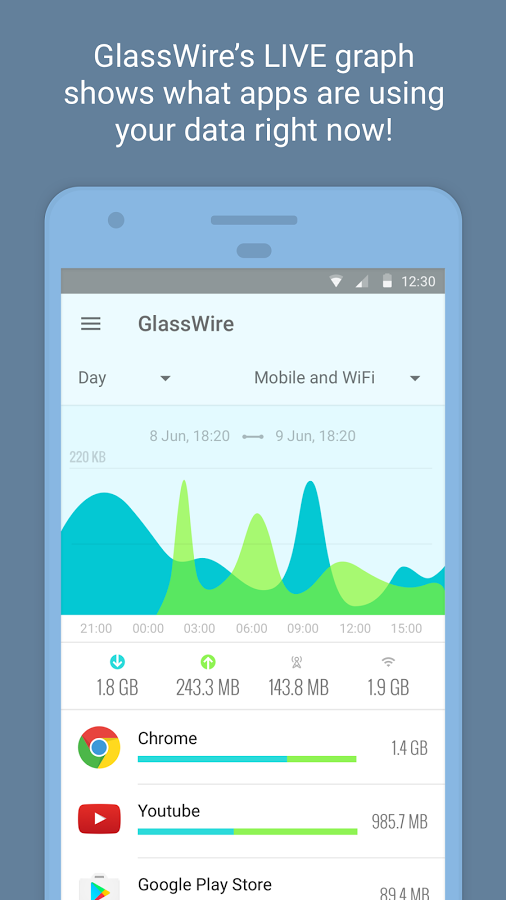
A live graph shows which apps are using your carrier data or Wi-Fi connection at the moment, so a slow connection has a visible culprit.
Get warned before you hit your data limit
Data alerts tell you before you reach your carrier limit. The Data Plan screen lets you set up zero-rated apps that don't count against your plan. It can also track roaming and roll-over minutes, and you can add a usage widget.
Look back at past usage by day or month
Swipe right on the graph to see which apps used data earlier in the week or month. Past Wi-Fi and mobile usage can be viewed by day or by month.
Block apps with a mobile firewall
The firewall lets you block apps from the network, or allow or deny new connections before they start. You can create separate profiles for mobile and Wi-Fi. It works through a VPN connection (the VpnService API) that GlassWire creates on your device.
Spot new or suspicious network activity
You're told every time a new app accesses the network. The graph can also reveal unusual app activity. The Speed Meter in the notification bar shows real-time usage, and GlassWire can alert you if your "unlimited" plan starts to throttle you.
Who it's for
It suits you if you're on a capped mobile plan, if your connection slows down for no obvious reason, or if you want to know which apps talk to the network. It works with carriers such as Verizon, T-Mobile, AT&T, Sprint, Magenta and Jio. It can also track cable, DSL or satellite ISP caps.
Pros and cons
Pros
- Per-app history and a live graph in one place
- Alerts before you reach your data limit
- Built-in firewall with separate mobile and Wi-Fi profiles
- The developer says no ads, and that your usage data never leaves your phone
Cons
- The firewall relies on a VPN connection, so it can't be used alongside another VPN
- One Google Play reviewer says the firewall lets some blocked services through
- One reviewer reports it stopped working after an Android update
What users say
"Exceptional app for checking fine-grained data usage stats!" - a reviewer on Google Play
FAQs
Does GlassWire show ads?
The developer says it will never show ads or violate your privacy. It says it makes its money from its Windows software.
Does it send my usage data anywhere?
According to the developer, your data and app usage information never leave your phone.
Can it stop an app from using the network?
Yes. The firewall can block apps or approve new connections before they start.
Will it work with my carrier?
It works with many carriers worldwide and with 3G, 4G, 5G, Edge, GPRS and Wi-Fi networks.
How do I report a problem?
Open the menu at the bottom right of the app and choose Send Feedback. That sends debug logs to the developer.
System requirements