Your PC feels slower than it should, and Task Manager shows a list of process names like svchost.exe and a dozen others you can't place. Is one of them a keylogger, or just part of Windows? Security Task Manager from Neuber Software is built to answer that question for each process, so you don't have to search the web for every unfamiliar name.
Quick facts
- Version: 3.2c
- Platforms: Windows 11, Windows 10 and Windows Server
- Price: $29, one-time payment, no subscription
- Trial: free 30-day trial; 30-day money-back guarantee on purchase
- Size: about 2.9 MB; a portable ZIP version is also offered
Key features
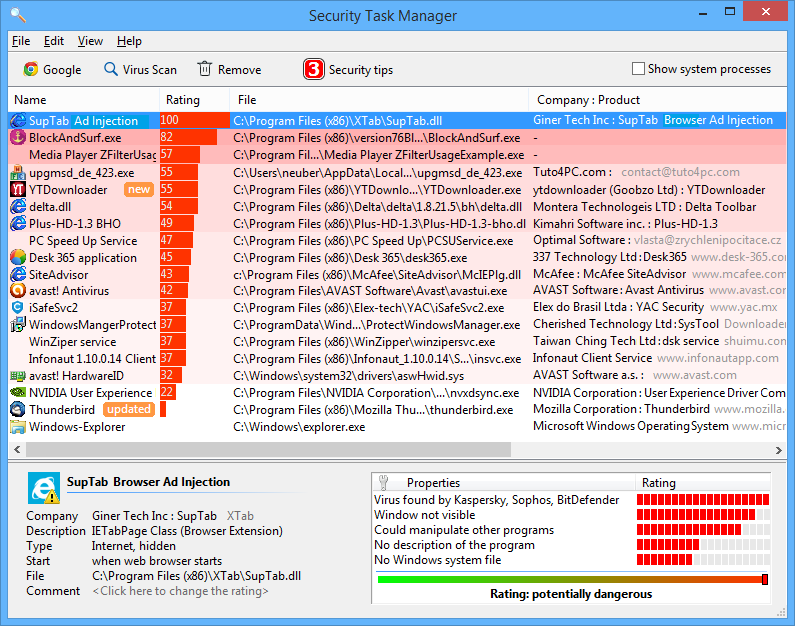
A clear security rating for every running process
Each process gets a security rating, so you can see which ones deserve attention. The program also shows comments from other users and expert explanations of what a process does.
Antivirus scanner results alongside the rating
The results of leading antivirus scanners are shown for a process. The vendor says the tool detects unknown malware and rootkits hidden from your antivirus software, and that it works alongside the antivirus you already run.
Hidden behavior such as keyboard and browser monitoring
Security Task Manager flags hidden functions in a process, such as keyboard monitoring, browser monitoring or manipulation. These are the things you can't judge from a file name.
AI-powered system analysis with fix recommendations
The AI analysis looks for security risks, performance slowdowns and stability problems, and gives recommendations on how to fix them. It is included in the full version.
SpyProtector for monitoring and traces
The full version adds SpyProtector. It prevents keyboard and mouse monitoring, warns when the registry changes, and cleans traces of your internet activity and of recently used file lists in programs such as Word and WinZip.
Drivers and services, not just programs
The full version includes driver and service checks. Neuber describes the analysis as covering all running processes, services and drivers.
Who it's for
It suits you if you have ever wondered whether an unfamiliar process is safe and want an answer on the spot. The vendor says the AI analysis is easy for beginners, with detailed insights for advanced users. It is also useful if you already run antivirus and want a second opinion on what is actually running.
Pros and cons
Pros
- One payment, no subscription, and free minor updates.
- Small download, and a portable ZIP version that runs without installation.
- Installation doesn't copy files into your Windows folder, and uninstalling removes the program completely.
- Available in many languages, including German, French, Spanish, Japanese and Korean.
Cons
- It runs only on Windows 11, Windows 10 and Windows Server.
- AI analysis, SpyProtector and driver and service checks need the full version; the free trial lasts 30 days.
- If you own a 2.x license, moving to version 3 costs a special update price of $14.95.
FAQs
Does it replace my antivirus?
No. Neuber says it is compatible with the antivirus software you already have. It adds process ratings and scanner results on top.
Can I try it before paying?
Yes. There is a free 30-day trial, and a registration code unlocks it into the full version after purchase.
Do I have to install it?
No. You can download the ZIP file, unzip it and start the program without installing anything.
Do I pay again for updates?
Minor updates are free. Owners of version 3.x can install the newest version over the old one at no cost.
What do I do if I own an older 2.x license?
You can buy the latest version at a special update price of $14.95.
System requirements
- Windows 11, Windows 10 or Windows Server
- 2.9 MB free disk space