Driver Easy: One-Click Driver Updates for Windows PCs
Driver Easy is a Windows driver updater that scans your PC for missing or outdated drivers and installs them with one click, at $39.95 a year for one computer. It suits people who'd rather not hunt through manufacturers' sites for the right download, and there's a 7-day free trial.
If your Wi-Fi drops, your sound vanishes after a Windows update or a new printer won't behave, an out-of-date driver is one of the first things to check. Driver Easy automates that check. It also makes changes deep in your system, so its backups and restore points matter.
Quick facts
- Version: 7.3.0.6732
- Developer: Easeware Technology Limited
- Platform: Windows 11, 10, 8 and 7, including ARM64 devices
- Price: $39.95 at checkout for 1 computer, renews every 12 months
- Trial: 7 days. There's been no free version since 6.0
- Guarantee: 30-day money-back
- Download: 12.4 MB installer
What we checked: installer file version 7.3.0.6732 (12.4 MB, dated November 5, 2026), and the 1 Computer License / 1 Year order at $39.95 with a 12-month renewal on November 5, 2026. We didn't run a scan or update any drivers.
Download Free TrialBuy Now
Overview
Driver Easy has a simple job. You press Scan Now, it compares your hardware with its database of over 30 million drivers, and it lists what's missing, outdated or mismatched. Update All then downloads and installs everything, or you can update devices one at a time.
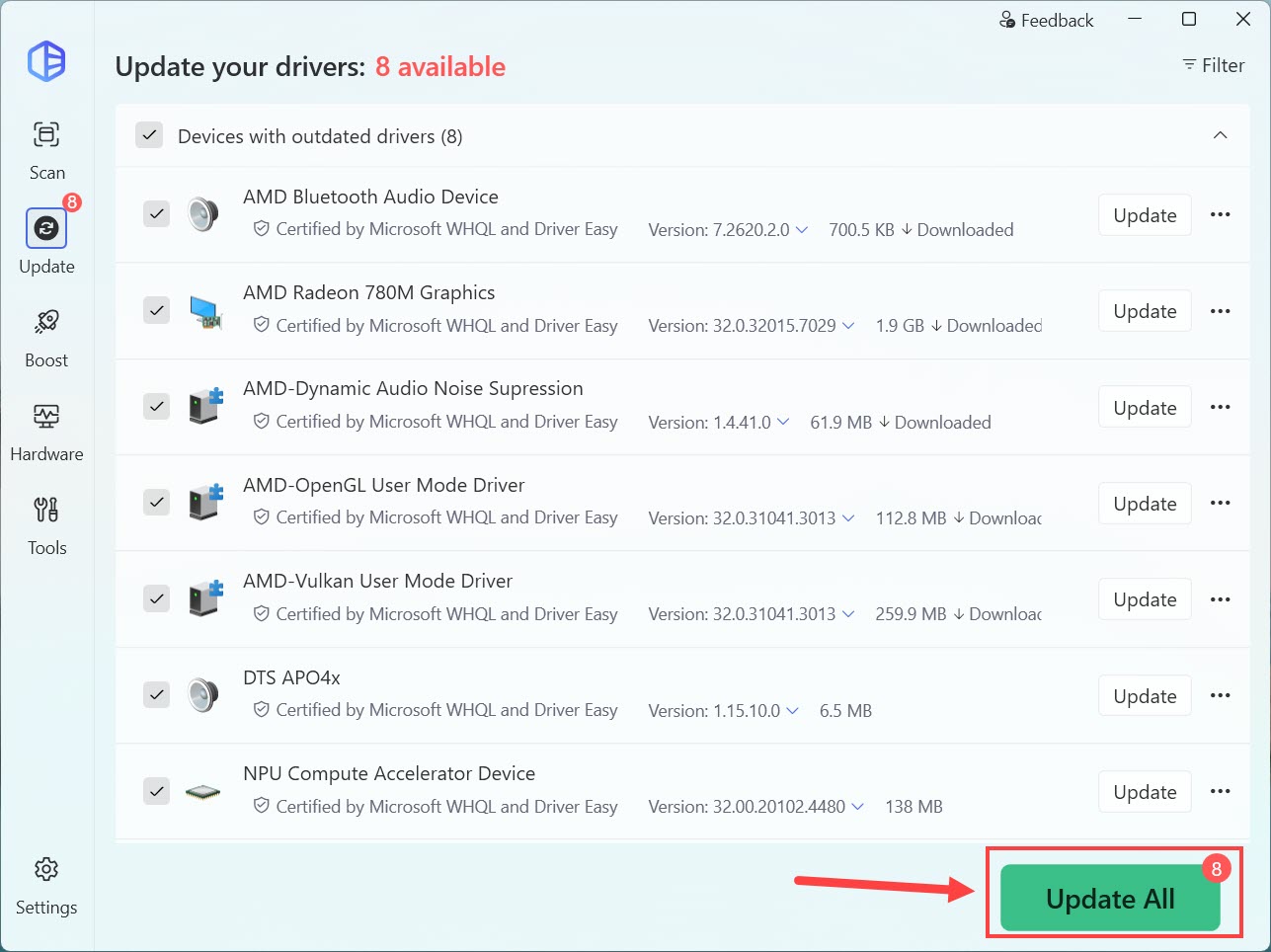
The update list: each driver shows its version and download size, with WHQL or Driver Easy certification noted. The arrow is the vendor's.
Features
Finds missing, outdated and mismatched drivers
Driver Easy covers audio devices, graphics cards, network and Wi-Fi cards, chipsets, printers, USB and Bluetooth devices, scanners and more. The vendor says its database holds over 30 million drivers, direct from manufacturers.
Backups and rollback before each update
Driver Easy backs up your current drivers and creates a Windows restore point before making changes. If a new driver causes trouble, Driver Recovery lets you roll back, and you can switch to an earlier driver version from the database.
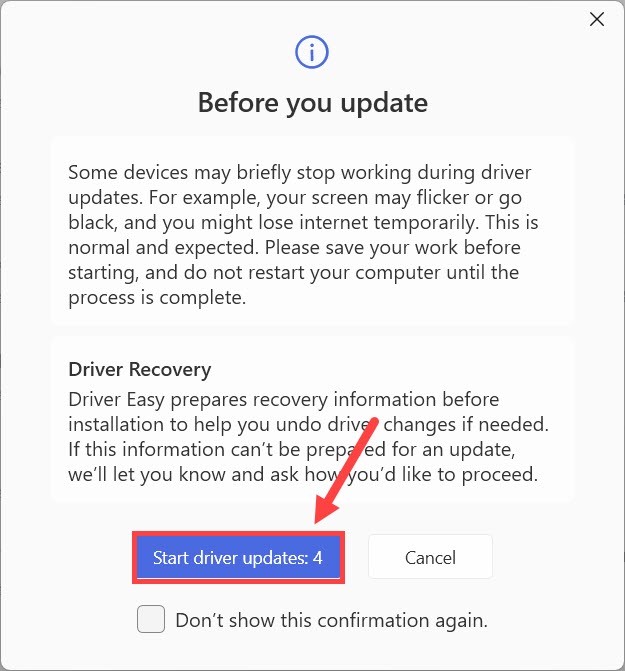
The warning shown before an update: screens may flicker and connections may drop for a moment. The red marks are the vendor's.
Works when the PC has no internet
Driver Easy has an offline mode for a common trap: you need a network driver, but you can't get online without one. It scans the offline PC, then you download the right driver on another computer and copy it across.
Scheduled scans and extra tools
Driver Easy can run background scans on a schedule. It can also remove leftover drivers for retired devices and show a hardware summary powered by CPU-Z.
AI and human support
Driver Easy Pro includes AI remote troubleshooting backed by support staff. Email support runs Monday to Friday, 9 to 5.
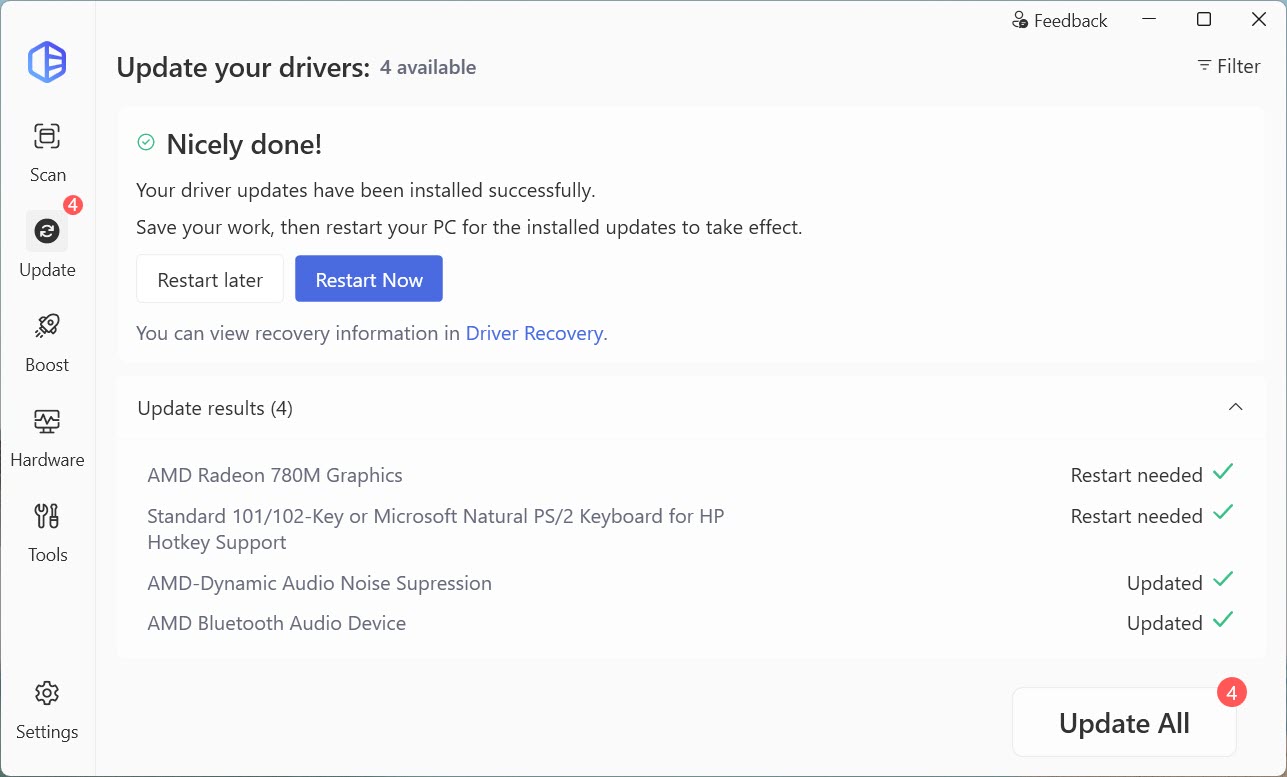
The results screen after an update, listing which drivers finished and which need a restart.
Benefits
- Saves the hunt. You don't need to know your exact hardware model or search vendor sites.
- Reduces wrong-driver mistakes. It matches drivers to your hardware rather than leaving you to guess from a list.
- Gives you a way back. Restore points and rollback are automatic, not an extra step you might forget.
Real-World Uses
- Setting up an older PC after a fresh Windows install, when several devices have no driver.
- Restoring Wi-Fi on a PC with no working network driver, using offline mode.
- Tracking down a mismatched audio driver after a Windows update.
- A repair technician or small office keeping a few PCs current on a multi-computer plan.
Who It's For, and Who Should Skip It
Driver Easy suits ordinary Windows users with a specific hardware problem, or those who want driver upkeep handled for them.
Skip it if your PC runs fine: Windows Update already delivers most drivers, and updating working drivers carries its own risk. Gamers can get graphics drivers free from NVIDIA or AMD. People comfortable with manufacturer sites don't need this at all. And if you want a tool you only pay for once, this isn't it, because Driver Easy is a yearly subscription.
Usage Guide
- Download the installer and start the 7-day trial, or enter your license key.
- Save your work, then press Scan Now.
- Review the list, and clear any device you don't want to touch.
- Press Update All, or Update next to a single device.
- Read the Before you update notice, start the updates, and restart when prompted.
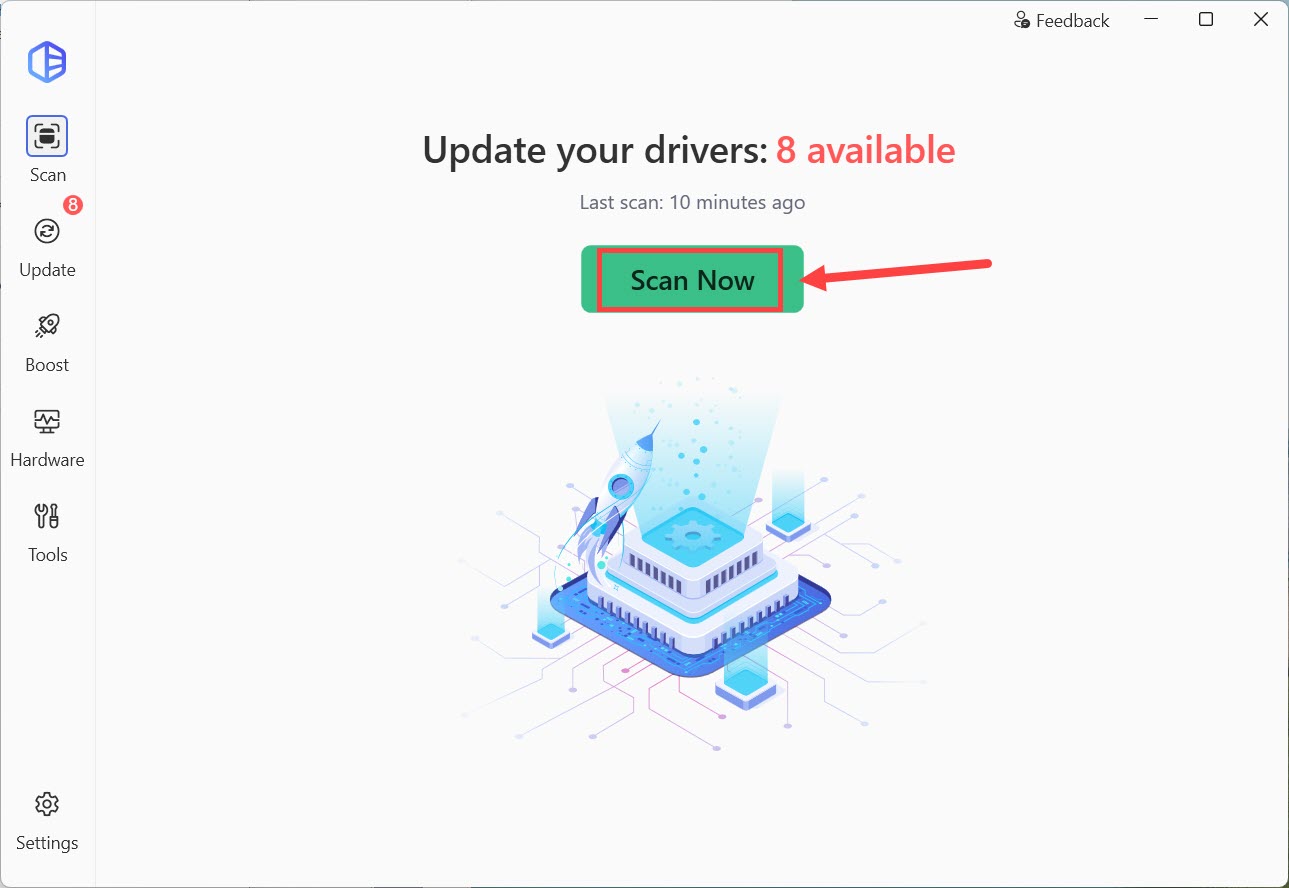
The home screen, showing the number of updates from the last scan, with Boost, Hardware and Tools in the sidebar.
Before you buy
- This is a subscription. The one-year order renews every 12 months, so turn off renewal if you only need it for one fix, and put the 30-day refund window in your calendar.
- Compare plans first. The vendor's order page has shown a 3-PC plan at a lower yearly price than the 1-PC plan with a free trial, for example $29.95 against $39.95.
- Trial users should note that the free version ended with version 5.8.x. A trial is the only way to try the current program.
- Create your own restore point too if the PC holds important work. Driver changes can stop a machine from booting.
Where it falls short
- Driver updates can go wrong. A few users report serious problems afterward, including boot loops and flickering screens, and any driver tool carries this risk.
- Not every fix is a driver fix. Reviewers report cases where a speaker problem stayed or a Wi-Fi driver wasn't updated.
- You're paying for free files. Manufacturers give drivers away, so you're paying for convenience and safety tools, not the drivers.
- Sales pressure in the app. Some users are annoyed to find they need the paid plan just to finish a one-off job.
What Users Say
Trustpilot is the main source here: 4.3 out of 5 from 22,299 reviews, rated "Excellent". That's a big sample, although the vendor actively gathers reviews, so read the low scores too.
Praise on Trustpilot
"It was fast, affordable, and most importantly, I felt safe with the program making changes to my PC." Thea Labuntog, 5 stars, July 7, 2025
"I downloaded driver easy and did one single scan/update and it fixed it" Noah Britton, 5 stars, July 5, 2025
"A dependable and complete tool." Carl W, 5 stars, July 8, 2025
"My laptop seems to be working a lot faster now and hopefully this will continue to be the case." Matilda Bignell, 5 stars, August 3, 2025
Criticism on Trustpilot
"Updates caused massive issues, Windows boot loops that took massive amounts of time and pain to fix" Human Race Controverted, 1 star, November 1, 2025
"My laptop is useless. I had to pay a couple hundred dollars to make it useable." Darold Meyer, 1 star, July 14, 2025
"Let's be clear: hardware drivers do not cost money." Bobby Bentsen, 1 star, August 7, 2025
"tells me i need premium, FOR A SITUATION ILL NEVER BE IN AGAIN" Simon Uhroka, 1 star, July 2, 2026
"sacm, boughtr trial,didnt get key, cant cancel, reported to my bank as scam" Pawel Wardzynski, 1 star, October 20, 2025
The pattern: most buyers are pleased that a scan fixed something quickly. The minority of complaints are about damage after updates, trial and billing confusion, and paying for what manufacturers give away. If you do have a billing problem, the vendor's FAQ says 2Checkout may hold a key while it checks an order, and it offers a Resend License Key page.
Comparisons
Driver Easy vs Windows Update
Windows Update is free and delivers tested drivers, but it doesn't always offer the newest version or cover every device. Driver Easy looks further and adds rollback tools, and it costs money. Try Windows Update and your PC maker's support page first.
Driver Easy vs Driver Booster and other updaters
IObit's Driver Booster PRO and similar tools do the same basic job and also come as yearly plans. Compare seat counts and renewal prices, and look at the restore tools rather than the size of the driver database.
Editions and Pricing
| Plan | PCs | Yearly price | Notes |
|---|
| 1 Computer (this listing) | 1 | $39.95 | 7-day free trial, renews every 12 months |
| Pro Version | 3 | $29.95 (regular $59.90) | Offer price on the vendor order page |
Plans for 10, 50 and 100 PCs are also sold. The 1-computer price is what we saw at checkout on November 5, 2026, and the 3-PC price is from the vendor pricing page.
FAQs
Is there a free version of Driver Easy?
No. Driver Easy has had no free version since version 6.0.0. The free edition applied only to version 5.8.x and earlier, and the current product offers a 7-day trial instead.
Does Driver Easy work on Windows 11?
Yes. Driver Easy supports Windows 11, 10, 8 and 7, including ARM64 devices.
Can I get a refund on Driver Easy?
Yes, within 30 days of purchase for Home and Business plans. Driver Easy refunds 100% of the current subscription period, cancels auto-renewal and deactivates your key. The Computer Repair Shop License isn't refundable.
What happens to my drivers when my Driver Easy subscription ends?
Drivers already installed stay on your PC. You just lose access to the paid update features in Driver Easy.
Is it safe to use Driver Easy?
Driver Easy creates backups and restore points before changing drivers, which lowers the risk, but a few users still report bad results. Save your work first, and update only what needs it.
System Requirements
- Windows 11, 10, 8 or 7, including ARM64 devices
- An internet connection, except for the offline scan workflow
- 12.4 MB for the installer, plus space for the drivers you download
Conclusion
Driver Easy is worth $39.95 if you have a real driver problem, or you want a low-effort way to look after a family PC. The one reason to buy is the combination of one-click updates with automatic rollback.
The main reason not to buy is that a healthy PC doesn't need it, and it's a renewing subscription for files that are free elsewhere. If you only have one problem to fix, use the 7-day trial and the 30-day guarantee, and turn off auto-renewal.
Download Free TrialBuy Now