Wondershare EdrawMax: One Diagram App for Flowcharts, Floor Plans, Network Maps and Org Charts
Wondershare EdrawMax is a general-purpose diagramming app for Windows, macOS and Linux (plus web, iOS and Android versions) that covers more than 210 diagram types, opens and saves Visio VSDX files, and can draft a diagram from a typed prompt with its built-in AI agent. The plan sold on our order page is the Team & Business annual plan for one user at $119 a year, which renews automatically; individual and one-time perpetual licenses are sold separately on Wondershare's own store.
If you've ever had to sketch a process for a manager, map an office network for IT, or lay out a room before buying furniture, you've probably bounced between PowerPoint shapes, a free web tool and someone else's Visio license. EdrawMax tries to be the one tool for all of those jobs. It's broad rather than deep, and the pricing takes some reading, so here is what you actually get.
Quick facts
- Developer: Wondershare (EdrawSoft)
- Version: 16.0.0, released September 28, 2026
- Platforms: Windows 7 and later, macOS (Intel and Apple Silicon), Linux (Debian, Ubuntu, Fedora, CentOS, openSUSE, Mint and others), a browser version, iOS 11+ and Android 9+
- Content: 210+ diagram types, 1,500+ built-in templates, 26,000+ symbols, plus a community template gallery
- File formats: saves EDDX; exports PDF (and PDF/A), Word, PowerPoint, Excel, Visio VSDX, SVG, HTML, PS, EPS, JPG, PNG, BMP and TIFF
- Price on our order page: $119 per year, Team & Business plan for 1 user, auto-renews every 12 months
- Free plan: yes, with limits (see below)
- Guarantee: Wondershare advertises "up to a 30-Day Money-Back Guarantee", with refunds only in the cases its policy accepts
- What we checked: the Windows installer link (edraw-max_full5371.exe, a 2 MB web installer that downloads the full program), the version history page listing 16.0.0, the tech specs, Wondershare's pricing pages, and the order page on November 4, 2026, which showed "Wondershare EdrawMax Team & Business (1 User) for Win/Mac/Web/Linux - Annual Plan" at $119.00 with a 12-month renewal. We didn't install it or build diagrams with it ourselves.
Before you buy
- The Buy Now button sells the Team & Business plan, not the individual one. It costs $119 a year for one user and renews every year until you turn renewal off. Wondershare's own pricing page lists the Individual annual plan at $99 a year, so if you're a solo user who only wants a subscription, the vendor's store is cheaper.
- A one-time license exists, but not on our order page. Wondershare's store sells a Perpetual plan for $198: lifetime use of the EdrawMax V16 desktop app, plus the mobile and online versions and 10 GB of cloud storage for 3 years. Bundles with EdrawMind are also offered. A perpetual license covers one major version (V16); later major versions are paid upgrades.
- Try the free plan first. It caps you at 60 shapes for general diagrams (120 for specialized ones), 2 pages, 3 editable cloud files and 500 AI tokens, and exports carry a watermark at standard definition. That's enough to judge the editor, not to do real work.
- It needs an internet connection for activation, cloud files, translation and updates, though the desktop app draws offline once activated.
Download Free TrialBuy Now
Overview
EdrawMax opens on a start screen that asks what kind of diagram you want, with a search box, a one-click AI generation link and rows of categories: flowcharts, network diagrams, org charts, floor plans, research presentations, software development and more. Pick a template or a blank drawing and you land in a ribbon-style editor that will feel familiar to anyone who has used Office or Visio: Home, Insert, Design, View, Symbols, Advanced and AI tabs across the top, the symbol library on the left, the canvas in the middle, and fill, line and shadow settings on the right.

The EdrawMax start screen from Wondershare's user guide: diagram categories, sub-types such as Basic Flowchart, Org Chart (Automated), Gantt Charts and Process P&ID, and template thumbnails (shown here from a Chinese-language template set).
EdrawMax started life as Edraw Max, a Windows Visio look-alike, and Wondershare has since turned it into a cross-platform app with cloud files and an AI layer. Recent releases show where the work is going: AI image tools and AI-to-3D floor plans in 15.1 (February 2026), community symbol search and custom cloud libraries in 15.2.1 (May 2026), continuous wall drawing and AI floor-plan recognition in 15.2.9 (August 2026), and a redesigned home page with a rebuilt Edraw Agent in 16.0.0.
Features
210+ diagram types with their own symbol sets
EdrawMax covers far more than flowcharts. Each diagram type brings its own library of standard symbols: cross-functional swimlanes and BPMN for processes, UML and ER diagrams for software, rack and network shapes for IT, P&ID and electrical symbols for engineering, doors, windows and furniture for floor plans, plus org charts, Gantt charts, mind maps, timelines and infographics. The libraries are editable, and your own shapes go into a "My Library" panel you can reuse across files.
Edraw Agent: diagrams from a text prompt
EdrawMax's AI tab holds the Edraw Agent, which generates a diagram from a description you type. Version 16 rebuilt it with a multi-turn chat page, so you can refine the result over several messages, and Wondershare says it now gives better flowcharts, swimlanes, architecture diagrams and technology roadmaps. Earlier 15.x releases added ECharts, Gantt charts, ER diagrams, scientific illustrations and Mermaid code. The same tab has diagram analysis, image generation, background and object removal, image enhancement and image-to-text (OCR in 24 languages).
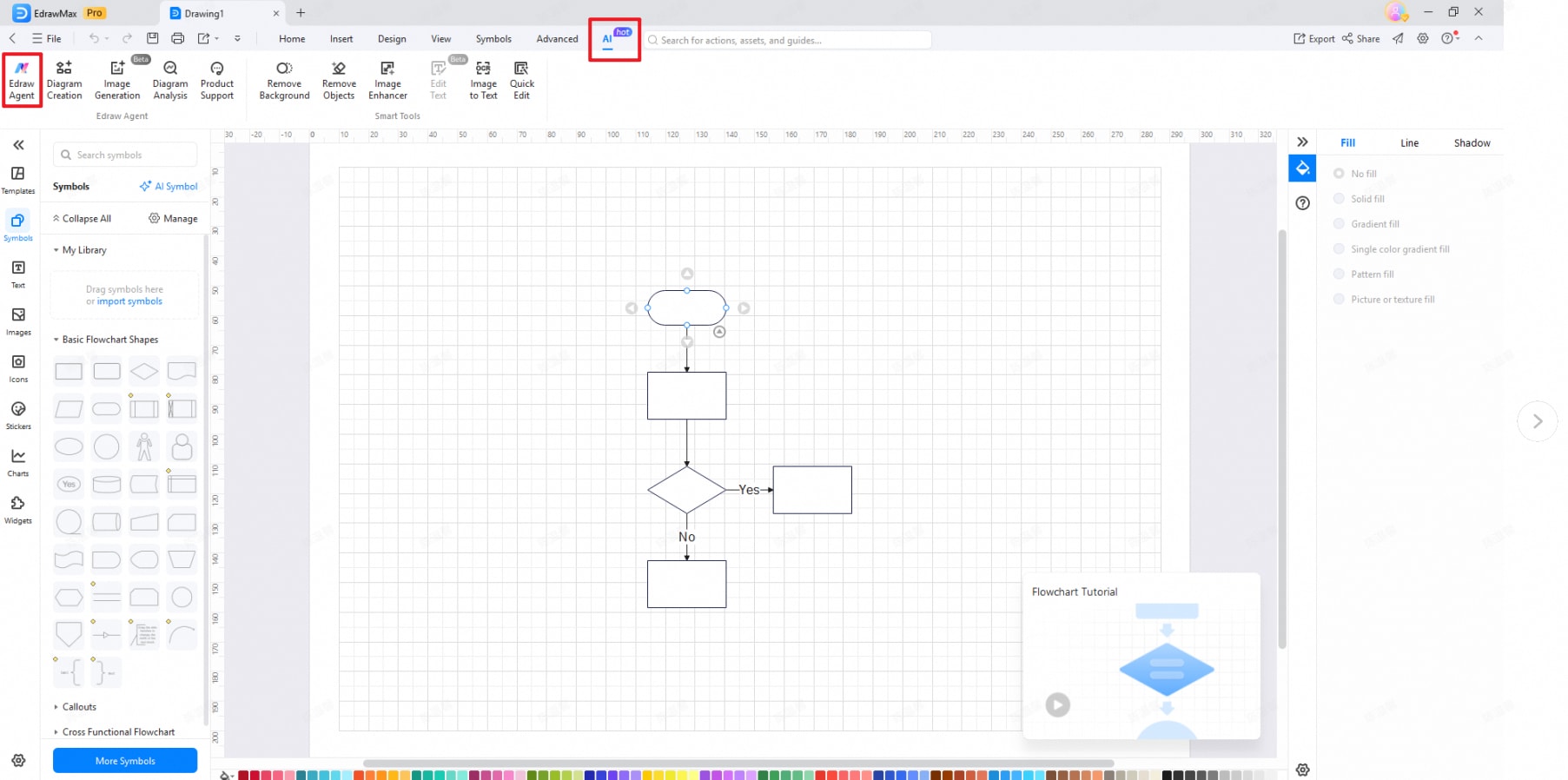
The EdrawMax editor with the AI tab open: Edraw Agent, Diagram Creation, Image Generation and Diagram Analysis on the left of the ribbon, Smart Tools on the right, Basic Flowchart Shapes in the symbol panel and a flowchart on the canvas.
Visio files in and out
EdrawMax imports Visio VSDX and VSD drawings, one at a time or in a batch, and can load Visio stencils as custom libraries. Going the other way it exports VSDX only, alongside PDF, Word, PowerPoint, Excel, SVG, HTML and image formats. For a team that has drawings in Visio but not every member has a Visio license, that two-way VSDX support is the main draw.
Floor plans drawn to scale
EdrawMax's floor plan tools draw walls continuously, show live distances to nearby walls, doors and windows as you move them, and set dimensions from a wall's center, inner or outer edge (added in 15.2.9). An AI recognition feature turns an uploaded drawing of a plan into editable walls, doors and windows. It's a planning tool for offices, rooms and simple layouts, not a CAD replacement.
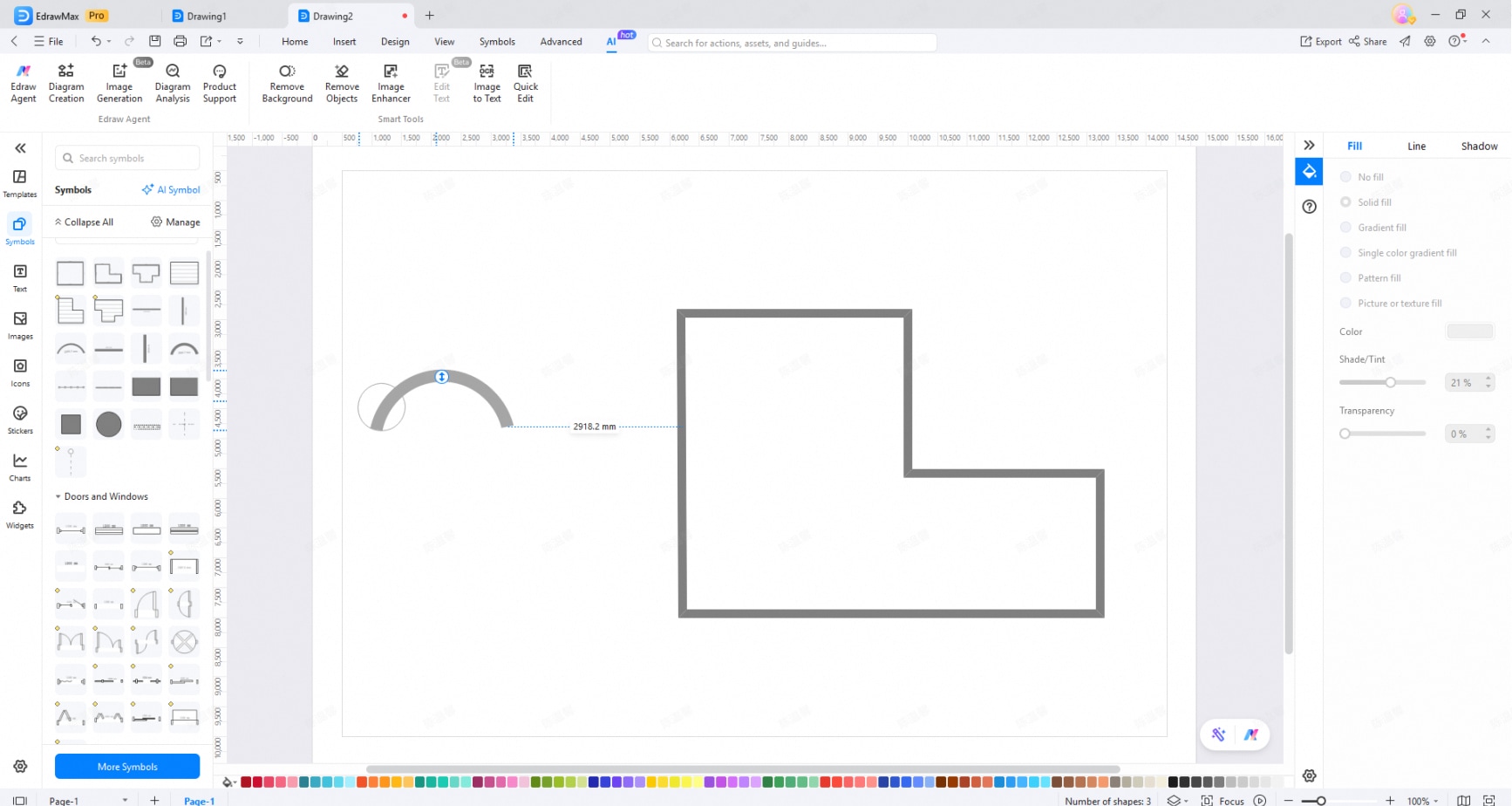
Drawing walls in an EdrawMax floor plan: a dotted guide shows the distance (2918.2 mm) between an arc wall and the L-shaped room, with Doors and Windows symbols in the left panel.
AI drawing for icons, stickers and illustrations
Wondershare AI Drawing inside EdrawMax creates symbols, stickers or images from a text description or from another image, in several aspect ratios and three quality levels that cost different numbers of AI points. It's useful when a diagram needs an icon the libraries don't have.

The Wondershare AI Drawing dialog: Text to Image and Image to Image tabs, Symbol, Sticker and Image styles, aspect ratios from 1:1 to 16:9, and Standard, HD and Ultra HD quality with the AI points each one costs.
The same files on desktop, browser and phone
EdrawMax saves to Wondershare's cloud as well as to local EDDX files, so a diagram started on a Windows PC can be opened in EdrawMax Online or the mobile app. The paid individual plans include 1 GB of cloud storage, the perpetual plan 10 GB for three years. A PowerPoint add-in turns text into diagrams inside a slide.
Benefits
- One license instead of several tools. The same app handles the process map, the network rack diagram and the office layout, so you learn one interface.
- Visio compatibility without Visio's cost. You can open a colleague's VSDX file, edit it and send it back as VSDX.
- Linux is supported. Few commercial diagram apps run natively on Debian, Ubuntu or Fedora.
- A fast start. Templates and the AI agent give you a first draft to edit instead of a blank page.
Real-World Uses
- An operations lead documenting an approval process builds a cross-functional swimlane flowchart for each department and exports it to PDF for the procedures manual.
- An IT administrator draws the office network and server rack with the network shape library, then exports a VSDX copy for the outside contractor who uses Visio.
- A small business owner moving offices sketches the new floor to scale, places desks, doors and windows, and checks clearances before ordering furniture.
- A developer writing a design document asks the Edraw Agent for an ER diagram or a Mermaid-based sequence diagram, then tidies it by hand.
- An HR team keeps the org chart up to date with the automated org chart template and shares it through the cloud.
Who It's For, and Who Should Skip It
EdrawMax suits people who draw many kinds of diagrams and want them in one desktop app: office workers, IT staff, engineers, students and consultants, especially those who exchange files with Visio users or work on Linux.
Skip it if you only ever make mind maps (a dedicated mind-mapping app is simpler, and Wondershare's own EdrawMind is one), if your team already lives in a browser-first collaborative whiteboard, or if you need real CAD precision for building plans. If you're a solo user, also skip the plan behind our Buy Now button in favor of the $99 Individual annual plan or the $198 perpetual license on Wondershare's store.
Usage Guide
- Install. Run the 2 MB Windows web installer, which downloads the full program (allow 2.5 GB of disk space). Mac and Linux packages are on Wondershare's download page.
- Sign in. Create or log in to a Wondershare ID; the license and cloud files are tied to it.
- Pick a starting point. On the home screen, choose a category and a template, start a blank drawing, or click One-click AI Generation and describe the diagram.
- Add shapes. Drag symbols from the left panel onto the canvas; connectors snap to shape anchors. Search symbols by name or click More Symbols to load another library.
- Format. Use the Design tab for themes and the right-hand panel for fill, line and shadow.
- Save and share. Save locally as EDDX or to the cloud, or export to PDF, VSDX, PowerPoint or an image from the Export button.
Where it falls short
- Pricing is confusing. Individual, Team & Business and Education tabs, semi-annual, annual and perpetual terms, bundles, AI tokens and cloud storage tiers all differ. TechRadar called the "lack of pricing simplicity frustrating and unnecessary", and Zapier found the website "a bit confusing".
- Billing and refund complaints. Several Trustpilot reviewers report being billed for a year early in a trial and refused a refund. Turn off auto-renewal if you're only testing.
- Major-version upgrades. A Trustpilot reviewer with a lifetime license says the app showed "free trial" after he upgraded from V14 to V15 and support didn't resolve it. Perpetual licenses cover one major version.
- Extra software. One reviewer complains that a floating button was installed that she couldn't remove; EdrawMax has a documented AI floating ball, which is the likely culprit.
- The browser version can hang, according to TechRadar's review, which also found the interface "a little untidy".
What Users Say
TechRadar (3.5 out of 5)
Christian Cawley's review for TechRadar (first published July 2020, updated July 2024) liked the breadth of the tool: "EdrawMax is a powerful, fully-featured drawing app that has all the features, templates, and guides for you to accomplish any task in mind." He also found that "the AI tool gives EdrawMax a fair advantage over some of these tools," while noting that "Microsoft Visio and Lucidchart have a more mature reputation."
The criticism is about pricing and polish: "You may find the user interface to be a little untidy, however, and the browser version tends to hang at times." And for some readers the scope is too much: "due to the tool offering more than just mind mapping and flowcharts, EdrawMax can be considered overkill."
Zapier
Zapier's roundup of flowchart and diagram software (by Justin Pot with Maria Bell, updated November 2025) picks EdrawMax as best for "AI-powered productivity", with "All the advanced diagramming functions you need, plus best-in-class AI productivity tools" and the ability to "Create and edit diagrams inside Microsoft PowerPoint". Its con: the "Website is a bit confusing by listing Edraw.AI and other specific diagram tools separately", though once inside the app it's easy to find what you need.
Trustpilot (3.7 out of 5 from 60 reviews)
Trustpilot's page for EdrawMax is split: 83% five-star and 12% one-star reviews, little in between. The text below came to us through a page summarizer, so only the short quotes are word for word.
- Francois Guérette (5 stars, April 2025): "EdrawMax is, in my opinion, the best alternative to Microsoft Visio, especially thanks to its one-time payment model." He also praised the templates, VSDX compatibility and offline use.
- Asim Javed (5 stars, April 2025), after three years of use: "this proved an all-in-one hub for everything I required to do in my work."
- Fawad Ahmed (5 stars, June 2025), who used it for a thesis: "EdrawMax is one of the easiest diagramming tool with a lightning fast interface."
- qasim khan (5 stars, June 2025): "Super efficient and user-friendly, with a rich library of templates and symbols"
- Steven Barnett (1 star, December 2025, "Appauling customer service"): "I have a lifetime licence to EDrawMax and was prompted to upgrade from V14 to V15." After the upgrade the app showed a free trial, and he says support only repeated the activation steps.
- Sally Underwood (1 star, January 2026, "Installs things on a PC you can't get rid of"): "It even shows up when I'm watching movies."
- Bruce Ratzlaff (1 star, February 2026), who needed quick PFD diagrams and found the AI slow: "the billed me for a year like 2 days into the free trial and wont refund."
The pattern
People who use EdrawMax for work like the template and symbol range, the speed of the editor and the fact that it opens Visio files. The complaints are rarely about drawing: they're about money and accounts, namely renewals charged during a trial, refunds refused, licenses that stop working after a major upgrade, and a pricing page that's hard to read. GetApp lists an average of 4.5 out of 5 from 205 reviews, which matches the positive side.
Comparisons
EdrawMax vs Microsoft Visio
Visio is the standard EdrawMax measures itself against. EdrawMax runs on Mac and Linux, where Visio's desktop app doesn't, has a perpetual license option and adds AI generation. Visio has the deeper Microsoft 365 integration and the more established reputation. EdrawMax reads and writes VSDX, so mixed teams can share files.
EdrawMax vs browser diagram tools
Browser-first tools such as Lucidchart are built around real-time collaboration. EdrawMax is a desktop app first, with cloud files and an online version added; it's the better pick if you want to work offline or own a perpetual license, and the weaker one if live co-editing is your main need.
Editions and Pricing
| Plan | Price | Term | Where sold | Notes |
|---|
| Free | $0 | No expiry | Download | 60 shapes, 2 pages, watermarked exports |
| Team & Business, 1 user | $119 per year | Renews every 12 months | Our order page | Windows, Mac, web and Linux; team license management |
| Individual annual | $99 per year | Renews yearly | Wondershare store | 3 PCs, 3 mobiles and online, 1 GB cloud |
| Individual perpetual | $198 once | V16 desktop for life | Wondershare store | Mobile, online and 10 GB cloud for 3 years |
Wondershare also sells a semi-annual individual plan, perpetual bundles with EdrawMind (and EdrawProj), education pricing and quoted business plans for larger teams. Prices on its store change with promotions, so compare on the day you buy.
FAQs
Is the EdrawMax plan on this page a one-time purchase?
No. The EdrawMax plan behind our Buy Now button is the Team & Business annual plan for one user, $119 a year, and it renews automatically every 12 months. Wondershare sells the one-time Perpetual license ($198) on its own store.
Can EdrawMax open and save Visio files?
Yes. EdrawMax imports VSDX and VSD files (singly or in a batch) and Visio stencils, and exports to VSDX. It doesn't export to the older VSD format.
Does EdrawMax work on Linux and Apple Silicon Macs?
Yes. EdrawMax has native packages for Debian, Ubuntu, Fedora, CentOS, openSUSE and other distributions, and the Mac version runs on Apple M-series chips. Wondershare also keeps an archived EdrawMax 9.2 build for older macOS versions.
Can I use EdrawMax offline?
EdrawMax's desktop app edits and saves local files offline, but activation, cloud files, translation and live updates need an internet connection.
What happens to a perpetual EdrawMax license when version 17 comes out?
An EdrawMax perpetual license is for one major version (currently V16). You keep using that version for good; moving to the next major version is a paid upgrade, and the bundled mobile, online and cloud access lasts three years.
How do I stop EdrawMax from renewing?
The EdrawMax order page uses automatic renewal, and the order page says you can disable automatic renewal at any time. Do it before the renewal date if you only need one year.
Do EdrawMax's AI features cost extra?
EdrawMax's paid individual plans include unlimited AI features, according to Wondershare's pricing page, while the free plan gets 500 AI tokens. AI image generation uses points per image, with HD and Ultra HD costing more.
Which languages does EdrawMax support?
The Windows version of EdrawMax runs in English, French, German, Italian, Japanese, Korean, Portuguese, Russian, Spanish and Simplified and Traditional Chinese; OCR reads 24 languages.
System Requirements
- Windows: Windows 7 or later, Pentium 4 or equivalent, 1 GB RAM (4 GB recommended), 2.5 GB free disk space
- macOS: Intel or Apple M-series, 1 GB RAM (4 GB recommended), 1.5 GB free disk space
- Linux: Debian, Ubuntu, Fedora, CentOS, openSUSE, Mint, Knoppix, Red Hat, Gentoo and more; 1.5 GB free disk space
- Web: Chrome and Edge (all versions), Firefox and Safari (not all versions)
- Mobile: iOS 11 or later, Android 9 or later
- Internet: needed for activation, help, cloud features and updates
Conclusion
EdrawMax is worth paying for if you draw many kinds of diagrams, need to swap files with Visio users, or work on a Mac or Linux machine where Visio isn't an option. Its range of templates and symbols and its AI agent get you to a usable draft fast, and the reviews from people who use it daily are good. The main reason to hesitate is the buying experience: the plan here is a $119 Team & Business subscription that renews every year, solo users can pay less on Wondershare's own store, and enough reviewers report renewal and refund problems that you should test the free version first and switch off auto-renewal if you're unsure.
Download Free TrialBuy Now