You have a folder with Word files, scanned TIFFs, Excel sheets, Outlook emails and a few HTML pages, and the person asking for them wants one set of PDFs. Running five different converters for that is slow and easy to get wrong. Coolutils Converter is built to take that whole mixed pile in one batch.
Quick facts
- Platform: Windows (7, 8, 10, 11; Windows 2000 is also listed)
- Price: $169.00, one-time payment, no subscription
- Trial: 30-day free trial, plus a 30-day money-back guarantee
- Output formats: PDF, PDF/A, XPS, DOC, TIFF, TXT, JPEG
- Run modes: graphical interface or command line
Key features
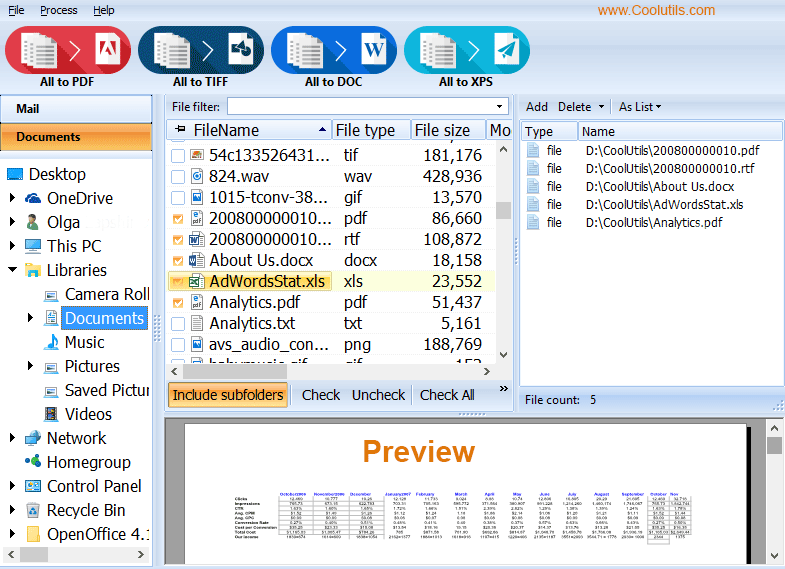
Convert mixed file types in a single batch
Input formats include PDF, XPS, EPS, PCL, HTML, DOC, DOCX, RTF, XLS, XLSX, TIFF, JPG, MSG and EML, plus Outlook emails. Newer additions cover PowerPoint and OpenDocument presentations, OneNote sections and OFD files, the Chinese e-invoice format. You choose the files, pick a target format and apply your settings.
Stamp page counters, Bates numbers and watermarks
You can add headers, footers, page counts, date stamps, any custom text and image watermarks such as a logo. The same tools handle Bates stamping, which matters for legal and e-discovery work.
Archive-ready PDF/A output and protected PDFs
Save to PDF/A for long-term records. For ordinary PDFs you can set permissions (view, print, edit, annotate), add a password, or sign with a digital certificate.
Combine, rename and preview inside the app
It can merge documents within folders and rename output files with counters or dates. A preview panel and a Filter tab let you sort the list by name, date, type or size and check a file before converting it.
Command line and a server version
The GUI can produce a ready-to-use command line for your settings. For silent server work there is a separate ConverterX SDK with no interface or popup messages.
Who it's for
It suits people who regularly convert large, mixed batches: legal teams, e-discovery and forensics staff, accountants handling invoices and tax documents, and anyone archiving old project files. If you only convert a single Word file now and then, a dedicated single-format tool will do.
Pros and cons
Pros
- One app replaces several converters
- Wide input list, including OneNote, OFD and Outlook emails
- One-time payment with a 30-day trial
- GUI and command-line use
Cons
- Windows only
- The $169.00 price is steep for occasional use
- The installer is large, about 122 MB
- Output formats are limited to PDF, PDF/A, XPS, DOC, TIFF, TXT and JPEG
FAQs
Do I need Office or PowerPoint installed?
No. The vendor says presentations convert without PowerPoint, OneNote sections without OneNote, and Word and Excel files without an Office installation.
Can it convert emails?
Yes. It handles Outlook emails (MSG, EML) and exported mail from other providers, converting them to PDF, DOC, TIFF or TXT.
Is the trial limited?
The vendor describes a 30-day free trial with no limitations. No credit card or email is required to download it.
Can I automate it on a server?
Yes, through the command line or the separate ConverterX SDK, which runs without a graphical interface.
Can I request another output format?
The vendor says it will add target formats on request.
System requirements
- OS: Windows 2000 / 7 / 8 / 10 / 11 (32 and 64-bit)
- Memory: 4 GB
- Input: keyboard and mouse
- Download size: about 122 MB