You have a few hundred machines, a mix of Windows, Mac and Linux, and someone just asked how many copies of a particular application are installed and whether you are licensed for all of them. Answering from memory or spreadsheets takes days. PC Audit, which the vendor sells as Total Network Inventory, is built to answer that question by scanning the network from one computer.
Quick facts
- Current version: 6.9.0
- Console runs on: Windows
- Can scan: Windows, Mac OS X, Linux and FreeBSD computers, plus network devices
- Price: $90 shown on the vendor's price section, with 1 year of updates included. The price depends on the number of nodes and the edition (Standard or Professional).
- Trial: free for 30 days, with all features enabled
- Installer size: about 61 MB
Key features
Scan a whole network from one installed copy
You install the program on a single computer. You then enter network nodes or IP ranges, or connect to an Active Directory domain. Add administrative credentials and start the scan. A resident agent option is also listed for PC scanning.
Keep inventory data in plain files you can move or archive
Data is stored in a folder on your hard drive, with a small file for each scanned device. You can group computers and attach comments or inventory numbers. For larger networks, database-backed storage allows multi-user access.
See installed software and whether your licenses cover it
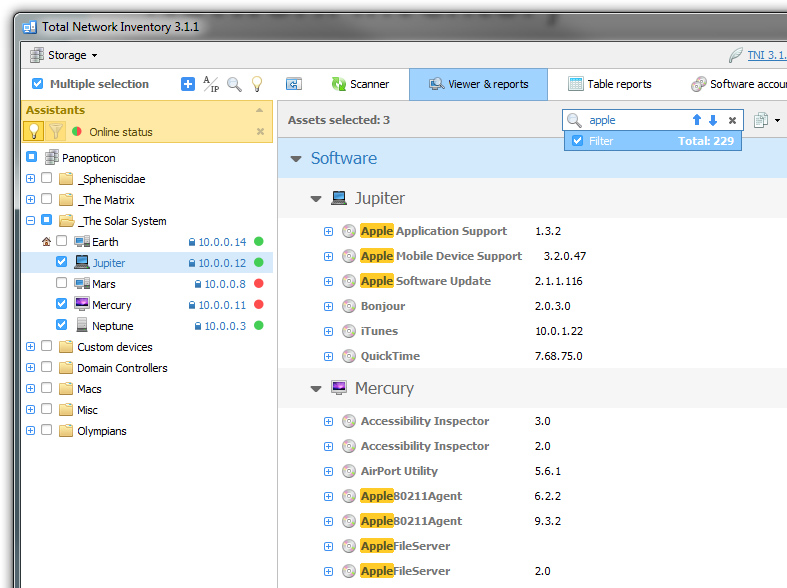
The software audit shows which versions are installed, which computers have them and how many copies are in use. It also shows whether your licenses cover that number. Some license keys are scanned automatically. You enter the rest by hand.
Build reports from ready-made types or custom fields
Pick the computers, choose a hardware or software report, then print or export it. For custom reports you select specific objects and fields, and instant search helps in large reports.
Rescan on a schedule and review what changed
The scan scheduler lets you scan different groups at different times. Each rescan creates a configuration snapshot. The Change Log compares snapshots and lists what was added, removed or modified.
Draw your network as a map
Drag assets and groups onto a map, split it into segments for sites or floors, and connect them with links. You can also add images and shapes. The map size is not limited.
Who it's for
It suits IT administrators who maintain a mixed network and need an up-to-date list of hardware, software and licenses. A separate MSP/ITSP license exists for consultants who inventory their clients' computers.
Pros and cons
Pros
- Agentless scanning from a single installation.
- Covers Windows, Mac OS X, Linux, FreeBSD and network devices.
- License tracking and a change log are included.
- 30-day trial with every feature enabled.
- Perpetual license.
Cons
- The management console runs on Windows only.
- Pricing is based on node count, so large networks cost more.
- Updates beyond the first year are not covered by the base price.
- The Standard edition leaves out some of the Professional edition's features.
FAQs
What counts as a node?
A node is a computer, server, network printer, router or any other network device with an IP address. Custom assets you add manually are not counted.
Can I try it first?
Yes. The 30-day trial has all features enabled.
Can it scan computers outside my office?
Yes, remote computers can be scanned over the Internet if your network and firewall settings allow it.
Is it a subscription?
No. The license is perpetual, and the price includes 1 year of updates.
Are discounts available?
The vendor lists 30% off for educational, government and non-profit institutions. It also lists 50% off if you switch from other inventory software.
System requirements
The console runs on Windows. The vendor's download entry lists all Windows versions as supported. The installer is about 61 MB, and scan data is stored on your local hard drive.