Password Agent: an Offline Password Manager for Windows That Never Touches the Cloud
Password Agent is a Windows password manager that keeps your logins in an encrypted file on your own PC, with no account and no cloud service, and fills them into any browser with a hotkey. It's free for up to 20 items per file, and a one-time $24.99 license removes the limit.
If you've ever hesitated before typing every password you own into a company's servers, this is the tool made for that worry. Moon Software, a small Estonian developer that has been writing Windows utilities since 1996, built Password Agent around one idea: your password database is a file you own, like a document, and the program itself never goes online.
Quick facts
- Version: 2026.5.5, released May 5, 2026
- Developer: Moon Software (Paide, Estonia)
- Platforms: Windows 7, 8, 10 and 11, native 32-bit and 64-bit; a free Android app opens the same files
- Price: $24.99 one-time personal license with 1 year of free updates; renewal for later versions $14.99
- Free version: Lite mode, the same program limited to 20 items per file, free for private and commercial use
- Encryption: AES (or Twofish), key derived with PBKDF2 SHA2-256
- Guarantee: unconditional 30-day money back
- What we checked: the Password Agent 2026.5.5 installer (15.6 MB, file version 26.5.5.0, digitally signed by OÜ Moon Software) downloaded from the vendor on November 8, 2026, and the personal license at $24.99 as a one-time purchase with no renewal schedule on the order page on November 8, 2026. We didn't install it and test the autofill ourselves.
Download Free TrialBuy Now
Overview
Password Agent stores passwords, user IDs, card numbers, passport details, software license keys and free-form notes as items inside a .pwa data file. You can keep one file or several (personal and work, for example), each locked with its own master password. Items sit in folders, can be starred as favorites, and get an icon for the site they belong to, so the main window reads like a tidy address book of your accounts.
What sets it apart from LastPass, Bitwarden or 1Password is what it leaves out. There's no account to create, no sync server, no browser extension and no subscription. The program doesn't access the internet at all. If you want your passwords on a second device, you put the file in a cloud folder you already use, such as OneDrive, and Password Agent works with that folder like any other.
The trade-off is convenience. Autofill works through a global hotkey rather than an extension that spots login forms on its own, and syncing is something you set up and keep an eye on, not something that just happens.

The Password Agent main window in dark and light mode: folders and counts on the left, logins and cards in the middle, the selected item's fields on the right, and a warning bar about three failed unlock attempts.
Features
Hotkey autofill that works in any browser
Password Agent fills your user ID and password by sending keystrokes after you press a global hotkey, so it works in Chrome, Edge, Firefox, Opera and desktop programs alike, with nothing installed in the browser. There are two ways to use it:
- Autofill matching item: click the login box on a website and press the hotkey. Password Agent, running in the background, reads the page address, finds the item with that site in its Link field and fills it. You never leave the browser.
- Classic autofill: pick the item in Password Agent first, switch to the login form and press the hotkey. Handy for desktop programs and odd login screens.
- Autofill templates handle forms that need more than one Tab between fields, for example
$USERID{TAB 3}$PASSWORD.
Strong, standard encryption with careful memory handling
Password Agent encrypts each file with AES (or Twofish if you prefer) and derives the key from your master password with PBKDF2 SHA2-256, about 200,000 rounds by default. That's why unlocking takes a moment: the deliberate delay slows down anyone trying to guess your master password, and you can raise or lower it under File | Master password & encryption settings. While the file is open, item fields stay encrypted in memory and are decrypted one at a time only to be drawn on screen, so there's never a moment when the whole item sits in memory as plain text.
The master password itself isn't stored in the file, only a fingerprint of it. There's no back door and no reset, which is exactly the point, and also the risk (see below).
A password generator with presets
Password Agent's built-in generator creates random passwords from presets (random with symbols, random without symbols, numeric PIN) with a length slider, character set checkboxes and an option to leave out look-alike characters such as O, 0, I, l and 1. Numbers and symbols are shown in color, which makes a long password easier to read back or type on another device.
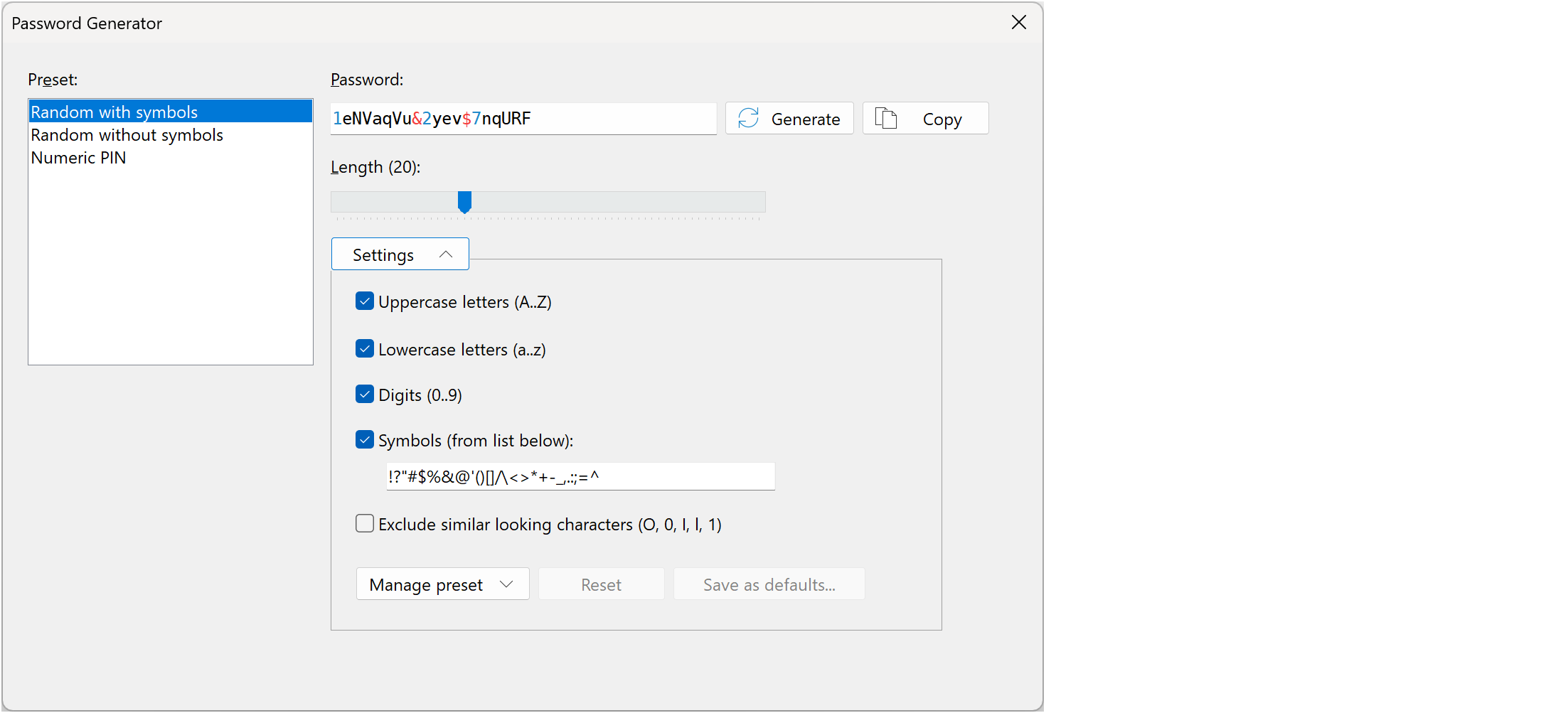
The Password Generator with its settings expanded: presets on the left, a 20-character password with digits and symbols highlighted, and options to choose character sets or exclude similar-looking characters.
Portable, self-contained and easy to leave
- Password Agent needs no framework or runtime, so it can run straight from a USB flash drive or a file server. A zip version without installer and updater runs without administrator rights.
- The Take With Me tool copies your data files (and, if you like, the program) to a removable drive in a few clicks.
- You can export everything to XML or CSV at any time, so you're never locked in.
- Sharp on 4K screens (up to 250% scaling), with a dark mode.
Cloud folder syncing you control, plus an Android app
Password Agent can keep its file in a OneDrive, Google Drive or ownCloud folder so your phone and other PCs see the same data. With cloud software that uses the Windows Cloud API (OneDrive, ownCloud), it shows the sync state on the status bar and tells you when the cloud copy has changed while your file is open. The free Android app opens those files through Android's storage framework, so it doesn't need internet permission either.

Password Agent's toolbar with the cloud notice: the open file was changed in the cloud, and a link to lock the file so the cloud software can sync it.
Benefits
- Nothing to breach but your own PC. Cloud password services are a single target holding millions of vaults. Your Password Agent file is one encrypted file among the billions on home computers.
- No yearly bill. You pay $24.99 once and the version you bought keeps working forever. Updates after the first year are optional and discounted.
- One tool for every browser. Because autofill doesn't depend on extensions, switching from Chrome to Firefox or using a portable browser changes nothing.
- Free if you're small. If you only have a dozen or so important logins, the Lite mode never expires, never nags and shows no ads.
Real-World Uses
- Leaving the browser's password store. You move from Chrome's saved passwords to an encrypted file with a master password, turn off the browser's autocomplete, and log in with the hotkey instead.
- A small office without a cloud subscription. A site license ($299.99) covers everyone in one building, and the shared file lives on the office file server, where the program can run without being installed on each PC.
- A technician's USB stick. Router, server and customer logins travel on a flash drive with the program, and nothing is left behind on the machines you work on.
- Storing more than passwords. Card numbers, passport details and software license key files (as attachments) sit in their own folders in the same encrypted file.
Who It's For, and Who Should Skip It
Password Agent suits Windows users who distrust cloud vaults, people who'd rather pay once than every year, and small businesses that want an offline, on-premises password file. It's also a good fit if you use several browsers or portable browsers.
Skip it if you use a Mac or an iPhone (there's no macOS or iOS version), if you want passwords to sync across devices without thinking about it, or if you want a browser extension that detects login forms and offers to save new passwords on its own. A cloud manager such as Bitwarden or 1Password fits those needs better. If you'd like an offline file but also want Mac and Linux support, the open-source KeePass family is the usual alternative.
Usage Guide
- Download and run the installer (or unzip the portable version). The download starts in Lite mode with no time limit.
- Create a new data file and choose a master password you won't forget. Write it down somewhere safe offline: it can't be recovered.
- Add items with New login (Ctrl+N) or New password, and put each website's address in the item's Link field so matching autofill can find it. Import from another manager's CSV if you're moving over.
- Turn off your browser's own password autocomplete, otherwise both may type into the form at once.
- Test autofill in Notepad: select an item, click in Notepad and press Ctrl+Shift+A. If the user ID and password appear, it works.
- On a website, click the user ID box and press the hotkey. If a form needs extra Tab presses, edit that item's autofill template.
- To use the file on your phone, put it in OneDrive or Google Drive, set Password Agent to lock open files after a few minutes of inactivity, and open the file in the Android app.
- When you outgrow 20 items, buy a license and enter the key: your data stays where it is.
Before you buy
- A forgotten master password means lost data. Moon Software can't reset it or open your file. If you changed it and still remember the old one, an older copy of the file may still open.
- The license covers 1 year of updates. Since January 15, 2025 new licenses include 1 year of free updates (it used to be 2). After that the program keeps working; newer versions need a $14.99 renewal.
- Try the Lite mode first. It's the full program with a 20-item cap, so you can test autofill on your own sites before paying.
Download Free TrialBuy Now
Where it falls short
- Autofill is only as safe as typing. Password Agent fills forms with simulated keystrokes, so a keylogger on your PC can capture them the same way it would capture your typing. It saves effort, not exposure.
- Some forms and apps resist it. Programs that can't take fast keyboard input, multi-step logins, and apps running as administrator (Windows blocks keystrokes sent to a higher-privileged program) may need a custom template or running Password Agent elevated.
- Syncing has sharp edges. The file can't be merged automatically, and cloud software can't update it while it's unlocked, so editing the same file on two devices before they sync can leave you with a conflict copy.
- The Android app has no autofill. On the phone you copy and paste, and the clipboard is readable by other apps.
- No Mac, iOS or Linux version.
What Users Say
Password Agent has a small, loyal user base rather than a big review footprint, and independent reviews are scarce. Here's what's available.
Customer comments on the vendor's site
Moon Software quotes two customers on the Password Agent page, without names:
"It's the best I've come across, and finding such a great combination of features took me literally years."
"I've tried well over a dozen of password management programs and yours is the best by far. Clean, elegant design, highly flexible configuration. It has everything I want and need plus that charming little touch of class (the giggle). The price is very fair too. It is a pleasure to use this program."
Microsoft Store and software directories
- Microsoft Store: Password Agent Lite averages 5.0 out of 5 from 6 ratings. Moon Software actively asks users to rate it there, so read that as a small, friendly sample.
- AlternativeTo: listed as a Windows-only freemium password manager with a one-time license, with 1 like and no written reviews yet.
- Snapfiles and Softpedia list it as a password manager that stores logins in one database, opens saved sites and fills credentials, without a detailed written review.
The themes
The praise centers on the clean design, flexible configuration and a fair one-time price. The complaints you'll see in the vendor's own support pages are practical ones: autofill clashing with the browser's own autocomplete, logins that need a custom Tab template, and cloud sync conflicts. We found no independent lab test or security audit of Password Agent, and no pattern of complaints about lost data or broken updates.
Comparisons
Password Agent vs. cloud password managers
Bitwarden, 1Password and LastPass sync your vault through their servers and fill logins with a browser extension that notices forms and offers to save new passwords. Password Agent does neither: you sync the file yourself and trigger autofill with a hotkey. In return, there's no account that can be breached, no monthly fee and no dependence on a company staying in business.
Password Agent vs. KeePass
KeePass is the best-known offline password manager: free, open source and extended by plugins for Mac, Linux and iOS ports. Password Agent is a commercial, polished single program with a modern interface, a careful in-memory design and support from its developer, but it's Windows and Android only. If you value open source and many platforms, KeePass wins; if you want something that works well out of the box on Windows, Password Agent is the friendlier choice.
Editions and Pricing
Every license is the same program; the license type decides who may use it. Each includes 1 year of free updates, and the program keeps working after that.
| License |
Price |
Renewal |
Who it covers |
| Lite | Free | - | Anyone, home or business; up to 20 items per file |
| Personal | $24.99 | $14.99 | One person on any number of their computers, or one shared workstation |
| Family | $39.99 | $24.99 | Every family member living at the same address |
| Site | $299.99 | $159.99 | Unlimited users and computers of one organization at one location |
| Worldwide | $999.99 | $549.99 | Unlimited users and computers of one organization at any number of locations |
The Buy Now button on this page is for the Personal license. Prices include VAT.
FAQs
Is Password Agent a subscription?
No. Password Agent is a one-time purchase: the $24.99 personal license is yours forever and includes 1 year of new versions. You only pay again ($14.99) if you want versions released after that year.
Does Password Agent work on Mac or iPhone?
No. Password Agent runs on Windows 7 through 11, and there's a free Android app that opens the same data files. There's no macOS, iOS or Linux version.
Can Password Agent import my passwords from another manager?
Yes. Password Agent can import CSV files exported from other password programs, and it exports to XML or CSV, so moving in or out is straightforward.
Can I use Password Agent on more than one PC?
Yes. A personal license covers one person on as many of their own computers as they like. Copy the .pwa file over, or keep it in a OneDrive folder that each PC syncs.
What happens to my data if I stop paying for updates?
Nothing. Password Agent keeps running the last version your license covers, and your data file stays readable. Only newer versions need a renewal.
Why does Password Agent take a second or two to unlock a file?
Password Agent runs the master password through about 200,000 rounds of key derivation on purpose, which makes brute-force guessing far slower. You can change the round count, but the vendor recommends keeping at least a one-second delay, and phones take a few times longer than a PC.
Does Password Agent still support Internet Explorer?
No. Version 2026.5.5 removed Internet Explorer support, and links set to open in it now open in Edge. Firefox, Chrome, Edge, Opera and other Chromium browsers are supported.
Can I get a refund?
Yes. Every Password Agent license and renewal comes with an unconditional 30-day money-back guarantee; the refunded key stops being valid.
System Requirements
- Windows 7, 8, 10 or 11, 32-bit or 64-bit (native executables for both)
- About 16 MB for the installer; no .NET or other framework needed
- Optional: OneDrive, Google Drive or ownCloud for syncing; Android device for the free viewer app
Conclusion
Password Agent is worth $24.99 if you're a Windows user who wants your passwords off other people's servers. It's a mature, actively maintained program (three releases between October 2025 and May 2026) with standard encryption, thoughtful memory handling, hotkey autofill for any browser and no subscription. The free 20-item mode lets you prove it on your own logins first.
The main reason not to buy it: you'll trade the hands-free convenience of a cloud manager's browser extension and automatic sync for control. If you live on a Mac or iPhone, or never want to think about where your password file is, pick a cloud manager instead.
Download Free TrialBuy Now