Moving files to a server without the guesswork
You have a website, a Linux box or a cloud bucket on the other end, and you need to get files onto it safely, then keep them in step with what is on your PC. Dragging files through a command line gets old fast. WinSCP is a free file manager for Windows that does this over the protocols servers actually use.
Quick facts
- Version: 6.7.1
- Platform: Windows (also offered through the Microsoft Store)
- Price: Free
- Protocols: SFTP, FTP, FTPS, SCP, S3, WebDAV
- Installer size: about 13 MB
Key features
One client for many kinds of servers
You copy files between a local computer and remote servers using FTP, FTPS, SCP, SFTP, WebDAV or S3. You don't need a separate tool for your web host and your cloud storage.
A graphical interface with an integrated text editor
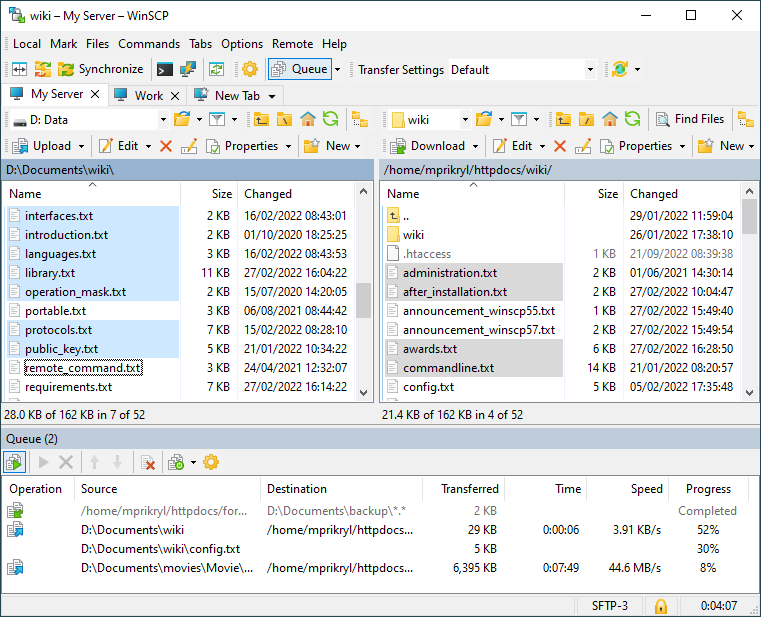
You work in a graphical user interface and cover the common file operations. The integrated text editor lets you change a remote file without a separate editor.
Scripting and automation for repeat jobs
The site lists scripting and task automation, command-line options and a .NET and COM library. A transfer you repeat every day can run without you.
Synchronization, now including two local folders
Version 6.7 added synchronization of two local directories. The vendor's changelog also lists synchronization checklists.
Dark theme, ssh-agent and sessions that reconnect
Recent releases improved the dark theme and added support for OpenSSH ssh-agent. They also improved how sessions and workspaces work. Inactive sessions can be reconnected automatically.
Portable use and many languages
The documentation covers portable use. The interface is translated into many languages.
Who it's for
- Website owners who upload to a host over SFTP or FTP.
- Administrators who move files to and from servers and want to automate it.
- Anyone who works with S3 storage and prefers a file-manager view to a console.
Pros and cons
Pros
- Free to use.
- Covers six protocols in one program.
- Scripting, a .NET library and command-line options for automation.
- Updated often, with security fixes in recent releases.
Cons
- Windows only.
- The 64-bit build is described as experimental.
- The remote side must be a server that speaks one of the supported protocols.
FAQs
Is WinSCP really free?
Yes. The vendor describes it as a free file manager. A donation page exists if you want to contribute.
Which protocols can I use?
You can use FTP, FTPS, SCP, SFTP, WebDAV and S3.
Can I automate transfers?
Yes. The vendor documents scripting, command-line options and a .NET and COM library.
Can I run it without installing it?
The documentation includes a page on portable use.
Is there a 64-bit version?
The 6.7 release added an experimental 64-bit version.
System requirements
You need Windows on your PC. For the other end, you need a server that supports one of the protocols above, such as an SSH server with SFTP or SCP, an FTP server, a WebDAV server or S3 storage.