Rank Tracker Professional: Desktop Rank Tracking and Keyword Research Without Keyword Limits
Rank Tracker Professional is a desktop SEO app for Windows, macOS and Linux that checks where your site ranks for unlimited keywords in Google, Bing, YouTube and hundreds of other search engines, and finds new keywords to target. It costs $179 a year, and the free version lets you try every tool on one project before you pay.
It's built for site owners, freelancers and small agencies who are tired of rank trackers that charge per keyword: here you can track 50 keywords or 5,000 for the same price, because the checks run from your own computer.
Quick facts
- Current version: 8.51.11, released October 8, 2026
- Developer: Link-Assistant.Com, the maker of SEO PowerSuite
- Runs on: Windows 10 and 11, macOS 11 Big Sur or later (Intel and Apple silicon), 64-bit Linux
- Tracking: unlimited websites and keywords, desktop and mobile, any country, city or street address
- Price: $179 a year for Professional, renewing yearly
- Free version: all tools, but 1 project, no saving and 1 competitor per project
- Download: 606 MB Windows installer (includes its own Java runtime)
- What we checked: the download page and the change list both showed version 8.51.11, dated October 8, 2026, and the Windows installer link served an x64 installer of 606 MB on October 20, 2026. The order page showed "Rank Tracker Professional - Yearly" at $179.00 on October 20, 2026, with renewal settings and no discount. We didn't run rank checks with it ourselves.
Before you buy
Rank Tracker Professional is a yearly subscription that renews automatically. Link-Assistant scores 2.9 out of 5 on Trustpilot from 417 reviews, and most of the 1-star reviews are from people charged for a renewal they didn't want and then refused a refund. Its pricing page says it can't refund partial use or the time left in a subscription. If you buy, note the renewal date and turn off auto-renewal in your order if you only want one year. Try the free version on your own keywords first, since it has every tool.
Download Free VersionBuy Now
Overview
Rank Tracker works on projects: one project per website. A sidebar on the left holds the four main areas, Target Keywords (your tracked keywords, ranking summary and keyword map), Keyword Research, SERP Analysis and Competitor Research, plus Domain Strength and Reports. You add keywords, choose the search engines and locations, and click the refresh button: the app queries each search engine, records your position, the page that ranks, the SERP features and the top 30 results, and stores everything so you can compare later.
Because it's a desktop program, the data lives on your computer and the checks come from your connection. That's why there's no keyword limit, and also why big projects keep your PC busy.
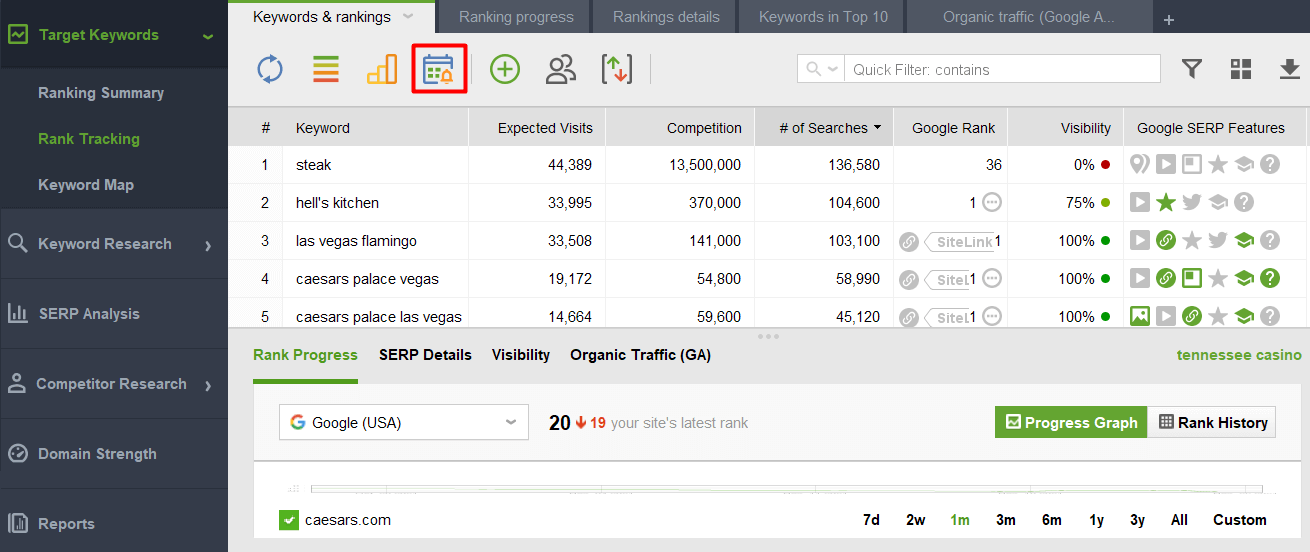
The Rank Tracking view, from Link-Assistant's own guide: tracked keywords with expected visits, competition, search volume, Google rank, visibility and SERP feature icons, and the Rank Progress pane for the selected keyword below. The calendar button outlined in red opens scheduled tasks.
Features
Unlimited rank tracking in hundreds of search engines
Rank Tracker checks positions for as many sites and keywords as you like in Google, Bing, Yahoo, YouTube, Yandex, Baidu, Naver and hundreds more regional engines. You can scan the top 10, top 50 or up to 1,000 results, track desktop and mobile separately, and run checks daily, weekly or monthly. Each check also records which page ranks, so you notice when Google swaps one of your pages for another.

Keywords sorted by Google Difference, from Link-Assistant's guide: the current and previous rank (here lost from the Local Pack), the SERP features each keyword triggers, the ranking page and the visibility score.
Local rankings down to a street address
Rank Tracker can check rankings as a searcher in a particular country, state, city or exact street address would see them, and you can create separate workspaces for each location and language. That matters for a dentist, a restaurant or any business whose customers search "near me", since rankings in the next town can be quite different. It also records your Google Maps and Local Pack positions.
SERP features and ranking history
Rank Tracker notes which SERP features appear for each keyword (featured snippets, local packs, images, videos, review snippets, People Also Ask, ads and more) and whether you own them. It saves the top 30 results of every check for as long as you keep the project, so you can go back months later and see which competitor overtook you and when. A SERP fluctuation graph shows when results shook up, and you can mark events such as a site redesign on the ranking graph.
Keyword research from a dozen sources
Rank Tracker's Keyword Research section has Ranking Keywords (keywords a domain already ranks for), Keyword Gap (keywords your competitors rank for and you don't), Google Search Console and Keyword Planner imports, autocomplete tools, Related Searches, Related Questions, TF-IDF Explorer and Keyword Combinations. Every result gets search volume, CPC, competition and a keyword difficulty score, and you can group keywords into clusters and map them to pages.
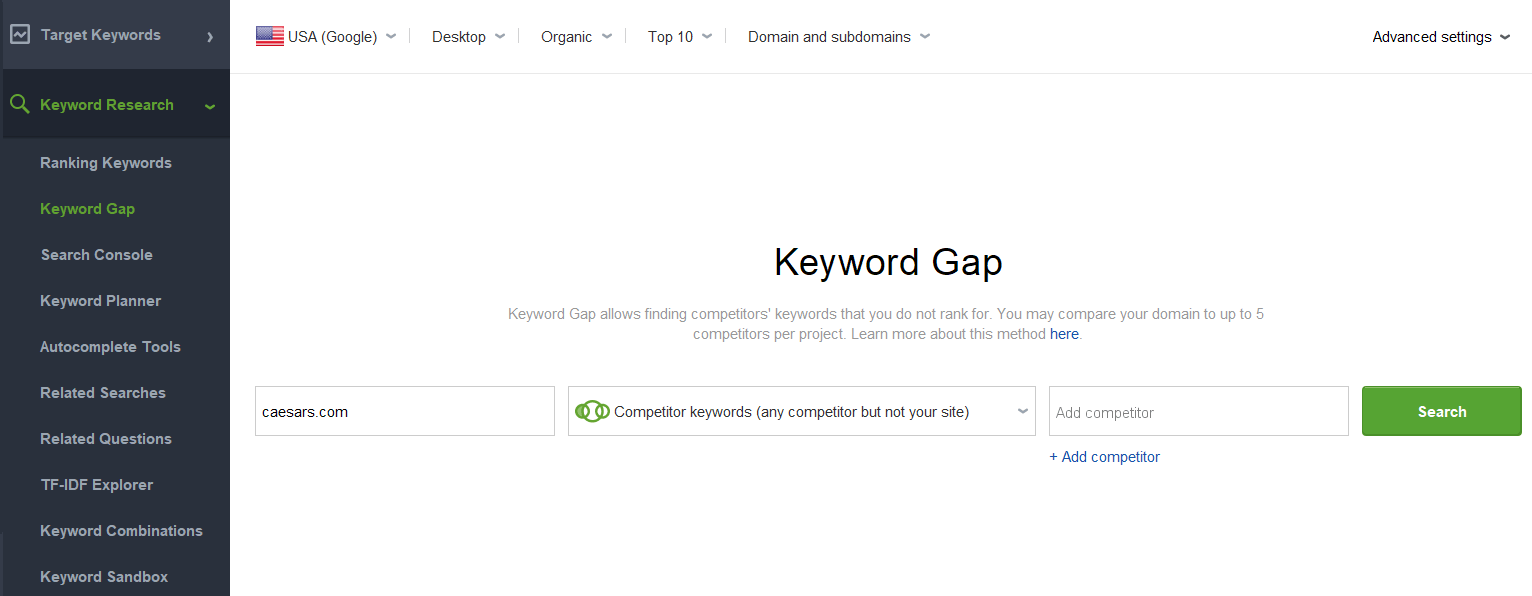
Keyword Gap, from Link-Assistant's guide: enter your domain, choose "Competitor keywords (any competitor but not your site)" and add up to 5 competitors. The full list of research methods is in the menu on the left.
Competitor research and SERP analysis
Rank Tracker finds the domains that compete with you in organic search, shows their top-ranking pages, and lets you track up to 5 competitors per project in the Professional edition. SERP Analysis takes any keyword and shows the ranking pages with their strength and backlink metrics, so you can judge how hard it would be to break into that top 10.
Google Analytics and Search Console data
Rank Tracker connects to Google Analytics 4 and Google Search Console, so the same table can show your rankings next to real impressions, clicks and organic traffic. Search Console also becomes a keyword source: it lists the queries you already appear for, which is often where the quickest wins are.
Scheduled checks and Safe Query Mode
Rank Tracker can run rank checks on a schedule and alert you to changes, as long as the computer and the app are running at that time. With a paid license it uses Safe Query Mode, which sends ordinary rank checks through Link-Assistant's servers so Google doesn't show you CAPTCHAs or block your IP.
Benefits
- Flat price, no keyword meter. Cloud rank trackers charge by the number of keywords checked. Rank Tracker Professional costs the same whether you track one site or thirty.
- History you own. Rankings and SERP snapshots are kept on your disk for as long as you want, not deleted when a plan's history window runs out.
- Rankings and research in one place. The keyword you find in Keyword Gap goes straight into tracking.
- Local detail. Street-level locations and separate mobile tracking show what real customers see.
Real-World Uses
- A local business: track 40 service keywords from three city-center addresses and see whether the Google Maps pack moves after you update the Google Business Profile.
- A blogger after a Google update: compare positions before and after, check which pages lost rankings, and look at the saved top 30 to see who replaced them.
- A freelancer with several clients: one project per client site, each with its own keywords, locations and competitors, all for one license.
- Planning new content: run Keyword Gap against three competitors, sort by difficulty, and group the easy keywords into topics for new articles.
- A YouTube channel: track video rankings on YouTube and in Google's video results for the channel's main topics.
Who It's For, and Who Should Skip It
Rank Tracker Professional suits site owners and freelancers who track many keywords, care about local or mobile rankings, and are happy to run SEO software on their own computer.
Skip it if you want an online dashboard you and your team can open from any device, since Rank Tracker's projects live on one computer and scheduled checks only run while it's on. Agencies that send branded reports should look at the Enterprise edition instead, because Professional can't save, email or white-label reports. If you only need a dozen keywords, Google Search Console's free performance report may be enough. And if you'd rather not manage a subscription that renews on its own, think twice.
Usage Guide
- Install and launch. Download the free version and run the installer (on Windows you need an administrator account). Then create a new project.
- Set up the project. Enter your site's URL, and optionally connect Google Analytics and Search Console.
- Add keywords. Type or paste them, or pull them from Ranking Keywords or Search Console under Keyword Research.
- Pick search engines and locations. Add Google for your country, a mobile engine, and any city or street address you care about.
- Check rankings. Click the refresh button on Target Keywords > Rank Tracking. The table fills in with ranks, ranking pages and SERP features.
- Register. After buying, enter your registration key in the app to save projects and lift the free version's limits.
- Schedule it. Use the scheduler button to run checks automatically, and leave the computer on at that time.
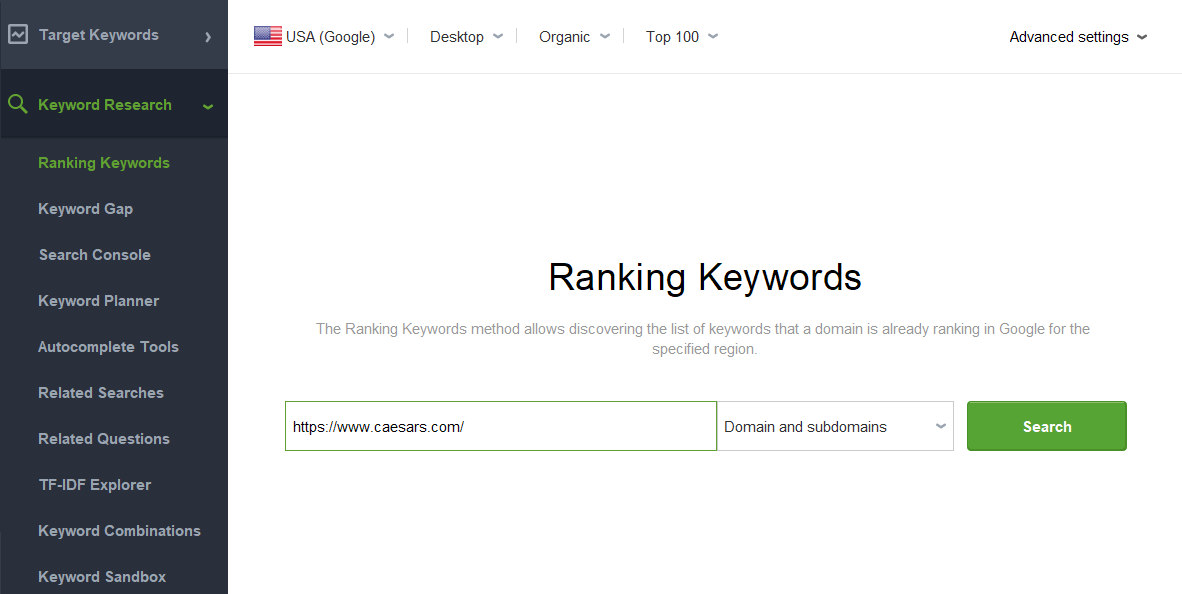
Ranking Keywords, from Link-Assistant's guide: a quick way to fill a new project with the keywords a domain already ranks for, here set to USA Google, desktop, organic results and the top 100.
Where it falls short
- CAPTCHAs and temporary blocks. The free version, and any task Safe Query Mode doesn't cover, sends queries from your own IP. Too many at once and Google answers with CAPTCHAs or blocks your IP for a while, and you're told not to skip any CAPTCHA. Link-Assistant recommends just 1 or 2 simultaneous tasks on a direct connection, which makes big projects slow.
- Heavy on your computer. It needs at least 4 GB of RAM (8 GB recommended on Windows), the Windows installer alone is over 600 MB, and reviewers say large projects can keep the PC busy for hours.
- Desktop only. No web dashboard and no built-in team access. Sharing a project means using Link-Assistant's cloud storage or sending files.
- Reports are limited in Professional. You can view reports, but saving them as PDF or HTML, emailing them, scheduling them and exporting data to CSV need Enterprise.
- Accuracy complaints. A few reviewers report rankings that don't match what they see in Google, including one Professional user whose site wasn't found with Safe Query Mode on.
- Renewals and refunds. The most common complaint on Trustpilot by far, covered in "Before you buy" above.
What Users Say
Opinions split sharply. The G2 reviews Link-Assistant quotes praise the value and the depth of the tools, while Trustpilot, which covers the whole company, is dominated by billing complaints.
G2 reviews quoted by Link-Assistant
Link-Assistant's Rank Tracker page quotes these G2 reviewers (chosen by the vendor, so expect the positive side):
- "Great amazing rank tracker for a very affordable price. FAST! I love how fast it is!" (Tony H, G2)
- "SEO PowerSuite is versatile and has no credit system, so you can use it as much as you want." (Constantin N, G2)
- "SEO PowerSuite offers excellent value for money, providing a powerful set of tools." (Sándor H, G2)
- "This is an all in one SEO platform that covers almost anything you will need to boost your SEO." (Maria A, G2)
Trustpilot: the complaints
Link-Assistant has a TrustScore of 2.9 out of 5 from 417 reviews, and Trustpilot notes it replies to 28% of negative reviews, usually after more than a month. Most low ratings are about billing:
- Denis Breus (1 star, October 2026): "make sure to cancel the auto-renewal the very same minute, or your money will be gone."
- Richard (1 star, September 2026): "I requested a refund the day i was charged and i received a refusal notice (same day)."
- Indigo Cube (1 star, May 2026), on cancelling: "there was no clear or direct way to cancel within that communication."
- Matt Bianco (1 star, August 2026), a Rank Tracker Professional user: "With Safe Query Mode enabled, Rank Tracker failed to find my website for the keywords I was monitoring."
- Gavin Ramsey (1 star, May 2026): "Slow and clunky. Similar tools are worth the price difference."
- Vape.ch (1 star, May 2026): "Computer is blocked for hours, needs research and tweaking of the computer settings"
Trustpilot: the praise
- Nicole Crocker (5 stars, June 2026): "I love that it gives me access to multiple tools in one suite"
- Julie M (5 stars, May 2026), about a billing problem: "They replied quickly, took the time to research the problem and they made it right."
The pattern
Users who like Rank Tracker like the same things: no keyword limits, no credits, lots of tools and a price well below cloud SEO suites. The complaints fall into two groups. The larger one is billing: automatic renewals people forgot about and refunds refused. The smaller one is the desktop model itself: a slow or busy computer during big checks, and rankings that sometimes don't match a manual search.
Comparisons
Rank Tracker Professional vs. Rank Tracker Enterprise
Both editions track unlimited projects and keywords with the same search engines and research tools. Enterprise raises the competitor limit from 5 to 40 per project and adds what agencies need for clients: white-label reports, saving and emailing reports as PDF or HTML, customizable templates, scheduled report delivery, one-click sharing, CSV, SQL and HTML export, and priority support. If reports go to clients, Enterprise is the edition to buy. For your own sites, Professional is enough.
Rank Tracker vs. the full SEO PowerSuite
SEO PowerSuite bundles Rank Tracker with WebSite Auditor (site audits), SEO SpyGlass (backlink analysis) and LinkAssistant (link building). If you only need rankings and keyword research, Rank Tracker on its own costs much less. Buy the suite if you also want to audit sites and check backlinks.
Editions and Pricing
| Edition |
Price |
Projects and keywords |
Competitors per project |
Reports |
| Free |
$0 |
1 project, nothing saved |
1 |
View only |
| Professional (this license) |
$179 a year |
Unlimited |
5 |
View only |
| Enterprise |
419 a year |
Unlimited |
40 |
Save, email, schedule, white-label, export |
The Professional price is the order-page price on October 20, 2026. The Enterprise price is from Link-Assistant's pricing page, which showed it in euros from our location. Both plans renew every year until you cancel.
FAQs
Does Rank Tracker Professional renew automatically?
Yes. Rank Tracker Professional is a yearly subscription that renews automatically at $179 unless you cancel. Link-Assistant says it doesn't refund partial use or the time left in a subscription, so turn off auto-renewal before the renewal date if you don't want another year.
Can I use my own proxies with Rank Tracker?
Yes. Rank Tracker's Proxy Rotation, in both the free and paid versions, sends queries through your own private proxies instead of your IP and spreads them across the list, so you can run more checks at once.
Does Rank Tracker need my computer on to run scheduled checks?
Yes. Rank Tracker is desktop software, so scheduled rank checks only run when the computer is on and the app can start. If you need checks while your laptop is closed, run it on an always-on PC or a small server.
Will Rank Tracker get my IP blocked by Google?
Rank Tracker can trigger Google CAPTCHAs or a temporary IP block if it sends many queries from your own IP. A paid license avoids this for most checks with Safe Query Mode, which processes them on Link-Assistant's servers and is on by default in registered copies. Without it, keep simultaneous tasks at 1 or 2 and turn on the human emulation pauses (3 to 8 seconds is the vendor's advice).
Can Rank Tracker Professional send PDF reports to clients?
No. Rank Tracker Professional lets you build and view reports, but saving them as PDF or HTML, emailing them, scheduling delivery and white-labeling them are Enterprise features.
Does Rank Tracker track Google AI Overviews?
Yes. Link-Assistant's current plans, including the free one, list tracking of Google AI Overviews alongside the other SERP features Rank Tracker records.
Does Rank Tracker still run on Windows 7 or 8?
No. Rank Tracker's current requirements list Windows 10, Windows 11 and Windows Server 2016 R2 or later, macOS 11 Big Sur or later, and 64-bit Linux only.
System Requirements
- Windows: Windows 10, 11 or Windows Server 2016 R2 or later, administrator account, 1 GHz processor (2 GHz dual-core recommended), 4 GB RAM (8 GB recommended), 100 MB per app, 1366 x 768 screen
- macOS: macOS 11 Big Sur or later, Intel or Apple silicon, 4 GB RAM, 300 MB disk space, 1440 x 900 screen
- Linux: 64-bit only (Ubuntu 18.04+, Debian 10+, Fedora 38+, openSUSE 15.5+, RHEL 8.9+), 4 GB RAM, 120 MB per app, no ARM
- Internet: a broadband connection
Conclusion
Rank Tracker Professional is worth $179 a year if you track a lot of keywords, especially local or mobile ones, and don't mind running SEO software on your own computer. The one reason to buy it is unlimited tracking and keyword research at a flat price that cloud tools can't match. The main reason not to is the business around it: a yearly plan that renews on its own, a strict no-refund policy and a 2.9 Trustpilot score built mostly on billing complaints. Use the free version on your real keywords first, and if you buy, turn off auto-renewal unless you're sure you'll want a second year.
Download Free VersionBuy Now