Kerish PC Doctor: Background Maintenance, Error Repair and Hardware Monitoring for Windows
Kerish PC Doctor (called Kerish Doctor until late 2023) is a Windows maintenance suite that cleans junk files, repairs system errors, watches hardware temperatures and battery wear, and fixes Windows faults in real time while you work. It runs on Windows 7 through 11, and a one-year key for up to 3 PCs costs $14.95, a one-time payment that doesn't renew automatically, with a 15-day free trial.
It's built for people who'd rather have one program quietly keep the PC tidy than run a cleaner, a defragmenter, a driver updater and a temperature monitor separately. The trade-off is a very large toolbox, and a vendor whose support gets poor marks.
Quick facts
- Version: 4.95; the current build was released October 14, 2026 (version 4.95 first appeared in November 2023, when the program was renamed)
- Developer: Kerish Products LLP, Astana, Kazakhstan, making Windows utilities since 2005
- Platform: Windows 11, 10, 8.1, 8 and 7
- Price: $14.95 for 1 year, $19.95 for 2 years, $24.95 for 3 years; every key covers 1 to 3 PCs
- Renewal: none; each key is a one-time purchase for a fixed period
- Trial: 15 days
- Refund: within 30 days of purchase, once per product
- What we checked: the installer from kerish.org is 48.9 MB (51,262,256 bytes), file version 4.95, digitally signed by Kerish Products LLP; on the order page the 1-year key was $14.95, the 2-year key $19.95 and the 3-year key $24.95, each a one-time charge with no renewal, on November 8, 2026. We didn't install it or run its repairs on a test PC.
Before you buy
- Support is the weak spot. Kerish Products scores 2.7 out of 5 on Trustpilot, and the recent 1-star reviews describe slow replies and a license key that took days to arrive. Use the 15-day trial first, and keep your order email.
- Be careful with the driver updater. One reviewer's PC wouldn't boot after a driver update, twice. Create a restore point (Kerish PC Doctor's scheduler can do this) before updating drivers, or update drivers from your PC maker instead.
- The license period starts when the key is issued, not when you enter it, and keys for different periods can't be combined.
Download Free TrialBuy Now
Overview
Most PC cleaners wait for you to click "Scan". Kerish PC Doctor's main idea is the opposite: once installed, its components run in the background. Disk Optimization cleans junk and defragments hard disks when the PC is idle, Error Repair fixes faults as they come up, PC Protection checks for threats and weak security settings, Apps Live Optimization shares out CPU time between running programs, and PC Control tells you about important events. Each component has its own switch on the main screen, so you can turn off whatever you don't want.
Behind that sit dozens of manual tools: a hardware monitor, a driver updater, a list of common Windows problems with one-click fixes, hidden Windows settings, a file shredder, data recovery, startup and process managers, and more. Version 4.95 renamed the program from Kerish Doctor to Kerish PC Doctor and added the hardware monitor's desktop widget, battery and motherboard voltage monitoring, and a portable install mode.
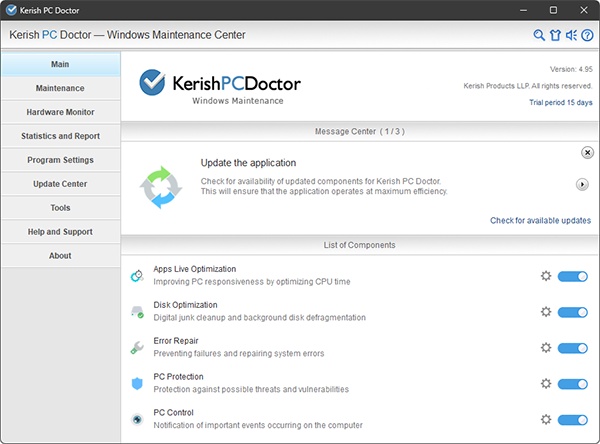
The main window of Kerish PC Doctor 4.95 (trial): the Message Center at the top, and below it the background components (Apps Live Optimization, Disk Optimization, Error Repair, PC Protection, PC Control), each with a settings icon and switch.
Features
Real-time failure detection
Kerish PC Doctor's Real-time Failure Detection System watches for Windows faults while you use the PC, such as a disabled audio service or a blocked Task Manager, and offers a fix on the spot. You choose Fix or Ignore, and can tell it to remember the choice.

A real-time alert: the Windows Audio service is disabled, so sound won't work. Fix is recommended; Ignore leaves it alone.
Deep cleanup and error repair
Kerish PC Doctor's full scan sorts what it finds into categories: junk files, broken system service settings, file extensions and ActiveX/COM components that point to removed programs, invalid registry settings, dead startup entries and shortcuts, history lists and damaged caches. Each category has a Details link, so you can see and untick items before you click Repair.

A scan result with 299 items: 7 GB of junk files, 149 orphaned application components, 58 broken shortcuts and more, each with a checkbox and a Details link.
Hardware monitor and disk health
Kerish PC Doctor tracks component temperatures and load, the physical state of a laptop battery and the motherboard's power supply voltages, and warns you right away when something goes out of the normal range. A desktop widget keeps the readings in view. On the disk side it uses S.M.A.R.T. data, gives each disk a rating score, and defragments hard disks (not SSDs) in the background when the PC is idle.
One-click fixes for common Windows problems
Kerish PC Doctor's "Solving PC Problems" tool lists everyday Windows breakdowns in plain words: the desktop doesn't load, Safe Mode won't start, Wi-Fi shows no networks, Windows Update or Windows Search doesn't work, a game complains that d3dx9_*.dll is missing, System Restore fails with an error code. Pick the problem, click Repair, and it applies the fix it has for that case.

The Solving PC Problems window, with "Windows Update does not work" selected and a Quick Search box at the bottom.
Recommendations for speed and security
Kerish PC Doctor analyzes your Windows configuration and suggests changes, each labeled Optimization or Security: turn off file indexing on an SSD, disable peer-to-peer Windows Update delivery, shorten the autorun delay, require a password after sleep, block Bluetooth advertising messages. Everything is a checkbox, so you apply only what you agree with.

Getting Recommendations: optimization tweaks (blue) and security settings (yellow), each explained in one line.
Virus protection and vulnerability checks
Kerish PC Doctor includes basic protection against malware: it deletes a detected threat and keeps a copy in Quarantine, which you can restore from the Tools section. It also flags Windows settings that malware likes to change, such as a blocked Task Manager, and offers to reset them to safe values. It's an extra layer, not a replacement for a full antivirus.

A threat alert: a Trojan.Generic file in system32 was deleted and copied to Quarantine, with Details and Restore buttons.
The toolbox: drivers, recovery, shredder and more
Kerish PC Doctor also bundles a driver updater covering more than 100,000 known devices (updated monthly) with a driver backup manager, game acceleration, recovery of deleted files, a file shredder with selectable wiping methods, a disk map and large-file finder, an empty-folder cleaner, an installed-software manager that removes leftovers, browser extension and startup checks rated by cloud data, system restore point tools, a Windows Update tool, and an auto-shutdown timer.
Benefits
- Set it and mostly forget it. Cleanup, defrag and repairs happen in idle time, so the PC stays tidy without a weekly routine.
- Early warning on hardware. Temperature, voltage and battery alerts can catch a clogged fan or a failing battery before it becomes a crash.
- Cheap for a household. $14.95 covers up to three PCs for a year, and there's no surprise renewal charge.
- Answers in plain words. The problem list and recommendations explain what each fix does, which helps if you're not a Windows expert.
Real-World Uses
- A family's three aging laptops that get slower every few months: one key keeps all three cleaned and defragmented in the background.
- A gaming PC that shuts down under load: the hardware monitor and its widget show whether the CPU or GPU is overheating.
- Windows Search or Windows Update stopped working and you don't want to spend an evening in forums: pick the problem in the list and run the repair.
- Helping a relative remotely: turn on the background components and the security recommendations once, and the PC needs less hands-on care.
Who It's For, and Who Should Skip It
Kerish PC Doctor suits home users with one to three Windows PCs who want an all-in-one maintenance tool that runs on its own, and who like the idea of hardware monitoring alongside cleanup. It's good value if you'd otherwise buy a cleaner and a driver updater separately.
Skip it if you already keep Windows lean with free tools like Windows' own Storage Sense and a temperature monitor: on a well-kept PC, a MalwareTips user found no difference. Skip it, too, if dependable support matters to you, if you need a Mac version, or if you want a real antivirus: its virus protection is a side feature. Power users who prefer to control every change may find the background repairs too hands-off.
Usage Guide
- Download and install Kerish_PC_Doctor_4.95.exe (48.9 MB). The installer also offers a portable install mode.
- Start the trial. The main window shows the days left in the 15-day trial. When you buy, the key arrives by email, and the vendor's support page has activation instructions.
- Check for updates from the Message Center so the components and databases are current.
- Run the first full scan, open the Details of each category, untick anything you want to keep, then click Repair.
- Choose your background components on the Main screen, and adjust each one with its settings icon.
- Open Hardware Monitor and enable the desktop widget if you want temperatures always in view.
- Before big changes, such as driver updates, create a system restore point from the tools.
Where it falls short
- Little independent testing. Apart from Windows Report, we found no recent hands-on review from a major tech site; the awards on the vendor's page are mostly from download sites.
- Registry cleaning has limited payoff. Many of the "problems" in a scan (orphaned COM entries, old history lists) don't slow a modern PC noticeably. A MalwareTips user who ran it on a healthy machine "could notice no difference".
- Overwhelming at first. Even the positive Windows Report review says the number of options "can initially feel overwhelming".
- Odd version history. Version 4.91 was a "technical release" with no changes, and 4.95 has kept the same number since November 2023 while the builds were refreshed.
What Users Say
Opinion on Kerish PC Doctor splits cleanly: people who use the program mostly like it, while the complaints are about the company behind it, its support and license delivery, plus one serious driver-update report.
Windows Report: hands-on review
Keelan Balderson tested Kerish PC Doctor for Windows Report (the site notes it may earn a commission on purchases). His verdict: "Its defining strength is its preventive approach: continuous background maintenance, real-time diagnostics, hardware monitoring, security checks, repair tools, and a broad collection of Windows utilities in one application."
"Its biggest strengths, in my view, are Real-Time Mode and Hardware Monitor... Of course, not every tool will be essential for every user, and the sheer number of options can initially feel overwhelming. Still, that depth is also the software's biggest advantage."
Trustpilot: 2.7 out of 5 from 24 reviews
A third of the reviews are 1 star, and the company hasn't replied to negative reviews. The criticism:
- leszek szulkowski (1 star, February 2026): "I purchased a license five days ago. They still haven't sent me the license key. I don't recommend it!!!"
- Val, "Interesting but BAD! support." (1 star, January 2026): "The ticket was not updated neither replied for 1 week now."
- Conan the Barbarian (1 star, 2025): "The product is fine. BUT the Customer Support portion is less than 1 star."
- RD, "Don't update your drivers with this software!" (1 star, May 2025): "Twice I tried to update my software drivers with their software and both times my computer would not boot afterwards."
And the praise:
- Kurt Miller, "Best system optimizer out there!" (5 stars, August 2023): "Much better than CC Cleaner, ASC or Ashampoo and it is much more lightweight."
- William Shader (5 stars, April 2024): "My boot and shutdown is now half as long as it was."
- Gary Goss (5 stars, July 2024): "I have NEVER EVER had any kind of issue with this product, I have purchased a licence."
- Eratas, "Behold The Extended Review of Doom" (4 stars, February 2025): "Kerish does a lot of things that others don't and for a somewhat fair price."
MalwareTips forum (Kerish Doctor 2015)
A December 2015 thread asked whether Kerish Doctor was "a legitimate, safe and effective product". Replies were mixed:
- Exterminator: "This is a legitimate piece of software and is actually better than many... It does actually fix some errors and other maintenance performed by other programs such as CCleaner"
- juhful: "Have used it for a few months now, no problems at all seems very effective. One of the very few programs of this type I would use."
- Hangtooth: "The 'rollback' feature of the program is pretty darn good, I just tried it out and it rolled all the reg/settings changes etc it made back, that's a good mark in its favour."
- Smith83: "I used Kerish Doctor on my personal machine, I could notice no difference."
The pattern: users like the breadth of the program, its light footprint and the background maintenance, and several say it made their PCs start faster. The recurring complaints are slow or missing support and delayed license keys, which matter more than usual because the license is delivered by email. The driver-update report is a single review, but it's a serious one, so treat that tool with care.
Comparisons
Kerish PC Doctor vs a free cleaner
A free cleaner removes junk and browser traces when you run it. Kerish PC Doctor does that in the background and adds real-time error repair, the hardware monitor, the problem-fixing list and the driver updater. If all you want is disk space back, the free tool is enough.
Kerish PC Doctor vs the full Kerish bundle
Kerish Products also sells Kerish Disk Health, a separate tool that predicts the remaining life of SSDs and hard disks. A bundle of both costs $24.95 to $34.95 for 1 to 3 years. Kerish PC Doctor alone already reads S.M.A.R.T. data and rates disks, so the bundle is mainly for people who want lifespan forecasts.
Editions and Pricing
| License key | Price | PCs | Renewal |
|---|
| 1 year | $14.95 | 1 to 3 | None, one-time |
| 2 years | $19.95 | 1 to 3 | None, one-time |
| 3 years | $24.95 | 1 to 3 | None, one-time |
Every key includes free updates and technical support for its period, applies to all versions of the program, and can be recovered through the vendor's license restore service if you lose it. The Buy Now button on this page is for the 1-year key; the 3-year key works out cheapest per year.
FAQs
Is Kerish PC Doctor the same program as Kerish Doctor?
Yes. Kerish Doctor was renamed Kerish PC Doctor in version 4.95 (November 2023). Older versions such as Kerish Doctor 2014 (4.60) or 2008 (3.97) are superseded by it.
Does Kerish PC Doctor renew automatically?
No. Kerish PC Doctor keys are one-time purchases for 1, 2 or 3 years. When the period ends you buy a new key if you want to continue; nothing is charged on its own.
Can I use one Kerish PC Doctor key on three computers?
Yes. Every Kerish PC Doctor key covers 1 to 3 PCs, so a household can share one $14.95 key.
Can Kerish PC Doctor replace my antivirus?
No. Kerish PC Doctor has virus protection and security checks, but it's a maintenance tool first. Keep Microsoft Defender or another antivirus running alongside it.
Can I undo changes Kerish PC Doctor makes?
Kerish PC Doctor has a rollback feature that reverses the registry and settings changes it made, and it can create Windows restore points, including on a schedule. Quarantined files can be restored from the Tools section.
Does Kerish PC Doctor defragment SSDs?
No. Kerish PC Doctor defragments hard disks in idle time but skips SSDs, where defragmenting brings no benefit and adds wear.
What if my Kerish PC Doctor key doesn't arrive?
Kerish Products says card and PayPal orders are usually processed within minutes, but some are held for manual verification. If the key hasn't arrived, use the support request form or the license restore service on kerish.org, and keep your order number handy.
Is there a Mac version of Kerish PC Doctor?
No. Kerish PC Doctor is for Windows 7 to 11 only.
System Requirements
- Windows 11, 10, 8.1, 8 or 7
- About 50 MB for the installer
Conclusion
Kerish PC Doctor is worth $14.95 a year if you look after up to three Windows PCs and want one program to keep them clean, warn you about overheating and failing hardware, and fix common Windows faults without you thinking about it. The one reason to buy it is that background, preventive approach at a low household price with no auto-renewal. The main reason to hesitate is the company's support record: delayed keys and unanswered tickets come up again and again. Try it for the 15 days, avoid running the driver updater without a restore point, and if your PC is already lean and healthy, you may not need it at all.
Download Free TrialBuy Now