DJ Mixer Professional 3: Music, Video and Karaoke Mixing on One Older License
DJ Mixer Professional 3 (sold as DJ Mixer Pro) is DJMixerSoft's DJ program for Windows and Mac that mixes music, music videos and karaoke CDG files on up to four decks, with one license that covers both platforms. The regular price is $149.95 one-time, and the 30-day trial runs in 20-minute sessions. The catch: the current version, 3.6.10, dates from April 2022, and the Mac build stops at macOS 10.14 Mojave.
Quick facts
- Version: 3.6.10, released April 19, 2022
- Developer: DJMixerSoft (djmixersoft.com)
- Platforms: Windows 7, 8, 8.1, 10 and 11 (32- and 64-bit); Mac OS X 10.8 to macOS 10.14 Mojave
- Decks: 2 or 4, with audio, video and karaoke (MP3+CDG) on each
- Controllers: over 90 MIDI devices listed in the vendor's FAQ (Numark, Pioneer, Denon, Hercules, Reloop and others), plus keyboard mapping with LEARN
- Price: $149.95 regular, one license for both Windows and macOS, free minor updates
- Trial: 30 days, 20 minutes per session; restart the program to keep going
- Refunds: none, except for a bug the vendor can't fix, reported within 14 days
- What we checked: the Windows installer DJMixerPro3.exe (17.1 MB, file version 3.6.10.0) and the Mac package DJMixerPro3.pkg (18.4 MB) downloaded from djmixersoft.com on November 28, 2026; the Windows installer is not digitally signed. The buy page showed $59.95 instead of $149.95 that day. We didn't run a live set or test a controller.
Before you buy
DJMixerSoft's buy page offered DJ Mixer Pro at $59.95 on November 28, 2026, with a $90-off offer it says runs until November 30, 2026, while its features page still says $99.95. Look at the order page for the price you'll actually pay.
The last update was April 2022, and the Mac version is listed for Mac OS X 10.8 to 10.14 only, so it won't be a safe buy on a current Mac. On Windows, try it with your own controller and sound card first: the refund policy covers only bugs the vendor can't fix.
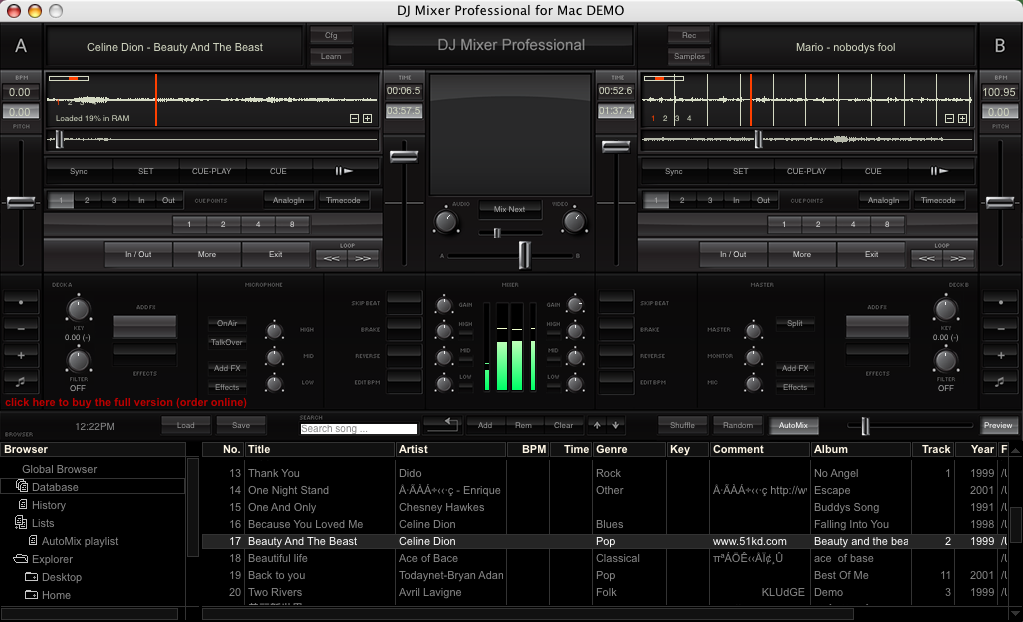
The two-deck layout from the vendor's user manual (an older Mac demo build): waveforms and cue buttons on each deck, the video window and mixer in the middle, and the song browser below.
Overview
DJ Mixer Professional has been around since at least 2010. Version 3 arrived in 2012 with four decks and controller support, and point releases through 3.6.10 added controllers, macOS Sierra to Mojave support, a new BPM analysis algorithm and flexible audio routing. The Windows installer's own version information carries a XYLIO copyright, the company behind the Future DJ engine, which explains why the layout looks a lot like other Xylio-based DJ programs.
What sets it apart from a plain MP3 mixer is that video and karaoke sit on the same decks as audio. You can crossfade two music videos, send the mix full-screen to a TV or projector, and load MP3+CDG karaoke tracks with their lyrics, all from one window. Your iTunes library and playlists show up in the browser.
Features
Four decks for audio, video and karaoke
DJ Mixer Professional plays MP3, FLAC, OGG, WAV, AIFF, M4A and audio CDs next to AVI, MPEG, MP4, MOV, WMV and MKV video and MP3+CDG karaoke, on 2 or 4 decks. A video crossfader blends the picture as you mix, and the output can go full-screen on a second monitor, TV or projector.
Beat-matching, sync and key tools
DJ Mixer Professional counts BPM on the fly (70-155 BPM), syncs decks with one click, and detects each track's key for harmonic mixing. KeyLock (master tempo) keeps the pitch when you change speed, and pitch ranges go from +/-4% to +/-32%.
Loops, cues and vinyl-style control
DJ Mixer Professional sets cue points and beat-aware loops that snap to the beat and resize on the fly. The interactive waveform lets you scratch, reverse, brake and spin with the mouse, and timecode vinyl or CD control is supported for turntable setups.
Effects, EQ and microphone
DJ Mixer Professional has a 3-band EQ and gain per deck, a sweep filter, and eight built-in effects (Reverse, Brake, AutoPan, Flanger, Phaser, Reverb, Echo, Delay). VST effects on Windows and Audio Units on the Mac can go on a deck, the master or the microphone, which has TalkOver and OnAir buttons.
AutoMix, recording and headphone cueing
DJ Mixer Professional's AutoMix plays a playlist by itself, with an optional beat-match, so dinner music can run while you step away. Mixes record to WAV or AIFF, or to MP3 once you install the free LAME encoder. With a multi-channel sound card you get separate speaker and headphone outputs; with a plain stereo card, SPLIT mode sends speakers to the left channel and headphones to the right.
Real-World Uses
- A bar or restaurant video screen: AutoMix a playlist of music videos to the TV through the evening, and take over the decks when the room fills up.
- A small karaoke night: load MP3+CDG tracks on a deck, show the lyrics full-screen and talk over the mic between singers. There's no singer rotation list, so you keep the queue yourself.
- A bedroom DJ with an older controller: many 2010-2018 controllers (Numark Mixtrack Pro 3, Pioneer DDJ-SB2, Hercules P32) are mapped with zero configuration.
- Recording a party mix: mix from your iTunes playlists and record the set for a CD or an MP3 file.
Who It's For, and Who Should Skip It
It suits Windows users who want music, video and karaoke mixing in one inexpensive program, especially at the sale price, and who own a controller from the list. One license also covers an older Mac you still run on Mojave.
Skip it if you're on a Mac with Catalina or later, since the Mac version stops at 10.14. Skip it too if you need streaming services in the decks, stems, current controllers or regular updates: nothing has been released since April 2022. Karaoke hosts who need a proper singer rotation should look at dedicated KJ software instead.
Usage Guide
- Download DJMixerPro3.exe (Windows) or DJMixerPro3.pkg (Mac) from djmixersoft.com and install it. Windows will warn that the publisher is unknown, because the installer isn't signed.
- Open Cfg/Preferences and pick your sound card. On Windows choose an ASIO driver, or WASAPI if your card has no ASIO driver.
- Turn on a separate headphone output (or SPLIT mode) so you can pre-listen to the next track.
- Find songs in the browser (Database, iTunes, Lists or Explorer) and drag them onto deck A and deck B.
- Press Sync to match the tempos, set a cue point, and move the crossfader to mix. For video, open the video window and choose Full screen.
- To register, paste the license code from your order email into the program; it's the same download as the trial.
Where it falls short
- No updates since 3.6.10 (April 2022). The newest controllers named in the change log date from around 2017, and the iTunes integration targets iTunes 12, which Apple replaced with the Music app on the Mac.
- Old Mac support only: Mac OS X 10.8 to macOS 10.14 Mojave.
- Format gaps: WMA doesn't play on the Mac, and on Windows MP4 and M4A need iTunes installed. DRM-protected M4P files from the old iTunes Store don't play at all.
- Database errors with UAC: the vendor's FAQ says the program can fail to save its database on Windows unless you turn off User Account Control, which isn't something you should do lightly.
- No tag editing inside the program, and the online manual is older than the current version, as the vendor itself notes.
- Strict refunds: no refunds for a change of mind.
What Users Say
Reviews of DJ Mixer Professional are few and mostly from the years when it was updated often, so read them as a picture of the product's strengths rather than of its current state.
Download.com (CNET) staff review, April 2015
The reviewer praised the per-deck cues and brakes, equalizer, gain controls, scratching and looping, and found it light and dependable: "We did not experience any errors or crashes while testing the app."
The complaint was the price: "The only drawback is its premium price tag, especially when there are much cheaper and even free alternatives out there."
MIDI Lifestyle, Doug Beney, February 2016
Doug Beney found playback "simply too smooth for words" and liked KeyLock, though he noted it takes processing time on heavy tracks.
His main criticism: "The main arena in which DJMixer Pro falls behind is the list of audio formats it supports." He described controller support as "not comprehensive but it is steadily growing".
On value: "Priced at $160, DJMixer is slightly on the expensive side but still very much a good deal from every angle."
Customer testimonials on djmixersoft.com (undated, chosen by the vendor)
"I'm really enjoying your program! As someone who has been a professional radio announcer and DJ for 15 years its nice to see someone finally get it right at a price the rest of us can afford! Thanks!" -- Jon White
"I just wanted say that I'm so very happy with your product for our video system. I threw DJ Power in the trash!" -- Gene Savage
"Easy to use. Nice mixing features and great video performance". -- Ryan Parisi
The recurring themes: users like the stability, the video mixing and how easy it is to start. The complaints are the price (at the regular $149.95), format support and controller coverage, and none of the reviews we found are recent enough to speak to Windows 11 use.
Editions and Pricing
| Edition |
Regular price |
Buy page, Nov 28, 2026 |
License |
| DJ Mixer Pro 3.6.10 for Windows |
$149.95 |
$59.95 |
One-time, valid on Windows and macOS |
| DJ Mixer Pro 3.6.10 for Mac |
$149.95 |
$59.95 |
One-time, valid on Windows and macOS |
Free minor updates and email support are included. The vendor's FAQ also offers an optional CD by mail for $9.95.
Alternatives worth comparing
If the 2022 version or the Mojave limit rules DJ Mixer Professional out, these do the same jobs and are updated today:
PCDJ DEX 4: the closest match
PCDJ DEX 4 mixes music, music videos and karaoke in one window like DJ Mixer Professional, but runs on Windows 10 and 11 and macOS 12 or higher, supports over 120 controllers and got version 4.1 in October 2026. It costs $149 one-time for three computers, and its trial runs unlimited 30-minute sessions. DJ Mixer Professional is the cheaper buy at its sale price and lighter on an old PC; DEX 4 is the one to choose for a current Mac, streaming or regular updates.
For karaoke hosting: PCDJ Karaoki or LYRX Karaoke
If karaoke is the main job, a KJ program with a singer rotation saves you from keeping the queue on paper. PCDJ Karaoki ($99, Windows) and LYRX Karaoke ($79.95, Windows and Mac) both manage singers and their history, which DJ Mixer Professional doesn't do.
FAQs
Is DJ Mixer Professional the same as DJ Mixer Pro?
Yes. DJMixerSoft uses both names for the same program: the buy page sells "DJ Mixer Pro V3.6.10", and the installer calls itself "DJ Mixer Professional". "DJ Mixer 3 Pro" and "DJ Mixer Professional 3" refer to version 3 of it. DJ Mixer Express, found on other sites, is a different and simpler product.
Does DJ Mixer Professional work on Windows 11?
DJ Mixer Professional 3.6.10 is listed by its vendor for Windows 7 through 11, in 32- and 64-bit versions. It was released in April 2022, so test it with the trial on your own PC and sound card before you pay.
Does DJ Mixer Professional run on macOS Sonoma, Sequoia or later?
DJ Mixer Professional for Mac is listed for Mac OS X 10.8 to macOS 10.14 Mojave only. Newer macOS versions aren't listed, so on a current Mac pick an updated program such as PCDJ DEX 4.
Is the DJ Mixer Professional download safe?
The DJ Mixer Professional installer on djmixersoft.com is the vendor's own file (17.1 MB, version 3.6.10.0 on November 28, 2026). It isn't digitally signed, so Windows SmartScreen shows an unknown-publisher warning. Download it only from djmixersoft.com, not from "full version" sites that bundle cracks.
What are the limits of the DJ Mixer Professional trial?
The DJ Mixer Professional trial works for 30 days, 20 minutes per session. When a session ends you close the program and start it again. The full version is activated with a license code in the same download.
Can I get a refund for DJ Mixer Pro?
DJMixerSoft doesn't refund DJ Mixer Pro purchases for a change of mind. The one exception is a bug that stops normal use and that the vendor can't fix or work around: you must report it within 14 days of purchase and ask for the refund in writing within 30 days.
Can one DJ Mixer Pro license be used on both Windows and Mac?
Yes. DJMixerSoft says one DJ Mixer Pro license is valid on both Windows and macOS, so the Windows and Mac entries on the buy page are the same license at the same price.
Is there an alternative to DJ Mixer Professional?
The closest alternative to DJ Mixer Professional is PCDJ DEX 4, which also mixes music, videos and karaoke, runs on current Windows and macOS versions and is still updated. For karaoke hosting with a singer list, PCDJ Karaoki and LYRX Karaoke are built for that job.
System Requirements
- Windows 7, 8, 8.1, 10 or 11, 32- or 64-bit
- Mac OS X 10.8 to macOS 10.14 Mojave
- A sound card; an ASIO driver (or WASAPI) is best on Windows, and a multi-channel card gives separate headphone output
- iTunes on Windows for MP4 and M4A playback; the free LAME encoder for MP3 recording
- Download size: 17.1 MB (Windows), 18.4 MB (Mac)
Conclusion
DJ Mixer Professional 3 is a capable all-in-one DJ program for music, music videos and karaoke, and at the $59.95 the buy page showed it's a fair price for a Windows user with an older controller who wants video mixing without a subscription. At the regular $149.95 it's hard to recommend: it hasn't been updated since April 2022, the Mac version stops at Mojave and refunds are close to impossible. Run the trial with your own gear first, and if you need current macOS support or ongoing updates, PCDJ DEX 4 does the same three jobs for about the same regular price.
Download Free Trial