Where did all your disk space go?
Your drive is almost full, and you have no idea which folder is to blame. Clicking through Explorer and checking properties one folder at a time takes forever. TreeSize Free from JAM Software does that job for you. It scans a drive or folder and shows how big every subfolder is, so the space hogs stand out.
Quick facts
- Vendor: JAM Software
- Version: 4.8.1
- Platforms: Windows 11 and Windows 10 (64-bit application)
- Price: free, for private, non-commercial use on desktop systems
- Not supported: Windows Server, Windows 8 and 8.1
Key features
See the size of every folder, down to file level
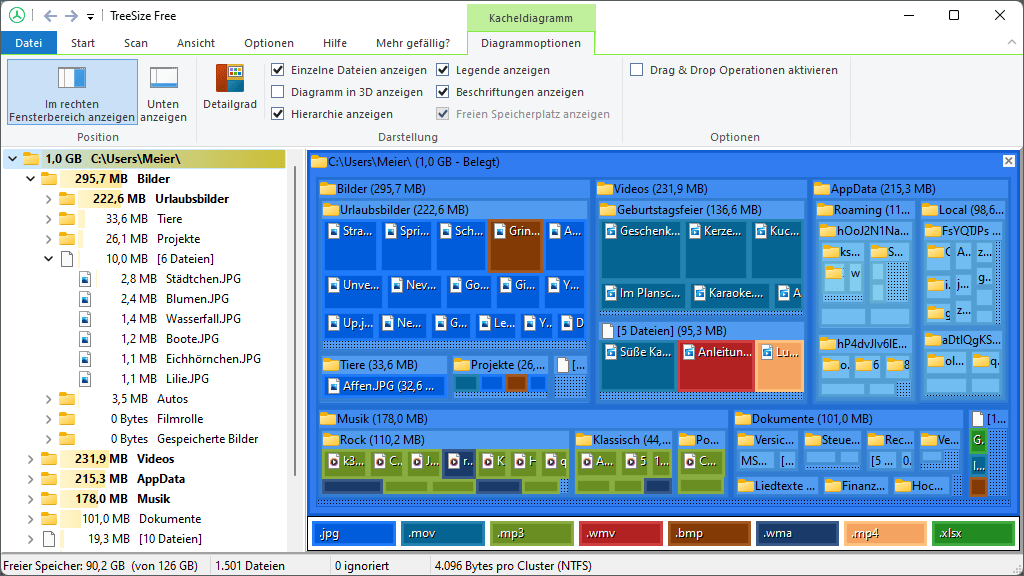
You start a scan on a folder or drive and get an Explorer-style tree that you expand to see each subfolder's size. You can drill down to individual files when you find a big folder.
Results appear while the scan is still running
Scanning runs in a thread, so you can start reading results straight away instead of waiting for the whole drive to finish. The vendor says scan performance has been improved a lot in recent releases.
A treemap that shows the biggest blocks at a glance
The treemap chart is the default view for disk space. Large areas on the chart mean large folders, which is quicker than reading a column of numbers.
Start it from the right-click menu
You can open TreeSize Free from the context menu of a folder or drive. It is also in the Windows 11 File Explorer context menu. Standard Explorer context-menu actions and drag & drop work inside the program.
PDF reports and NTFS compression info
You can export scan results to a PDF report, and the columns are exported as they appear in the Details list. TreeSize Free can also show the NTFS compression rate and let you switch NTFS compression on or off for folders.
Install without admin rights, or run it portable
If you don't have admin rights, the app installs into your user profile, much like a Windows Store app. A portable version that runs from a USB stick is offered for home and personal use.
Who it's for
It suits home users with a crowded SSD or hard drive who want to find what is eating the space before deleting things. It also suits anyone who needs a quick, one-off look at a folder structure on a Windows desktop. If you manage servers or need business use, the vendor points you to TreeSize Personal or TreeSize Professional instead.
Pros and cons
Pros
- Free for private use
- Folder tree and treemap in the same window
- Results show while the scan is running
- Works without admin rights
- Portable edition available
- PDF export of scan results
Cons
- Private, non-commercial use only
- Not usable on Windows Server
- No Windows 8 or 8.1 support in the current version
- Anonymous usage data is collected by default (you can turn it off in the options)
- Duplicate search, finding the largest files and comparing scans over time need TreeSize Personal or Professional
FAQs
Is TreeSize Free really free?
Yes. The Free edition is listed at $0.00 for home users in a non-commercial environment.
Can I use it on Windows Server?
No. Windows Server use is no longer supported in the free edition, and JAM Software recommends TreeSize Professional for that.
Does it run on older Windows versions?
The current version needs Windows 10 or 11. JAM Software keeps older builds for 32-bit systems, Windows 7, Windows XP, Windows 2000 and Windows 9x/ME on its TreeSize page.
Does it need to be installed?
Not necessarily. A portable version runs from a USB drive on one or more personal computers.
Does my data leave my PC?
The vendor states that all TreeSize editions work entirely on-premise and that no data leaves your PC. The free edition does send anonymous usage data unless you disable that in the options.
System requirements
- Windows 11 or Windows 10
- Desktop systems only; Windows Server is not supported
- Windows 8 and 8.1 are not supported by the current version