Aostsoft PDF to Excel Converter: PDF Tables into Editable Spreadsheets, in Batches
Aostsoft PDF to Excel Converter is a $49.95 Windows tool that turns the tables in PDF files into editable Excel spreadsheets (XLS, XLSX or XLSM), many files at a time, without Acrobat. It fits anyone who receives figures as PDF and needs to calculate with them.
Bank statements, price lists and sales reports arrive as PDF. The numbers are there, but you can't sum, sort or chart them until they are in a spreadsheet, and copying a PDF table into Excel usually dumps everything into one column.
Quick facts
- Version: 4.0.2 (released August 16, 2026)
- Developer: Aostsoft
- Platform: Windows 7, 8, 10 and 11
- Converts: PDF to Excel (XLS, XLSX, XLSM)
- Price: $49.95, one-time license with lifetime updates
- Trial: free; output carries a watermark and only part of each file is converted
- Guarantee: 30-day money-back
- Needs: no Adobe Acrobat or Microsoft Office
- What we checked: the 11.2 MB installer on the vendor's download server and the $49.95 one-time price on the order page, both on November 26, 2026. We didn't run a licensed conversion, so output quality is described from the vendor's information
Before you buy
PDF-to-Excel conversion works best on PDFs exported from software (accounting systems, Excel itself) with clear table structure; scanned statements need OCR first, which this tool doesn't have. Test a typical statement or report in the trial and check that columns line up before buying.
Download Free TrialBuy Now
Overview
Aostsoft PDF to Excel Converter does one job: tables out of PDF, into Excel. It writes the older XLS format or XLSX and macro-enabled XLSM.
Its most useful option is combining all pages of a PDF into a single worksheet, so a 12-page statement becomes one continuous sheet rather than 12 tabs to stitch together. You can also convert only a range of pages.
It converts PDFs protected with owner or user passwords and processes whole folders in one go.
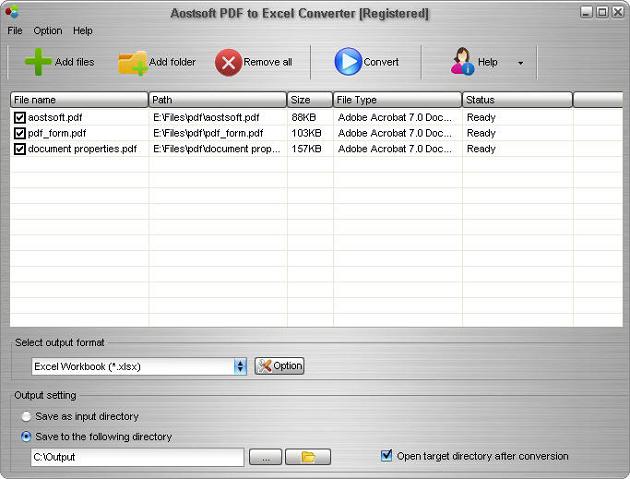
The converter with three PDFs queued and "Excel Workbook (*.xlsx)" as the output format (vendor screenshot of a registered copy).
Features
PDF tables to editable Excel
Aostsoft PDF to Excel Converter converts PDF tables into formatted, editable spreadsheets, keeping text, tables and layout as closely as it can.
XLS, XLSX or XLSM
Aostsoft PDF to Excel Converter writes Excel 97-2003 XLS as well as XLSX and XLSM for Excel 2007 and later.
All pages on one worksheet
Aostsoft PDF to Excel Converter can combine every page of a PDF into a single worksheet, ready to sort and filter.
Protected PDFs and page ranges
Aostsoft PDF to Excel Converter handles owner- and user-password-protected PDFs and can convert just the pages you pick.
Folder batches
Aostsoft PDF to Excel Converter converts multiple PDFs, whole folders and subfolders at a time.
Benefits
- Saves retyping numbers from PDF reports.
- One continuous worksheet per PDF makes analysis immediate.
- Batches handle a year of monthly statements at once.
- One-time $49.95, lifetime updates.
Real-World Uses
- A bookkeeper converts 12 monthly PDF bank statements into Excel to reconcile them.
- A buyer turns a supplier's 40-page PDF price list into one worksheet to compare prices.
- An analyst pulls tables from PDF annual reports into Excel for charts.
- A sales manager converts PDF reports from a system with no Excel export.
Who It's For, and Who Should Skip It
It fits bookkeepers, analysts and buyers who get tabular data as text-based PDFs and need it in Excel regularly.
Skip it for scanned PDFs (no OCR), one-off tables (Excel's own Data > Get Data > From PDF in Microsoft 365 imports PDF tables for free), or if you also need Word or PowerPoint output (the PDF to Office Document Converter is $59.95). Windows only.
Usage Guide
- Download the free trial from the button on this page and install it.
- Launch Aostsoft PDF to Excel Converter and add PDFs or a folder.
- Choose XLS, XLSX or XLSM; click Option to set page range and single-worksheet output.
- Pick the output folder and click Convert.
- Check the columns in Excel; register with your license key to remove the trial limits.
Where it falls short
- No OCR, so scanned statements don't convert to numbers.
- Tables without clear lines or with merged cells can land in the wrong columns, as with any PDF-to-Excel tool; check before relying on totals.
- The trial watermarks and converts only part of each file.
- No independent reviews of its table accuracy.
- Windows only.
What Users Say
Reviews and ratings
Aostsoft's single-format converters have almost no public reviews. G2 lists Aostsoft as a seller but says there are not enough reviews to give buying insight, and we found no rating for PDF to Excel Converter on Capterra or Trustpilot, only download-directory listings that repeat the vendor's description. So there are no other buyers' experiences to lean on here. The free trial is the real test: run a few of your own files through it and look at the output (watermark aside) before you pay, and keep the 30-day money-back guarantee in mind if the full version disappoints.
Comparisons
vs Excel's "From PDF" import
Microsoft 365 Excel can import PDF tables for free, one file at a time with some cleanup. Aostsoft PDF to Excel Converter adds batches, older XLS output and one-worksheet merging.
vs Aostsoft PDF to XLS XLSX Converter
The $45.95 PDF to XLS XLSX Converter skips XLSM output.
vs Aostsoft PDF to Office Document Converter
For $59.95 it adds Word, PowerPoint, RTF, HTML and TXT output.
Editions and Pricing
| Product | Price | License | What it converts | Buy |
|---|
| PDF to Excel Converter | $49.95 | One-time, lifetime updates | PDF to XLS, XLSX, XLSM | Buy |
| PDF to XLS XLSX Converter | $45.95 | One-time, lifetime updates | PDF to XLS, XLSX | Sold separately |
| PDF to Office Document Converter | $59.95 | One-time, lifetime updates | PDF to Word, Excel, PowerPoint, RTF, HTML, TXT | Sold separately |
Prices are from Aostsoft's order page on November 26, 2026, in US dollars. The Buy button in the table orders this converter; the other products are listed for comparison. The license key arrives by email right after payment.
FAQs
Can Aostsoft PDF to Excel Converter convert scanned bank statements?
No. Scanned pages have no text layer and the tool has no OCR; it works on PDFs created by software.
Will Aostsoft PDF to Excel Converter put a multi-page PDF on one sheet?
Yes, it can combine all pages of a PDF into a single Excel worksheet.
Does Aostsoft PDF to Excel Converter need Excel installed?
No, it converts standalone; you need Excel or another spreadsheet program to open the result.
Is Aostsoft PDF to Excel Converter a one-time purchase?
Yes: $49.95 once, with lifetime updates and a 30-day money-back guarantee.
What does the Aostsoft PDF to Excel Converter trial limit?
It adds a watermark and converts only part of each file.
Does Aostsoft PDF to Excel Converter run on Windows 11?
Yes, on Windows 7, 8, 10 and 11.
System Requirements
- Windows 7, Windows 8, Windows 10 or Windows 11
- 256 MB RAM
- 50 MB free disk space (the installer is 11.2 MB)
- 500 MHz processor
- No Adobe Acrobat, Reader or Microsoft Office needed
Conclusion
Aostsoft PDF to Excel Converter is worth $49.95 if you regularly turn software-generated PDF reports and statements into spreadsheets, especially in batches and as one worksheet per PDF.
It can't read scans, and Microsoft 365 users can import a single PDF table for free. Check a real statement in the trial and confirm the columns line up.
Download Free TrialBuy Now