Aostsoft PDF to HTML Converter: Turn PDFs into Web Pages in Batches
Aostsoft PDF to HTML Converter is a $45.95 Windows tool that turns PDF files into HTML pages in batches, so documents can be read in any browser and indexed by site search. It fits people moving PDF manuals, reports or newsletters onto a website or intranet.
A PDF on a website is a download, not a page: it doesn't reflow on a phone, and site search often can't see inside it. Converting each PDF by hand into a web page is slow work.
Quick facts
- Version: 4.0.2 (released August 16, 2026)
- Developer: Aostsoft
- Platform: Windows 7, 8, 10 and 11
- Converts: PDF to HTML (HTM)
- Price: $45.95, one-time license with lifetime updates
- Trial: free; output carries a watermark and only part of each file is converted
- Guarantee: 30-day money-back
- Needs: no Adobe Acrobat or Microsoft Office
- What we checked: the 11.1 MB installer on the vendor's download server and the $45.95 one-time price on the order page, both on November 26, 2026. We didn't run a licensed conversion, so output quality is described from the vendor's information
Before you buy
Decide what you want from the HTML first. If you need clean, editable pages for a CMS, test whether the output is a good starting point; if you only need searchable text, the text-extraction option may be enough. Check a typical PDF in the trial before buying.
Download Free TrialBuy Now
Overview
Aostsoft PDF to HTML Converter does one job. Load PDFs or folders, keep "Web Page (*.htm)" as the output, choose the folder and convert.
It opens PDFs protected with an owner or user password, converts all pages or a range, and can pull out only the text of a PDF when layout doesn't matter.
Like the rest of Aostsoft's range it runs without Acrobat or Reader and has the same list-based window.
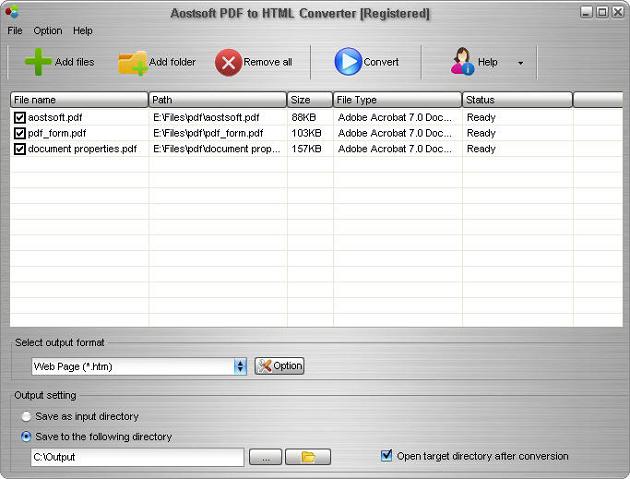
The converter with three PDFs queued and "Web Page (*.htm)" as the output format, saving to C:\Output (vendor screenshot of a registered copy).
Features
PDF to HTML pages
Aostsoft PDF to HTML Converter writes each PDF as an HTML (HTM) page that opens in any browser and can be indexed by search.
Batch conversion
Aostsoft PDF to HTML Converter converts many PDFs at a time, including whole folders and subfolders, with drag-and-drop.
Password-protected PDFs
Aostsoft PDF to HTML Converter converts PDFs secured with an owner password or a user password.
Page ranges and text-only output
Aostsoft PDF to HTML Converter converts a whole PDF or chosen pages, and can extract just the text.
Output beside the source
Aostsoft PDF to HTML Converter can save each HTML file in the same folder as its PDF, keeping a folder structure intact.
Benefits
- Makes PDF content readable in a browser without a PDF viewer.
- Puts document text where site and intranet search can find it.
- Handles a whole archive of PDFs in one run.
- Costs $45.95 once.
Real-World Uses
- An intranet admin converts a folder of policy PDFs into HTML pages staff can read and search.
- A small publisher turns PDF newsletters into web pages for its archive.
- A support team converts a PDF manual into HTML as the starting point for online help.
- A researcher extracts the text of many PDFs into HTML for full-text searching.
Who It's For, and Who Should Skip It
It fits webmasters, intranet editors and archivists with many PDFs to publish as web pages.
Skip it if you need polished, responsive pages with no cleanup: automatic PDF-to-HTML output from any tool usually needs editing. Skip it for scanned PDFs (no OCR), and for one-off files where free online converters do the job. Windows only.
Usage Guide
- Download the free trial from the button on this page and install it.
- Launch Aostsoft PDF to HTML Converter and add PDFs or a folder.
- Keep Web Page (*.htm) as the output format and use Option for page ranges or text-only output.
- Pick the output folder and click Convert.
- Open the pages in a browser to check them, then register with your license key to remove the watermark.
Where it falls short
- No OCR, so scanned PDFs give no text.
- HTML from PDFs tends to be fixed-layout markup; expect editing before it suits a modern responsive site.
- The trial converts part of each file and adds a watermark.
- No preview and a dated interface.
- No independent reviews of its output.
What Users Say
Reviews and ratings
Aostsoft's single-format converters have almost no public reviews. G2 lists Aostsoft as a seller but says there are not enough reviews to give buying insight, and we found no rating for PDF to HTML Converter on Capterra or Trustpilot, only download-directory listings that repeat the vendor's description. So there are no other buyers' experiences to lean on here. The free trial is the real test: run a few of your own files through it and look at the output (watermark aside) before you pay, and keep the 30-day money-back guarantee in mind if the full version disappoints.
Comparisons
vs free online PDF-to-HTML converters
Fine for a file or two, but you upload your documents to someone else's server and convert one at a time. Aostsoft PDF to HTML Converter works offline and in batches.
vs Aostsoft PDF to Office Document Converter
For $59.95 that tool outputs HTML too, plus Word, Excel, PowerPoint, RTF and TXT. Buy it instead if you also need Office formats.
vs Aostsoft All Document Converter Professional
The All Document Converter Professional ($169.95) is Aostsoft's all-in-one: Word, Excel, PowerPoint, PDF, HTML, text and images converted in many directions, with OCR. If you convert three or more kinds of files, it costs less than buying the single converters one by one. For this one job, the single converter is the cheaper buy.
Editions and Pricing
| Product | Price | License | What it converts | Buy |
|---|
| PDF to HTML Converter | $45.95 | One-time, lifetime updates | PDF to HTML | Buy |
| PDF to Office Document Converter | $59.95 | One-time, lifetime updates | PDF to Word, Excel, PowerPoint, RTF, HTML, TXT | Sold separately |
| All Document Converter Professional | $169.95 | One-time, lifetime updates | Many formats both ways, with OCR | Sold separately |
Prices are from Aostsoft's order page on November 26, 2026, in US dollars. The Buy button in the table orders this converter; the other products are listed for comparison. The license key arrives by email right after payment.
FAQs
Does Aostsoft PDF to HTML Converter keep images from the PDF?
Aostsoft says its PDF converters preserve the original content and layout; check how your own PDFs come out in the trial, since the trial shows the real output apart from the watermark.
Can Aostsoft PDF to HTML Converter convert a protected PDF?
Yes, it handles PDFs with an owner password or a user password.
Does Aostsoft PDF to HTML Converter need Acrobat Reader?
No, it is standalone.
Is Aostsoft PDF to HTML Converter a subscription?
No. It is a one-time $45.95 license with lifetime updates.
What does the Aostsoft PDF to HTML Converter trial limit?
A watermark on the output and only part of each file converted.
Is there a refund if Aostsoft PDF to HTML Converter doesn't work for me?
Yes, Aostsoft has a 30-day money-back guarantee.
System Requirements
- Windows 7, Windows 8, Windows 10 or Windows 11
- 256 MB RAM
- 50 MB free disk space (the installer is 11.1 MB)
- 500 MHz processor
- No Adobe Acrobat, Reader or Microsoft Office needed
Conclusion
Aostsoft PDF to HTML Converter is worth $45.95 if you have a pile of text-based PDFs to put on a website or intranet and want them done offline in one batch.
It is not the tool for scanned documents, and like every automatic PDF-to-HTML converter its pages are a starting point, not a finished design. Try a typical PDF first.
Download Free TrialBuy Now