Aostsoft PDF to TIFF Converter: Batch PDF to Multi-Page or Single-Page TIFF
Aostsoft PDF to TIFF Converter is a $45.95 Windows tool that converts PDF files into TIFF images in batches, as one multi-page TIFF per PDF or one TIFF per page, with your own resolution and color settings. It suits offices that feed TIFF-only systems such as fax servers, document management and archiving software.
Plenty of older document, imaging and fax systems still only take TIFF, while everything you receive is PDF. Printing to a TIFF driver or exporting page by page from an image editor works, but not for a folder of hundreds of files.
Quick facts
- Version: 4.0.2 (released August 16, 2026)
- Developer: Aostsoft
- Platform: Windows 7, 8, 10 and 11
- Converts: PDF to TIFF (single or multi-page)
- Price: $45.95 one-time license with lifetime updates
- Trial: free; output carries a watermark and only part of each file is converted
- Guarantee: 30-day money-back
- Needs: no Adobe Acrobat or Microsoft Office
- What we checked: installer (11.2 MB) downloaded from the vendor and the $45.95 price on the order page, both on November 25, 2026. We didn't run a licensed conversion, so output quality is described from the vendor's information
Before you buy
Check what your target system expects (resolution, color or black-and-white, multi-page or single-page) before you buy, then try exactly those settings in the trial. If you need only a handful of pages converted, free tools such as GIMP or an online converter will do; this tool is for volume.
Download Free TrialBuy Now
Overview
Aostsoft PDF to TIFF Converter is a batch tool with one job. You add PDF files or whole folders (subfolders included), set the TIFF options, choose where the files go and click Convert.
The useful controls are the ones TIFF users care about: the image resolution, the image color, a page range so you only convert the pages you need, and the choice between one multi-page TIFF per PDF or a separate TIFF for every page. It can also open encrypted PDFs.
It is standalone, so it needs no Adobe Acrobat or Reader on the PC.
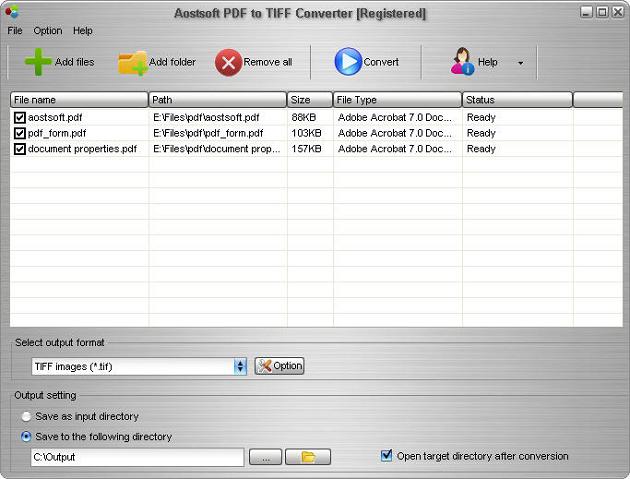
The converter window with three PDFs queued, "TIFF images (*.tif)" selected as the output format and C:\Output as the target folder (vendor screenshot of a registered copy).
Features
Batch PDF to TIFF conversion
Aostsoft PDF to TIFF Converter converts many PDF files at once, including whole folders and their subfolders, and accepts drag-and-drop.
Multi-page or single-page TIFF
Aostsoft PDF to TIFF Converter can write each PDF as one multi-page TIFF, the format most fax and archive systems want, or save each page as its own TIFF file.
Resolution and color settings
Aostsoft PDF to TIFF Converter lets you set the image resolution and image color of the TIFF output, so you can match what a fax server or imaging system expects.
Page ranges and encrypted PDFs
Aostsoft PDF to TIFF Converter can convert only a selected range of pages, and it can convert encrypted PDF files.
Choose where output goes
Aostsoft PDF to TIFF Converter saves each TIFF next to its source PDF or into one folder of your choice.
Benefits
- Turns a folder of PDFs into TIFFs in one run instead of page-by-page exports.
- One set of resolution and color settings applies to every file, so a whole batch comes out consistent for the system that receives it.
- No Acrobat license needed on the converting PC.
- One payment with lifetime updates.
Real-World Uses
- A clinic converts referral letters received as PDF into multi-page TIFFs for a records system that only imports TIFF.
- A law office prepares PDF exhibits as single-page TIFFs for a litigation document platform.
- An archive turns scanned PDF reports into TIFF masters for long-term storage.
- An office sends PDFs through a fax server that accepts TIFF only.
Who It's For, and Who Should Skip It
It suits office staff, records managers and IT admins who must hand TIFF files to another system on a regular basis.
Skip it if you want editable text: TIFF is an image, so use a PDF to Word converter instead. Skip it for an occasional page, where free image editors or online converters will do, and if you are on a Mac, since there is no Mac version. If you also need PDF to JPG, PNG or other formats, Aostsoft's PDF to Image Converter or the All Document Converter Professional covers more.
Usage Guide
- Download the free trial from the button on this page and install it.
- Open Aostsoft PDF to TIFF Converter and add PDFs with Add files, Add folder or drag-and-drop.
- Keep TIFF images (*.tif) as the output format and click Option to set resolution, color, page range and multi-page or single-page output.
- Pick Save as input directory or set an output folder.
- Click Convert, then open a TIFF in your target system to confirm it is accepted. After buying, enter the license key to remove the watermark and convert whole files.
Where it falls short
- The trial watermarks the TIFFs and converts only part of each file, so you can test settings but not a full production run.
- The interface is dated (an XP-era toolbar) and has no page preview.
- Output is an image: text in the TIFF is not searchable or editable.
- Aostsoft names image color settings but doesn't spell out TIFF compression options such as CCITT Group 4, which fax systems often need, so test that in the trial.
- Windows only, and no independent reviews to compare output quality.
What Users Say
Independent reviews
Aostsoft's converters have very few public reviews. G2 lists Aostsoft as a seller but shows no ratings, saying there are not enough reviews to give buying insight, and we found no rating for PDF to TIFF Converter on Capterra, Trustpilot or the big download sites. That doesn't mean the program is bad, only that you can't lean on other buyers' experience here. The free trial is the real test: run your own files through it and look at the output (watermark aside) before you pay. Aostsoft says its tools are standalone, keep the original layout, and have been sold since 2010, and the 30-day money-back guarantee on every product is the safety net if the full version disappoints.
Comparisons
vs free tools (GIMP, online converters)
Free tools convert a page or a file at a time, and online services mean uploading your documents. Aostsoft PDF to TIFF Converter works offline on whole folders with one set of settings.
vs Aostsoft All Document Converter Professional
The All Document Converter Professional ($169.95) also converts each PDF page to TIFF, plus PDF to Word, Excel, PowerPoint, HTML and other images, and documents to PDF, with OCR. Choose the single converter if TIFF is all you need.
Editions and Pricing
| Product | Price | License | What it converts | Buy |
|---|
| PDF to TIFF Converter | $45.95 | One-time, lifetime updates | PDF to TIFF | Buy |
| All Document Converter Professional | $169.95 | One-time, lifetime updates | Word, Excel, PowerPoint, PDF, HTML, text, images, OCR | Sold separately |
Prices are from the order page on November 25, 2026, in US dollars. The license key is emailed right after payment, and Aostsoft gives a 30-day money-back guarantee.
FAQs
Can Aostsoft PDF to TIFF Converter make one multi-page TIFF from a PDF?
Yes. Aostsoft PDF to TIFF Converter can write a whole PDF as one multi-page TIFF, or save every page as a separate TIFF.
Does Aostsoft PDF to TIFF Converter need Adobe Acrobat?
No. It is standalone and needs no Acrobat or Reader.
Can Aostsoft PDF to TIFF Converter convert password-protected PDFs?
Aostsoft says it converts encrypted PDF files. Test your own protected files in the trial, since a PDF locked with an open password still needs that password.
Is the TIFF text searchable after conversion?
No. Aostsoft PDF to TIFF Converter produces images. For searchable or editable text, convert the PDF to Word or text instead.
Is Aostsoft PDF to TIFF Converter a one-time purchase?
Yes, $45.95 once, with lifetime updates and a 30-day money-back guarantee.
Does Aostsoft PDF to TIFF Converter work on Windows 11?
Yes. Aostsoft lists Windows 7, 8, 10 and 11.
System Requirements
- Windows 7, Windows 8, Windows 10 or Windows 11
- 256 MB RAM
- 50 MB free disk space (the installer itself is 11.2 MB)
- 500 MHz processor
- No Adobe Acrobat, Reader or Microsoft Office needed
Conclusion
Aostsoft PDF to TIFF Converter is worth $45.95 if you regularly need folders of PDFs as TIFFs for a fax, archive or document system: batch conversion with consistent resolution and multi-page output is exactly what it does.
It is not worth it for occasional conversions, and it is the wrong tool if you need editable text. Run your own PDFs through the trial and load the result into the system that will receive it before you pay, since there are no independent reviews to rely on.
Download Free TrialBuy Now