Aostsoft All Document Converter Professional: One Batch Converter for Office, PDF, HTML and Images
Aostsoft All Document Converter Professional is a $169.95 Windows batch converter that moves files between Word, Excel, PowerPoint, PDF, RTF, text, HTML and a long list of image formats, with OCR for images. It suits offices that convert several kinds of documents in bulk and would otherwise buy a handful of single-purpose converters.
Document conversion rarely comes as one tidy job. This week it is PDFs to Excel, next week scans to Word, then a folder of PowerPoints to PDF. Buying a separate tool for each path gets expensive, and Office alone cannot batch most of them.
Quick facts
- Version: 4.0.2 (released August 16, 2026)
- Developer: Aostsoft
- Platform: Windows 7, 8, 10 and 11
- Converts: Word, Excel, PowerPoint, PDF, RTF, TXT, HTML and images (JPG, PNG, BMP, TIFF, GIF, EMF, WMF, PSD, PCX, DCX, JP2), with OCR
- Price: $169.95 one-time license with lifetime updates
- Trial: free; output carries a watermark and only part of each file is converted
- Guarantee: 30-day money-back
- Needs: no Adobe Acrobat or Microsoft Office
- What we checked: installer (31.7 MB) downloaded from the vendor and the $169.95 price on the order page, both on November 25, 2026. We didn't run a licensed conversion, so output quality is described from the vendor's information
Before you buy
At $169.95 this costs more than three of Aostsoft's single converters ($45.95 to $55.95 each), so it pays off only if you need four or more conversion types. If you need one path, such as PDF to Word, buy that converter instead. The trial watermarks output and converts only part of each file.
Download Free TrialBuy Now
Overview
Aostsoft All Document Converter Professional is the flagship of Aostsoft's converter line and rolls most of the single tools into one program. It uses the same window as the others: add files or folders, pick an output format, choose the output folder, Convert.
Inputs cover Word (DOC, DOCX, DOCM), Excel (XLS, XLSX, XLSM), PowerPoint (PPT, PPTX, PPTM, PPS, PPSX, PPSM, up to Office 2021), PDF, RTF, TXT, HTML and images. Outputs cover the same Office formats plus PDF, RTF, TXT, HTM, SWF and images including ICO.
On top of the format list there are many specific options: OCR from images into editable Word, RTF, HTML or text, PDF tables into Excel sheets, all PDF pages into one worksheet, merging output into multi-page PDF, TIFF or Office files, and splitting a text file into PowerPoint slides.
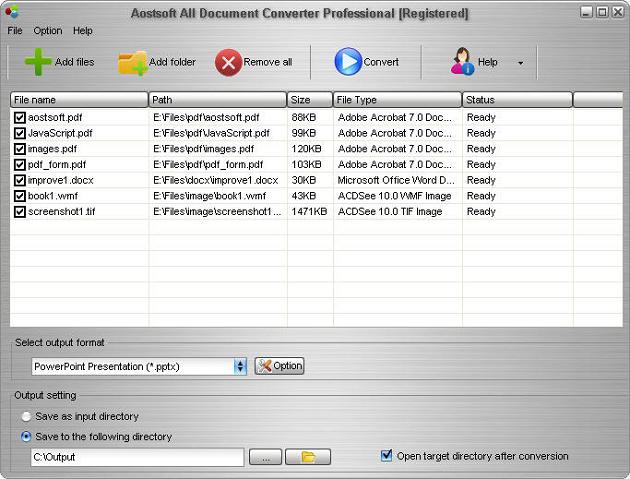
The All Document Converter Professional window with PDF, DOCX, WMF and TIF files in one queue and PowerPoint Presentation (*.pptx) chosen as the output format (vendor screenshot of a registered copy).
Features
Office and PDF in both directions
Aostsoft All Document Converter Professional converts PDF to Word, Excel, PowerPoint, HTML and images while keeping the layout, and converts Word, Excel, PowerPoint and images to PDF. It handles encrypted PDFs and page ranges.
OCR for images
Aostsoft All Document Converter Professional reads text in image files and saves it as editable Word, RTF, HTML or TXT, so scans and screenshots don't have to be retyped.
PDF tables to Excel
Aostsoft All Document Converter Professional turns PDF tables into editable Excel spreadsheets and can combine every page of a PDF into one worksheet.
Merge and split
Aostsoft All Document Converter Professional merges converted images into one multi-page PDF, Word, Excel, PowerPoint, TIFF, SWF or GIF, converts each PowerPoint slide to its own PDF, splits text into PowerPoint slides by a delimiter or blank lines, and converts multi-page TIFF and animated GIF.
Image and PDF output settings
Aostsoft All Document Converter Professional sets DPI for PDF to image and SWF, JPG quality from 1 to 100, color depth, output image size, slide size and orientation, and GIF/SWF playback speed, and can create password-protected PDFs.
Batch folders, no Office needed
Aostsoft All Document Converter Professional converts whole folders and subfolders, accepts drag-and-drop, and runs without Acrobat or Microsoft Office installed.
Benefits
- One program and one license instead of a shelf of single converters.
- Mixed queues: PDFs, Word files and images can sit in the same batch.
- OCR and PDF-to-Excel table extraction save hours of retyping.
- One payment with lifetime updates, no subscription.
Real-World Uses
- An accounts team pulls tables from supplier PDF statements into Excel and turns invoices in Word into PDF for sending.
- An office scans paper letters to images and converts them to editable Word documents with OCR.
- A trainer converts a folder of PowerPoint decks into PDFs, and some decks into single-slide images for handouts.
- An archivist merges a set of scanned TIFF pages into one multi-page PDF per file.
Who It's For, and Who Should Skip It
It suits small offices, admins and power users who convert many kinds of documents and want one offline batch tool for all of it, on PCs that may not have Office or Acrobat.
Skip it if you need one conversion path (a $45.95 single converter does it for far less), if you need to edit PDFs rather than convert them (a PDF editor fits better), or if you work on a Mac. People who only occasionally need a PDF from Word can use Word's own Save as PDF.
Usage Guide
- Download the free trial from the button on this page and install it (about 32 MB).
- Open Aostsoft All Document Converter Professional and add files or folders, or drag them onto the list.
- Choose the output format under Select output format and click Option for its settings (DPI, merge, passwords and so on).
- Pick Save as input directory or set an output folder.
- Click Convert. After buying, enter the emailed license key in the registration dialog to remove the trial limits.
Where it falls short
- The trial adds a watermark and converts only part of each file, so you cannot fully test OCR accuracy on long documents.
- The interface is dated and shows no preview; complex jobs mean digging through the Option dialog for each format.
- PDF to Word or Excel conversions of complex layouts rarely come out perfect in any converter; expect cleanup on dense or scanned files.
- SWF output is a dead format today and inflates the feature list.
- Windows only, and no independent reviews to benchmark its OCR against rivals.
What Users Say
Independent reviews
Aostsoft's converters have very few public reviews. G2 lists Aostsoft as a seller but shows no ratings, saying there are not enough reviews to give buying insight, and we found no rating for All Document Converter Professional on Capterra, Trustpilot or the big download sites. That doesn't mean the program is bad, only that you can't lean on other buyers' experience here. The free trial is the real test: run your own files through it and look at the output (watermark aside) before you pay. Aostsoft says its tools are standalone, keep the original layout, and have been sold since 2010, and the 30-day money-back guarantee on every product is the safety net if the full version disappoints.
Comparisons
vs Aostsoft's single converters
Each single converter costs $45.95 to $55.95 and does one path (for example PDF to TIFF, HTML to PDF or PPS to PDF). The All Document Converter Professional at $169.95 covers them together, so it is the better buy from roughly four needed paths up.
vs PDF suites such as Adobe Acrobat
Acrobat edits, signs and converts PDFs but is sold by subscription and focuses on PDF. Aostsoft All Document Converter Professional only converts, with no editing, but it is a one-time purchase and also converts between Office and image formats in bulk.
Editions and Pricing
| Product | Price | License | What it converts | Buy |
|---|
| All Document Converter Professional | $169.95 | One-time, lifetime updates | Word, Excel, PowerPoint, PDF, RTF, TXT, HTML, images, OCR | Buy |
| Single converters (for example PDF to TIFF) | $45.95 to $55.95 each | One-time, lifetime updates | One conversion path each | Sold separately |
Prices are from the order page and Aostsoft's purchase page on November 25, 2026, in US dollars. The license key arrives by email, and every Aostsoft product has a 30-day money-back guarantee.
FAQs
Does Aostsoft All Document Converter Professional need Microsoft Office or Acrobat?
No. Aostsoft All Document Converter Professional is standalone and needs neither Office nor Adobe Acrobat.
Can Aostsoft All Document Converter Professional turn scanned images into editable Word files?
Yes. Its OCR converts image files to editable Word, RTF, HTML or TXT. The trial is the place to check how well it reads your own scans.
Can Aostsoft All Document Converter Professional extract PDF tables to Excel?
Yes. It converts PDF tables to editable Excel spreadsheets and can put all pages of a PDF into one worksheet.
Is Aostsoft All Document Converter Professional a subscription?
No. It is a one-time $169.95 license with lifetime updates.
Does Aostsoft All Document Converter Professional work with Office 2021 files?
Yes. Aostsoft lists Word, Excel and PowerPoint formats from Office 97 to 2021, including DOCX, XLSX and PPTX.
What if Aostsoft All Document Converter Professional does not suit me after buying?
Aostsoft offers a 30-day money-back guarantee on all purchases.
Is there a Mac version of Aostsoft All Document Converter Professional?
No. It runs on Windows 7, 8, 10 and 11 only.
System Requirements
- Windows 7, Windows 8, Windows 10 or Windows 11
- 256 MB RAM
- 50 MB free disk space (the installer itself is 31.7 MB)
- 500 MHz processor
- No Adobe Acrobat, Reader or Microsoft Office needed
Conclusion
Aostsoft All Document Converter Professional is worth $169.95 for an office that converts many kinds of files in bulk: one offline tool, one payment, with OCR and PDF-to-Excel thrown in. The breadth is the reason to buy.
It is overkill if you need one or two conversion paths, where Aostsoft's $45.95 single tools or free Office exports are enough, and the dated interface and lack of independent reviews mean you should test your real documents in the trial first.
Download Free TrialBuy Now