Aostsoft HTM HTML to PDF Converter: Batch Saved Web Pages and HTML Files to PDF
Aostsoft HTM HTML to PDF Converter is a $45.95 Windows tool that turns HTM and HTML files on your disk into PDF in batches, with optional passwords and permissions. It suits anyone who has to archive or share folders of HTML files, such as exported reports, help files or saved pages, as PDF.
Reports, e-mail exports, help systems and saved web pages often end up as folders of HTML files. A browser's "Print to PDF" handles one page at a time, which is no way to deal with a few hundred.
Quick facts
- Version: 4.0.2 (released August 16, 2026)
- Developer: Aostsoft
- Platform: Windows 7, 8, 10 and 11
- Converts: HTM and HTML files to PDF
- Price: $45.95 one-time license with lifetime updates
- Trial: free; output carries a watermark and only part of each file is converted
- Guarantee: 30-day money-back
- Needs: no Adobe Acrobat or Microsoft Office
- What we checked: installer (9.8 MB) downloaded from the vendor and the $45.95 price on the order page, both on November 25, 2026. We didn't run a licensed conversion, so output quality is described from the vendor's information
Before you buy
Aostsoft HTM HTML to PDF Converter works on HTML files saved on your PC, so save a live web page first if that is your source. For a few pages, your browser's built-in "Print to PDF" is free. Pages that build their content with scripts may come out differently from what you see in a browser, so test your own files in the trial.
Download Free TrialBuy Now
Overview
Aostsoft HTM HTML to PDF Converter is a single-purpose batch converter. You add HTML files or whole folders (subfolders included), set an output folder or keep the PDFs beside the originals, and click Convert.
Besides the conversion itself, it can secure the PDFs with a user password, an owner password and permissions for printing, copying, form filling and content changes, applied to every file in the batch.
It runs without any Adobe software installed.
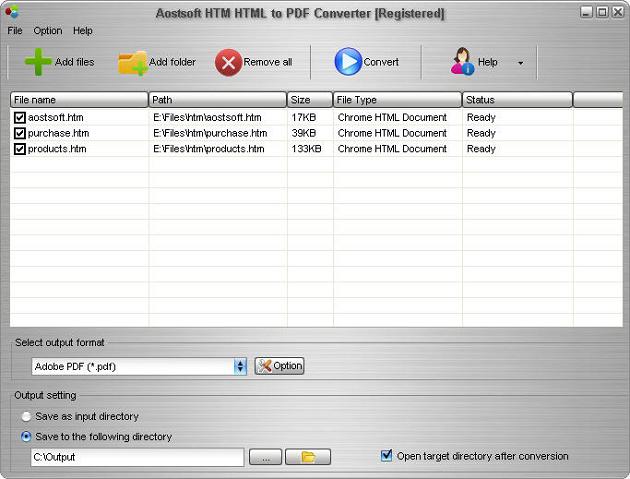
The converter window with three .htm files queued, Adobe PDF as the output format and C:\Output as the target folder (vendor screenshot of a registered copy).
Features
HTM and HTML to PDF
Aostsoft HTM HTML to PDF Converter converts .htm and .html files to PDF and, by Aostsoft's description, keeps the text, graphics and layout.
Batch folders and subfolders
Aostsoft HTM HTML to PDF Converter processes whole folders including subfolders, which suits exported report sets and help-file trees. Drag-and-drop works too.
PDF passwords and permissions
Aostsoft HTM HTML to PDF Converter can set user and owner passwords and allow or block printing, copying, form filling and content modification on the output.
Output next to the source or in one folder
Aostsoft HTM HTML to PDF Converter saves each PDF beside its HTML file or gathers all of them in one folder.
Benefits
- Converts a folder of HTML exports in one run instead of printing pages one by one from a browser.
- Applies the same security settings to every PDF.
- Works offline, so internal reports never pass through an online converter.
- One payment, lifetime updates.
Real-World Uses
- An accountant converts a folder of HTML statements exported by bookkeeping software into PDFs for the client file.
- A support team turns an HTML help system into a set of PDFs to send to customers.
- A researcher archives saved web articles as PDFs, kept in the same folder structure.
- An office protects exported HTML reports as PDFs that can be read and printed but not edited.
Who It's For, and Who Should Skip It
It suits office staff, support teams and anyone whose software exports HTML and who needs those files as PDF in bulk.
Skip it if you convert a web page now and then (use the browser's Print to PDF), if you need to capture live websites by URL, or if you are on a Mac. If your files are a mix of HTML, Word, Excel and images, the All Document Converter Professional covers all of them.
Usage Guide
- Download the free trial from the button on this page and install it.
- Open Aostsoft HTM HTML to PDF Converter and click Add files or Add folder, or drag files onto the list.
- Keep Adobe PDF as the output format and click Option to set passwords and permissions if needed.
- Choose Save as input directory or set an output folder.
- Click Convert and compare the PDFs with the pages in your browser. After buying, enter the license key to remove the watermark.
Where it falls short
- The trial watermarks the PDFs and converts only part of each file.
- It takes files, not URLs, so live websites have to be saved first.
- Aostsoft lists no page size, margin or header/footer options, which browser printing and many rivals offer.
- Script-heavy pages may not render as they do in a modern browser; test before buying.
- Dated interface, Windows only, and no independent reviews.
What Users Say
Independent reviews
Aostsoft's converters have very few public reviews. G2 lists Aostsoft as a seller but shows no ratings, saying there are not enough reviews to give buying insight, and we found no rating for HTM HTML to PDF Converter on Capterra, Trustpilot or the big download sites. That doesn't mean the program is bad, only that you can't lean on other buyers' experience here. The free trial is the real test: run your own files through it and look at the output (watermark aside) before you pay. Aostsoft says its tools are standalone, keep the original layout, and have been sold since 2010, and the 30-day money-back guarantee on every product is the safety net if the full version disappoints.
Comparisons
vs a browser's "Print to PDF"
Free, renders pages exactly as the browser does and offers page size and margins, but one page at a time. Aostsoft HTM HTML to PDF Converter wins on whole folders and on applying passwords and permissions in bulk.
vs Aostsoft All Document Converter Professional
The All Document Converter Professional ($169.95) converts HTML and HTM to PDF as well, and adds Word, Excel, PowerPoint, PDF, text and images, with OCR. Get the single tool if HTML is all you convert.
Editions and Pricing
| Product | Price | License | What it converts | Buy |
|---|
| HTM HTML to PDF Converter | $45.95 | One-time, lifetime updates | HTM, HTML to PDF | Buy |
| All Document Converter Professional | $169.95 | One-time, lifetime updates | Word, Excel, PowerPoint, PDF, HTML, text, images, OCR | Sold separately |
Prices are from the order page on November 25, 2026, in US dollars. The key is emailed after payment, with a 30-day money-back guarantee.
FAQs
Can Aostsoft HTM HTML to PDF Converter convert a website by its URL?
No. Aostsoft HTM HTML to PDF Converter converts HTM and HTML files on your disk. Save the page in your browser first, then convert the saved file.
Does Aostsoft HTM HTML to PDF Converter need Adobe Acrobat?
No. It is standalone and needs no Adobe software.
Can Aostsoft HTM HTML to PDF Converter password-protect the PDFs?
Yes. It can set user and owner passwords and control printing, copying, form filling and editing.
What does the Aostsoft HTM HTML to PDF Converter trial limit?
The trial adds a watermark and converts only part of each file; a license removes both.
Is Aostsoft HTM HTML to PDF Converter a subscription?
No. It costs $45.95 once and includes lifetime updates, with a 30-day money-back guarantee.
Which Windows versions does Aostsoft HTM HTML to PDF Converter support?
Windows 7, 8, 10 and 11.
System Requirements
- Windows 7, Windows 8, Windows 10 or Windows 11
- 256 MB RAM
- 50 MB free disk space (the installer itself is 9.8 MB)
- 500 MHz processor
- No Adobe Acrobat, Reader or Microsoft Office needed
Conclusion
Aostsoft HTM HTML to PDF Converter is worth $45.95 if you regularly need folders of HTML files as PDFs, with the same security settings on each: that is its one clear advantage over printing from a browser.
For occasional pages, the browser is free and gives you more layout control, and the lack of page size and margin options is the main reason to look elsewhere. Test your own files in the trial before buying.
Download Free TrialBuy Now