Aostsoft Image to PDF Converter: Scans, Photos and Screenshots into PDF, Merged or One by One
Aostsoft Image to PDF Converter is a $59.95 Windows tool that turns images in 13 formats into PDFs in batches, either one PDF per image or many images merged into a single multi-page PDF, with optional passwords. It fits anyone assembling scans, receipts or photos into PDF documents.
A scanner that saves every page as a separate JPG or TIFF leaves you with 30 images where you wanted one document. Emailing or archiving a pile of pictures is awkward; a single PDF is what people expect.
Quick facts
- Version: 4.0.2 (released August 16, 2026)
- Developer: Aostsoft
- Platform: Windows 7, 8, 10 and 11
- Converts: JPG, JPEG, TIFF, BMP, GIF, PNG, PSD, EMF, WMF, DCX, PCX, JP2 and J2K images to PDF
- Price: $59.95, one-time license with lifetime updates
- Trial: free; output carries a watermark and only part of each file is converted
- Guarantee: 30-day money-back
- Needs: no Adobe Acrobat or Microsoft Office
- What we checked: the 9.8 MB installer on the vendor's download server and the $59.95 one-time price on the order page, both on November 26, 2026. We didn't run a licensed conversion, so output quality is described from the vendor's information
Before you buy
Windows 10 and 11 can already print images to PDF with Microsoft Print to PDF, and free tools combine JPGs. This tool earns its price on large batches, odd formats (PSD, DCX, PCX, JP2), multi-page TIFFs and PDFs that need passwords. If you only convert JPGs, Aostsoft's JPG JPEG to PDF Converter costs $45.95.
Download Free TrialBuy Now
Overview
Aostsoft Image to PDF Converter is the image-input "PDF creator" in Aostsoft's range. Add images or folders, choose whether each image becomes its own PDF or all of them merge into one multi-page PDF, and convert.
Multi-page TIFF and multi-frame GIF files get special handling: all pages into one PDF, or each page into its own PDF. That is exactly what scanned faxes and document scanners produce.
The Option dialog sets the PDF page size, user and owner passwords, and permissions for printing, copying, form filling and changes.
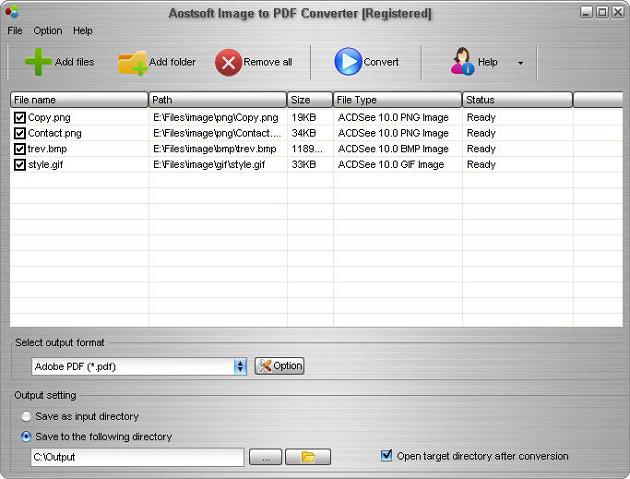
The converter with PNG, BMP and GIF images queued, Adobe PDF as the output format and C:\Output as the destination (vendor screenshot of a registered copy).
Features
13 image formats in
Aostsoft Image to PDF Converter accepts JPG, JPEG, TIFF, TIF, BMP, GIF, PNG, PSD, EMF, WMF, DCX, PCX, JP2 and J2K images.
Merge images into one PDF
Aostsoft Image to PDF Converter can combine many images into a single multi-page PDF without changing their look, or write one PDF per image.
Multi-page TIFF and GIF
Aostsoft Image to PDF Converter converts all pages of a multi-page TIFF or frames of a multi-frame GIF into one PDF, or each page into a separate PDF.
Passwords and permissions
Aostsoft Image to PDF Converter can protect PDFs with user and owner passwords and control printing, copying, form filling and changes.
Page size and batches
Aostsoft Image to PDF Converter resizes the PDF page and converts whole folders and subfolders.
Benefits
- Turns a scanner's loose image files into proper documents.
- Handles formats free tools often skip, like PSD, DCX and JP2.
- Secures the PDFs as it creates them.
- One-time payment with lifetime updates.
Real-World Uses
- An accountant merges a month of scanned receipts (JPG) into one PDF per client.
- An office converts multi-page TIFF faxes into PDFs for email.
- A designer sends PSD mock-ups to a client as a single PDF.
- A family archive turns folders of scanned photos into one PDF album per year.
Who It's For, and Who Should Skip It
It fits offices and individuals who regularly turn scans and images into PDF documents, in bulk or from awkward formats.
Skip it for a few JPGs (Windows prints to PDF for free), if you need OCR to make scans searchable (it doesn't do OCR), or if you need to edit the PDFs. Windows only.
Usage Guide
- Download the free trial from the button on this page and install it.
- Launch Aostsoft Image to PDF Converter and add images or folders, in the order you want the pages.
- Click Option to choose merged or separate PDFs, page size, passwords and permissions.
- Choose the output folder and click Convert.
- Check the PDFs; register with your license key to remove the watermark.
Where it falls short
- No OCR: scanned pages become image-only PDFs that can't be searched.
- The trial watermarks and converts only part of each file.
- No image editing (crop, rotate, deskew) before conversion.
- No independent reviews of the tool.
- Windows only.
What Users Say
Reviews and ratings
Aostsoft's single-format converters have almost no public reviews. G2 lists Aostsoft as a seller but says there are not enough reviews to give buying insight, and we found no rating for Image to PDF Converter on Capterra or Trustpilot, only download-directory listings that repeat the vendor's description. So there are no other buyers' experiences to lean on here. The free trial is the real test: run a few of your own files through it and look at the output (watermark aside) before you pay, and keep the 30-day money-back guarantee in mind if the full version disappoints.
Comparisons
vs Microsoft Print to PDF
Free and built into Windows, fine for a few images. Aostsoft Image to PDF Converter adds batches, more formats, multi-page TIFF handling and PDF security.
vs Aostsoft JPG JPEG to PDF Converter
The $45.95 JPG JPEG to PDF Converter takes only JPG files; this one takes 13 formats.
vs Aostsoft Document Image to PDF Converter Pro
For $79.95 it converts Office documents as well as images to PDF.
Editions and Pricing
| Product | Price | License | What it converts | Buy |
|---|
| Image to PDF Converter | $59.95 | One-time, lifetime updates | 13 image formats to PDF | Buy |
| JPG JPEG to PDF Converter | $45.95 | One-time, lifetime updates | JPG, JPEG to PDF | Sold separately |
| Document Image to PDF Converter Pro | $79.95 | One-time, lifetime updates | Office documents and images to PDF | Sold separately |
Prices are from Aostsoft's order page on November 26, 2026, in US dollars. The Buy button in the table orders this converter; the other products are listed for comparison. The license key arrives by email right after payment.
FAQs
Can Aostsoft Image to PDF Converter put all my images into one PDF?
Yes, it can merge multiple images into one multi-page PDF.
Does Aostsoft Image to PDF Converter make the PDF searchable?
No. It has no OCR, so text in scanned images stays an image.
Does Aostsoft Image to PDF Converter keep image quality?
Aostsoft says it keeps the original style of the images; check your own files in the trial.
Is Aostsoft Image to PDF Converter a one-time purchase?
Yes: $59.95 once, with lifetime updates and a 30-day money-back guarantee.
What does the Aostsoft Image to PDF Converter trial limit?
It adds a watermark and converts only part of the content.
Does Aostsoft Image to PDF Converter work on Windows 11?
Yes, it supports Windows 7, 8, 10 and 11.
System Requirements
- Windows 7, Windows 8, Windows 10 or Windows 11
- 256 MB RAM
- 50 MB free disk space (the installer is 9.8 MB)
- 500 MHz processor
- No Adobe Acrobat, Reader or Microsoft Office needed
Conclusion
Aostsoft Image to PDF Converter is worth $59.95 if you regularly assemble scans or images into PDFs, especially multi-page TIFFs, mixed formats or files that need passwords.
For a handful of JPGs, Windows' built-in PDF printer is enough, and the lack of OCR means scans stay unsearchable. Try your own scans in the trial first.
Download Free TrialBuy Now