Aostsoft Image to Word OCR Converter: Scans and Screenshots into Editable Word Files
Aostsoft Image to Word OCR Converter is a $69.95 Windows OCR tool that reads the text in scanned pages, photos and screenshots and saves it as editable Word documents, in batches. It reads nine European and Indonesian languages and fits offices digitizing paper documents.
A box of scanned letters, a fax saved as TIFF, a screenshot of a table: the words are right there, but you can't edit or search them. Retyping is the slow, error-prone answer.
Quick facts
- Version: 4.0.2 (released August 16, 2026)
- Developer: Aostsoft
- Platform: Windows 7, 8, 10 and 11
- Converts: JPG, JPEG, TIFF, BMP, GIF, PNG, PSD, EMF, WMF, DCX, PCX, JP2 and J2K images to editable Word (DOC, DOCX, DOCM) via OCR
- Price: $69.95, one-time license with lifetime updates
- Trial: free; output carries a watermark and only part of each file is converted
- Guarantee: 30-day money-back
- Needs: no Adobe Acrobat or Microsoft Office
- What we checked: the 17.4 MB installer on the vendor's download server and the $69.95 one-time price on the order page, both on November 26, 2026. We didn't run a licensed conversion, so output quality is described from the vendor's information
Before you buy
OCR accuracy depends on the scan: clean, straight, high-resolution pages work best, and handwriting, low-resolution photos and unusual fonts will need correcting. The supported languages are English, French, German, Italian, Spanish, Portuguese, Swedish, Romanian and Indonesian, with no Asian scripts. Run your own scans through the trial.
Download Free TrialBuy Now
Overview
Aostsoft Image to Word OCR Converter is the OCR member of Aostsoft's range: instead of converting formats, it recognizes characters in images and writes them into a Word document you can edit.
It accepts 13 image formats, from JPG and PNG to TIFF, BMP, GIF, PSD and fax-style DCX, and writes DOC (Word 97-2003), DOCX or DOCM. A multi-page TIFF or multi-frame GIF becomes one multi-page Word file, and you can set the Word page size.
Batches work as in Aostsoft's other tools: whole folders, subfolders and drag-and-drop. It runs standalone, with no Word or other OCR software required.
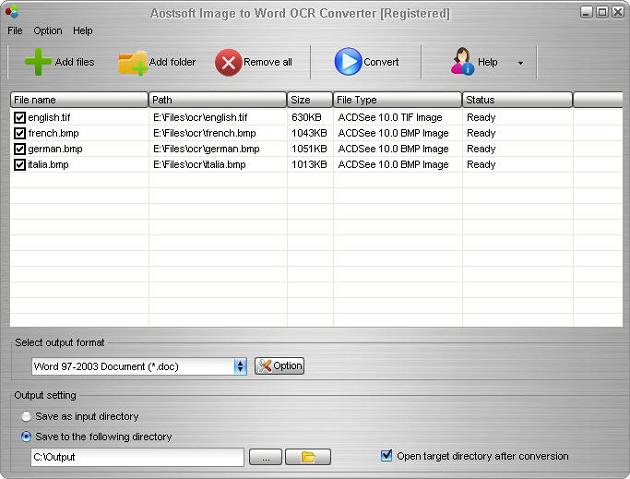
The OCR converter with an English TIFF and French, German and Italian BMP scans queued, and "Word 97-2003 Document (*.doc)" as the output format (vendor screenshot of a registered copy).
Features
OCR into editable Word
Aostsoft Image to Word OCR Converter recognizes the characters in an image and saves them as a DOC, DOCX or DOCM document you can edit like any text.
Nine recognition languages
Aostsoft Image to Word OCR Converter reads English, French, German, Italian, Spanish, Portuguese, Swedish, Romanian and Indonesian text.
13 input image formats
Aostsoft Image to Word OCR Converter accepts JPG, JPEG, TIF, TIFF, BMP, GIF, PNG, PSD, EMF, WMF, DCX, PCX, JP2 and J2K, so scanner, fax and screenshot output all work.
Multi-page scans into one document
Aostsoft Image to Word OCR Converter turns a multi-page TIFF or a multi-frame GIF into one multi-page Word document, and lets you set the Word page size.
Batch OCR of folders
Aostsoft Image to Word OCR Converter processes many images, whole folders and subfolders in one run.
Benefits
- Saves retyping scanned documents.
- Makes scanned archives searchable and editable in Word.
- Processes a folder of scans unattended.
- One-time payment with lifetime updates, no per-page OCR fees.
Real-World Uses
- An office digitizes a cabinet of scanned contracts into Word files it can search and edit.
- A secretary turns faxes saved as multi-page TIFF into one Word document each.
- A translator OCRs a French or German scan into Word to work on the text.
- A student converts photos of printed notes into editable documents.
Who It's For, and Who Should Skip It
It fits small offices, archivists and translators who OCR printed documents in the supported languages and want the result in Word.
Skip it if your documents are in Chinese, Japanese, Arabic or another unsupported language, if you mainly OCR handwriting, or if you only need a few pages: Microsoft OneNote and Word's phone apps and Google Drive offer OCR for free. If you want plain text instead of Word, Aostsoft's Image to Text OCR Converter costs $59.95. Windows only.
Usage Guide
- Download the free trial from the button on this page and install it.
- Launch Aostsoft Image to Word OCR Converter and add your scans or a folder of images.
- Choose DOC, DOCX or DOCM as the output and click Option to pick the recognition language and page size.
- Set the output folder and click Convert.
- Proofread the Word files; register with your license key to remove the trial limits.
Where it falls short
- Like all OCR, accuracy drops on low-resolution, skewed or noisy scans and on handwriting; plan to proofread.
- Only nine languages, all Latin-script.
- The trial watermarks output and converts only part of each image set.
- It outputs Word only; no searchable PDF output.
- No independent tests of its recognition accuracy.
What Users Say
Reviews and ratings
Aostsoft's single-format converters have almost no public reviews. G2 lists Aostsoft as a seller but says there are not enough reviews to give buying insight, and we found no rating for Image to Word OCR Converter on Capterra or Trustpilot, only download-directory listings that repeat the vendor's description. So there are no other buyers' experiences to lean on here. The free trial is the real test: run a few of your own files through it and look at the output (watermark aside) before you pay, and keep the 30-day money-back guarantee in mind if the full version disappoints.
Comparisons
vs free OCR (Google Drive, OneNote)
Free, but one image at a time and you upload documents to a cloud service. Aostsoft Image to Word OCR Converter works offline and in batches, straight to Word.
vs Aostsoft Image to DOC OCR Converter
The $59.95 Image to DOC OCR Converter writes older DOC files; this one adds DOCX and DOCM output for $10 more.
vs Aostsoft All Document Converter Professional
The All Document Converter Professional ($169.95) is Aostsoft's all-in-one: Word, Excel, PowerPoint, PDF, HTML, text and images converted in many directions, with OCR. If you convert three or more kinds of files, it costs less than buying the single converters one by one. For this one job, the single converter is the cheaper buy.
Editions and Pricing
| Product | Price | License | What it converts | Buy |
|---|
| Image to Word OCR Converter | $69.95 | One-time, lifetime updates | Images to DOC, DOCX, DOCM via OCR | Buy |
| Image to DOC OCR Converter | $59.95 | One-time, lifetime updates | Images to DOC via OCR | Sold separately |
| Image to Text OCR Converter | $59.95 | One-time, lifetime updates | Images to TXT via OCR | Sold separately |
| All Document Converter Professional | $169.95 | One-time, lifetime updates | Many formats both ways, with OCR | Sold separately |
Prices are from Aostsoft's order page on November 26, 2026, in US dollars. The Buy button in the table orders this converter; the other products are listed for comparison. The license key arrives by email right after payment.
FAQs
Which languages does Aostsoft Image to Word OCR Converter recognize?
English, French, German, Italian, Spanish, Portuguese, Swedish, Romanian and Indonesian.
Can Aostsoft Image to Word OCR Converter read handwriting?
It is built for printed text; handwriting recognition isn't among its listed features, so expect poor results there.
Can Aostsoft Image to Word OCR Converter OCR a PDF?
No, its input is image files. Convert the PDF to images first, or use a PDF OCR tool.
Does Aostsoft Image to Word OCR Converter need Microsoft Word?
No, it runs standalone. You need Word or another editor to open the results.
Is Aostsoft Image to Word OCR Converter a one-time purchase?
Yes: $69.95 once, with lifetime updates and a 30-day money-back guarantee.
What does the Aostsoft Image to Word OCR Converter trial limit?
It adds a watermark and converts only part of the content.
System Requirements
- Windows 7, Windows 8, Windows 10 or Windows 11
- 256 MB RAM
- 50 MB free disk space (the installer is 17.4 MB)
- 500 MHz processor
- No Adobe Acrobat, Reader or Microsoft Office needed
Conclusion
Aostsoft Image to Word OCR Converter is worth $69.95 if you OCR printed documents in its nine languages regularly and want them as Word files in batches, offline, without per-page fees.
It is the wrong buy for Asian or right-to-left languages, handwriting or occasional use, where free cloud OCR does the job. OCR quality is the whole product here, so test your own scans in the trial first.
Download Free TrialBuy Now