Aostsoft Office Document to PDF Converter: Word, Excel and PowerPoint to PDF in One Batch
Aostsoft Office Document to PDF Converter is a $59.95 Windows tool that turns mixed folders of Word, Excel, PowerPoint, RTF, text and HTML files into PDFs in one run, with optional passwords and permissions, and without Office or Acrobat installed. It suits offices that archive or send out documents as PDF in bulk.
A shared drive full of DOCX reports, XLSX sheets and PPTX decks has to become PDF for a records system or a client portal. Office can save each one as PDF, one window at a time; this tool does the whole folder, all three Office formats at once.
Quick facts
- Version: 4.0.2 (released August 16, 2026)
- Developer: Aostsoft
- Platform: Windows 7, 8, 10 and 11
- Converts: Word (DOC, DOCX, DOCM), Excel (XLS, XLSX, XLSM), PowerPoint (PPT, PPTX, PPTM, PPS, PPSX, PPSM), RTF, TXT, HTML and HTM to PDF
- Price: $59.95, one-time license with lifetime updates
- Trial: free; output carries a watermark and only part of each file is converted
- Guarantee: 30-day money-back
- Needs: no Adobe Acrobat or Microsoft Office
- What we checked: the 18.1 MB installer on the vendor's download server and the $59.95 one-time price on the order page, both on November 26, 2026. We didn't run a licensed conversion, so output quality is described from the vendor's information
Before you buy
If you only ever convert Word files, the $49.95 Word to PDF Converter is cheaper; this one is worth the extra $10 when your folders mix Word, Excel, PowerPoint, RTF, text and web pages. Try your largest spreadsheet in the trial too: wide Excel sheets are where any PDF converter has to decide how to split pages.
Download Free TrialBuy Now
Overview
Aostsoft Office Document to PDF Converter is the "PDF creator" for Office files in Aostsoft's range. You add files or whole folders (subfolders included), the list shows each file with its path, size and type, and Convert writes a PDF for each one.
What sets it apart from the single-format tools is the input list: every Word, Excel and PowerPoint format from Office 97 to 2021, including the macro-enabled DOCM, XLSM and PPTM files, plus RTF, TXT, HTML and HTM. One batch can hold all of them.
The Option button holds the PDF settings: page size, a user (open) password and an owner password, and permissions for printing, copying, filling in forms and changing content. Aostsoft says layout is preserved; as with any converter that doesn't use Office itself, check complex files in the trial.
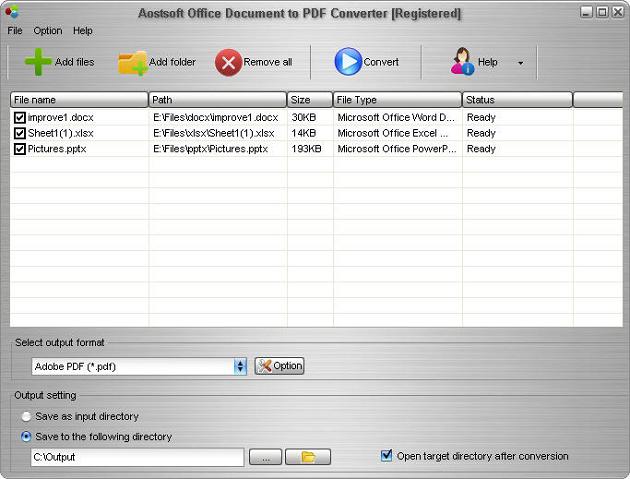
The converter with a DOCX, an XLSX and a PPTX file queued together, Adobe PDF as the output format and C:\Output as the target folder (vendor screenshot of a registered copy).
Features
Word, Excel and PowerPoint in one batch
Aostsoft Office Document to PDF Converter accepts DOC, DOCX, DOCM, XLS, XLSX, XLSM, PPT, PPTX, PPTM, PPS, PPSX and PPSM files from Office 97 to 2021 in the same list, so a mixed project folder converts in a single run.
RTF, TXT and web pages too
Aostsoft Office Document to PDF Converter also converts RTF documents, plain text files and saved HTML or HTM pages to PDF.
Folders, subfolders and drag-and-drop
Aostsoft Office Document to PDF Converter adds a whole folder tree at once, and you can drag files and folders onto the window. PDFs go next to their sources or into one folder you pick.
Passwords and permissions on every PDF
Aostsoft Office Document to PDF Converter can set a user password to open each PDF and an owner password, and allow or block printing, copying, form filling and content changes, applied to the whole batch.
Page-size settings
Aostsoft Office Document to PDF Converter has detailed parameters for resizing the PDF page, useful when documents must come out at one paper size.
Benefits
- One tool instead of three for a mixed folder of Office files.
- Works on a PC without Microsoft Office or Acrobat, such as a server or a locked-down workstation.
- The same security settings land on every PDF in the batch.
- A one-time payment with lifetime updates.
Real-World Uses
- An accounts team turns a month-end folder of XLSX reports, DOCX memos and a PPTX summary into PDFs for the auditors.
- A school converts teachers' worksheets and slides to PDF for the learning portal.
- An office archives old DOC and XLS files from the 1990s and 2000s as PDF before retiring the old software.
- A consultant sends clients PDFs that can be read and printed but not copied or edited.
Who It's For, and Who Should Skip It
It fits offices, schools and archivists who produce PDFs from mixed Office files in volume and want passwords set consistently.
Skip it if you convert a file now and then: Word, Excel, PowerPoint, LibreOffice and Windows' own Microsoft Print to PDF all make PDFs for free. Skip it too if you only handle one format (the single converters cost less), or if you need to edit PDFs afterwards, which this tool doesn't do. There is no Mac version.
Usage Guide
- Download the free trial from the button on this page and run the installer.
- Launch Aostsoft Office Document to PDF Converter and click Add files or Add folder, or drag documents onto the list.
- Leave Adobe PDF (*.pdf) as the output format and click Option to set page size, passwords and permissions.
- Choose Save as input directory or set an output folder.
- Click Convert, check the PDFs, then buy a license and enter the key in the registration dialog to remove the watermark and convert full files.
Where it falls short
- The trial converts only part of each file and stamps a watermark, so you can check layout but not a complete long document.
- It doesn't use Office to render files, so complex Word layouts, embedded objects, very wide spreadsheets and slide animations are where the output can differ from the original. Test those in the trial.
- The window is a plain list with no preview of the PDF.
- No PDF editing, merging or OCR: it only creates PDFs.
- Windows only, and no independent reviews to check output quality against.
What Users Say
Reviews and ratings
Aostsoft's single-format converters have almost no public reviews. G2 lists Aostsoft as a seller but says there are not enough reviews to give buying insight, and we found no rating for Office Document to PDF Converter on Capterra or Trustpilot, only download-directory listings that repeat the vendor's description. So there are no other buyers' experiences to lean on here. The free trial is the real test: run a few of your own files through it and look at the output (watermark aside) before you pay, and keep the 30-day money-back guarantee in mind if the full version disappoints.
Comparisons
vs Office's own "Save as PDF"
Free and the most faithful, since Office renders its own files, but one file at a time. Aostsoft Office Document to PDF Converter wins on batches of mixed formats and on machines without Office.
vs Aostsoft Word to PDF Converter
The Word to PDF Converter ($49.95) handles DOC, DOCX and DOCM only, with the same password and page options. This one adds Excel, PowerPoint, RTF, TXT and HTML for $10 more.
vs Aostsoft All Document Converter Professional
The All Document Converter Professional ($169.95) is Aostsoft's all-in-one: Word, Excel, PowerPoint, PDF, HTML, text and images converted in many directions, with OCR. If you convert three or more kinds of files, it costs less than buying the single converters one by one. For this one job, the single converter is the cheaper buy.
Editions and Pricing
| Product | Price | License | What it converts | Buy |
|---|
| Office Document to PDF Converter | $59.95 | One-time, lifetime updates | Word, Excel, PowerPoint, RTF, TXT, HTML to PDF | Buy |
| Word to PDF Converter | $49.95 | One-time, lifetime updates | DOC, DOCX, DOCM to PDF | Sold separately |
| All Document Converter Professional | $169.95 | One-time, lifetime updates | Word, Excel, PowerPoint, PDF, HTML, text, images, OCR | Sold separately |
Prices are from Aostsoft's order page on November 26, 2026, in US dollars. The Buy button in the table orders this converter; the other products are listed for comparison. The license key arrives by email right after payment.
FAQs
Does Aostsoft Office Document to PDF Converter need Microsoft Office installed?
No. Aostsoft says its converters are standalone and need neither Microsoft Office nor Adobe Acrobat.
Can Aostsoft Office Document to PDF Converter convert macro-enabled files like XLSM and DOCM?
Yes. DOCM, XLSM and PPTM are on its input list, alongside the regular Office 97 to 2021 formats. Macros don't run in a PDF, so only the document content is converted.
Can Aostsoft Office Document to PDF Converter merge several documents into one PDF?
No. It writes one PDF per source document. Merging documents is a job for a PDF editor or merger.
Is the Aostsoft Office Document to PDF Converter license a subscription?
No. It is a one-time payment of $59.95 with lifetime updates; the key arrives by email right after payment.
What does the Aostsoft Office Document to PDF Converter trial leave out?
The trial adds a watermark and converts only part of each file. Entering a license key removes both limits.
Does Aostsoft Office Document to PDF Converter run on Windows 11?
Yes. Aostsoft lists Windows 7, 8, 10 and 11.
Can I get my money back if Aostsoft Office Document to PDF Converter doesn't suit my files?
Aostsoft offers a 30-day money-back guarantee on every purchase.
System Requirements
- Windows 7, Windows 8, Windows 10 or Windows 11
- 256 MB RAM
- 50 MB free disk space (the installer is 18.1 MB)
- 500 MHz processor
- No Adobe Acrobat, Reader or Microsoft Office needed
Conclusion
Aostsoft Office Document to PDF Converter is worth $59.95 if you regularly turn folders of mixed Word, Excel and PowerPoint files into PDFs, especially on PCs without Office or when every PDF needs the same password and permissions. Batch handling of all three formats is the reason to buy.
For occasional files it isn't worth paying anything: Office and Windows already print to PDF. Run your most complicated spreadsheet and slide deck through the trial first, since there are no independent reviews to go on.
Download Free TrialBuy Now