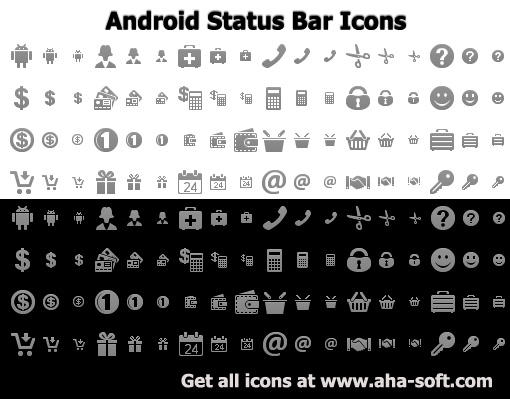
You have built an Android app that works, and then the notification that appears in the status bar looks like an afterthought: blurry, off-style, or the wrong size for half your users' screens. Status bar icons are tiny, and getting them right at several densities takes real design effort. Android Status Bar Icons from Aha-Soft is a ready-made collection that covers this one job.
Quick facts
- Icons in the set: 159 unique status bar icons (1321 image files in total)
- Resolutions: ldpi, mdpi and hdpi
- Formats: PNG and PSD raster; AI and SVG vector sources
- Target: apps designed for Android 2.3 and later
- Price: $49.00 for PNG only; $149.00 for PNG, PSD and vector sources
- Demo: a downloadable demo archive is available
Key features
159 icons drawn to the Android status bar guidelines
The set follows Google's status bar icon guidelines, so your notifications look like they belong on the device. It meets the requirements for apps designed for Android 2.3 and later.
Pre-rasterized icons for three screen densities
Every icon comes in ldpi, mdpi and hdpi, at pixel sizes of 24x38, 16x25 and 12x19. You drop the right folder into your project and skip the resizing.
PSD files with an extra depth layer
The PSD version adds a layer that controls the depth of each icon. On top of that, the alpha channel controls translucency, so icons render smoothly on any background.
Optional SVG and AI vector sources
If you need a size the raster files don't cover, the vector sources let you render icons at any size and resolution. They are only in the higher-priced edition.
Who it's for
This is for Android developers who need notification icons fast and don't have a designer on the team. It also suits designers who want a consistent starting point to edit in PSD or vector form. It is not a general app icon pack; it covers status bar icons only. The same vendor sells separate menu, tab, dialog, list view and launcher icon sets.
Pros and cons
Pros
- Large set of 159 icons with a coherent look
- Three densities already rendered
- Transparent backgrounds with an alpha channel
- Editable PSD and vector options
- A demo you can check before buying
Cons
- The $49.00 edition is PNG only; PSD and vectors cost $149.00
- Built around Android 2.3-era guidelines, so you may need to adapt them for newer design styles
- Covers only the status bar, so you will need other sets for the rest of your interface
FAQs
Which resolutions are included?
Low, medium and high density: ldpi, mdpi and hdpi.
Can I edit the icons?
With the higher-priced edition, yes. It adds PSD files and AI and SVG vector sources. The PNG-only edition gives you the finished raster files.
Do the icons work on any background?
They have transparent backgrounds and an alpha channel, so they render smoothly on any background.
How many icons do I get?
159 unique icons, which come to 1321 image files across formats and resolutions.
Can I try them first?
Yes, the vendor offers a demo archive to download.
System requirements
The icons are image files (PNG, PSD, AI, SVG), so you open them in any image or vector editor that supports those formats. They are designed for Android apps targeting version 2.3 and later.