Retail Inventory Tracking Barcode Maker
You have shelves full of products, and half of them have no label or a label your scanner can't read. Typing codes by hand and printing them from a spreadsheet is slow. Retail Inventory Tracking Barcode Maker (sold by the vendor as Barcode Maker Software for Retail Business) is a Windows program for designing and printing your own inventory and retail barcodes.
Quick facts
- Platform: Windows
- Price: $49 for a single-user license
- Barcode types: major linear and 2D standards
- Export formats: JPG, JPEG, BMP, PNG and others
Key features
Linear and 2D barcodes in one program
The software supports all major Linear and 2D barcode font standards. The linear list includes Code 128, Code 39, EAN 13, EAN 8, UPCA and UPCE. The 2D list includes QR Code, DataMatrix, PDF417, Aztec and MaxiCode.
Design labels with drawing objects
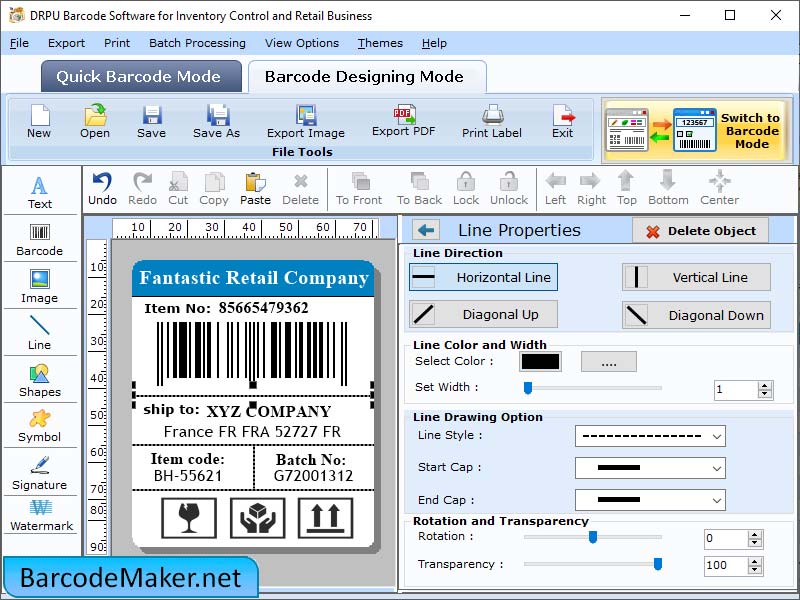
A barcode designing view gives you objects such as text, line, rectangle and ellipse. You use them to lay out the label the way you want it.
Customize each barcode
You can change the barcode value, header and footer. Font, color and image settings are adjustable, so your labels can follow your own style.
Save labels as image files
Finished barcodes can be saved as JPG, JPEG, BMP, PNG and other major image formats.
Works with common printers and scanners
The vendor says it supports all commonly used barcode printers and scanners.
Who it's for
It suits shop owners and stock managers who need to label products and track inventory. The vendor says it works for retail businesses of any size. It is also a fit if you want to print your own labels rather than order them.
Pros and cons
Pros
- Wide choice of linear and 2D symbologies
- Free-form label design with drawing objects
- Several image export formats
- One-time single-user license
Cons
- Windows only. A separate Mac edition exists.
- It is a label designer and generator, so it is not a full inventory database.
FAQs
Which barcode types can I create?
Linear types include Code 128, Code 39, EAN 13, EAN 8, UPCA and UPCE. 2D types include QR Code, DataMatrix, PDF417 and Aztec.
Can I design the label layout?
Yes. You can place text, lines, rectangles and ellipses, and adjust fonts and colors.
What file formats can I save to?
JPG, JPEG, BMP and PNG, among others.
Does it run on a Mac?
This edition is for Windows. The vendor lists a separate Mac edition.