IObit Malware Fighter 13 PRO: Award-Winning Antivirus with Complete Real-Time Protection
Product Overview
IObit Malware Fighter PRO is an award-winning antivirus and anti-malware solution that provides comprehensive, real-time protection for your computer, personal data, and online browsing activities. This powerful security software combines multiple advanced scanning engines, including the renowned Bitdefender engine, to deliver exceptional detection and removal capabilities against the latest cyber threats.
With over 200 million malware signatures in its database, IObit Malware Fighter PRO stands as one of the most robust security solutions available today. The software employs a unique triple-layer protection system that not only detects and removes existing threats but also prevents future infections before they can cause harm. Whether you're concerned about ransomware, spyware, adware, trojans, keyloggers, bots, worms, or any other form of malicious software, IObit Malware Fighter PRO offers comprehensive defense mechanisms to keep your system secure.
What sets IObit Malware Fighter PRO apart from conventional antivirus software is its holistic approach to security. Beyond traditional malware detection, it includes specialized features like ransomware protection, webcam security, browser protection, privacy safeguards, and USB drive protection. These advanced tools work together to create an impenetrable shield around your digital life, ensuring that your personal information remains private, your files stay secure, and your online activities remain confidential.
The software is designed to be both powerful and user-friendly, making it suitable for everyone from casual home users to IT professionals. Its intuitive interface allows you to perform scans, configure settings, and monitor your system's security status with just a few clicks. Despite its comprehensive feature set, IObit Malware Fighter PRO is optimized to run efficiently in the background without slowing down your computer, allowing you to work, play, and browse with peace of mind.

Why Choose IObit Malware Fighter PRO?
In today's rapidly evolving digital landscape, cyber threats have become increasingly sophisticated and pervasive. Every day, millions of new malware variants are created, targeting unsuspecting users and organizations worldwide. Traditional antivirus solutions often struggle to keep pace with these emerging threats, leaving your computer vulnerable to attacks that can compromise your personal data, financial information, and digital identity.
IObit Malware Fighter PRO addresses this challenge through its innovative multi-engine approach. By combining IObit's proprietary anti-malware engine with the industry-leading Bitdefender engine, the software achieves unprecedented detection rates while minimizing false positives. This dual-engine strategy ensures that threats missed by one engine are caught by the other, providing you with comprehensive protection that single-engine solutions simply cannot match.
The software's advanced ransomware protection is particularly crucial in an era where ransomware attacks have become one of the most significant cybersecurity threats facing individuals and businesses alike. Ransomware can encrypt your valuable files and demand payment for their release, potentially causing irreversible data loss and financial damage. IObit Malware Fighter PRO's specialized anti-ransomware engine monitors your system for suspicious encryption activities and blocks ransomware attacks in real-time, ensuring your files remain safe and accessible.
Beyond malware detection, IObit Malware Fighter PRO recognizes that modern cybersecurity requires a multi-faceted approach. The software includes specialized protection modules for your webcam, preventing unauthorized access that could allow hackers to spy on you through your own camera. It safeguards your browser against malicious websites, phishing attempts, and tracking cookies that compromise your privacy. It protects your USB drives from infections that could spread malware between devices. And it secures your personal data through password-protected folders that keep sensitive information away from prying eyes.
💡 Important Security Note
According to cybersecurity experts, ransomware attacks have increased by over 150% in recent years, making robust anti-ransomware protection essential for all computer users. IObit Malware Fighter PRO's specialized ransomware defense provides critical protection against these evolving threats, including notorious variants like WannaCry and other widespread ransomware families.
Comprehensive Feature Set
1. Dual-Engine Malware Detection
At the heart of IObit Malware Fighter PRO lies its powerful dual-engine detection system. The software integrates IObit's advanced anti-malware engine with the world-renowned Bitdefender engine, creating a formidable defense against malicious software. This combination leverages the strengths of both engines to achieve superior detection rates while maintaining optimal performance.
The IObit engine specializes in detecting and removing spyware, adware, trojans, keyloggers, bots, worms, and other common threats that plague modern computers. It employs heuristic analysis and behavior monitoring to identify suspicious activities that may indicate the presence of previously unknown malware. This proactive approach allows the software to catch zero-day threats and emerging malware variants before they can cause significant damage.
The Bitdefender engine, consistently ranked among the top antivirus engines in independent testing, brings over two decades of cybersecurity expertise to the table. With its massive cloud-based malware database and advanced machine learning algorithms, Bitdefender excels at detecting the latest viruses, ransomware, and sophisticated threats that traditional signature-based detection might miss. The engine's cloud scanning capability ensures that your system benefits from real-time threat intelligence without requiring constant database updates.
Together, these engines provide comprehensive protection against over 200 million known malware threats, with the ability to detect and neutralize new threats as they emerge. The dual-engine approach significantly reduces the likelihood of false negatives (missed threats) while maintaining a low rate of false positives (legitimate files incorrectly flagged as malicious).
2. Advanced Ransomware Protection
Ransomware represents one of the most devastating cybersecurity threats facing computer users today. These malicious programs encrypt your files and demand payment in exchange for the decryption key, often targeting irreplaceable personal photos, important documents, and critical business data. IObit Malware Fighter PRO's specialized anti-ransomware engine provides multiple layers of defense against these attacks.
The anti-ransomware module continuously monitors your system for suspicious file encryption activities that are characteristic of ransomware attacks. When it detects unusual behavior, such as rapid encryption of multiple files or attempts to modify system restore points, the engine immediately intervenes to block the malicious process. This real-time protection prevents ransomware from encrypting your files in the first place, rather than trying to recover them after the damage is done.
The software also includes specific protection against well-known ransomware families, including WannaCry, CryptoLocker, Locky, and hundreds of other variants. These targeted protections use signature-based detection combined with behavioral analysis to identify and neutralize ransomware before it can execute its payload.
Additionally, IObit Malware Fighter PRO can protect specific folders from unauthorized modifications, creating a safe zone for your most important files. Even if ransomware manages to infiltrate your system, it cannot encrypt files in these protected folders, ensuring that your critical data remains accessible.
3. Real-Time Protection
Real-time protection is the cornerstone of effective cybersecurity, and IObit Malware Fighter PRO excels in this area. The software's premium real-time protection module continuously monitors your system, scanning files as they are accessed, downloaded, or executed. This proactive approach ensures that threats are detected and neutralized before they can cause harm.
The real-time protection system includes multiple specialized guards that work together to provide comprehensive coverage:
- File Guard: Monitors file operations and scans files as they are opened, modified, or saved, preventing malware from executing or spreading through infected files.
- Network Guard: Analyzes network traffic for malicious activity, blocking connections to known malware servers and preventing data exfiltration.
- Startup Guard: Monitors programs that attempt to load automatically when Windows starts, preventing malware from establishing persistence on your system.
- Process Guard: Watches running processes for suspicious behavior, terminating malicious processes before they can cause damage.
- USB Disk Guard: Scans USB drives and removable media when they are connected, preventing malware from spreading through infected external devices.
- MBR Guard: Protects the Master Boot Record from rootkit infections that could compromise your system at the deepest level.
- Camera Guard: Controls access to your webcam, preventing unauthorized applications from using your camera to spy on you.
Each guard can be individually configured to suit your specific security needs, allowing you to balance protection and performance according to your usage patterns. The real-time protection system is optimized to minimize resource usage, ensuring that your computer remains responsive even with all protection modules active.
4. Browser Protection and Privacy
Your web browser is one of the most common entry points for malware and privacy invasions. IObit Malware Fighter PRO includes comprehensive browser protection features that safeguard your online activities and personal information.
The Download Protection module scans files as they are downloaded, blocking malicious executables, scripts, and documents before they reach your hard drive. This prevents drive-by downloads and malicious attachments from infecting your system, even if you accidentally click on a compromised link.
Surfing Protection analyzes websites in real-time as you browse, warning you about phishing sites, malicious domains, and compromised web pages. The feature uses a constantly updated database of known dangerous sites combined with heuristic analysis to identify suspicious websites that may not yet be in the blacklist.
Anti-Tracking (Pro feature) blocks tracking cookies and scripts that monitor your online behavior, preventing advertisers and data brokers from building detailed profiles of your browsing habits. This not only protects your privacy but also improves browsing performance by reducing the amount of tracking code that loads on each page.
DNS Protect ensures that your DNS queries are not hijacked by malicious actors who might redirect you to fake websites designed to steal your credentials. The feature verifies DNS responses and blocks attempts to redirect you to fraudulent sites.
Homepage Advisor prevents unauthorized changes to your browser's homepage and default search engine, a common tactic used by adware and browser hijackers to generate revenue through forced traffic.
The browser protection works seamlessly with all major browsers, including Google Chrome, Mozilla Firefox, Microsoft Edge, and Internet Explorer, providing consistent security regardless of your preferred browsing platform.
5. Webcam Security
Webcam hacking has become an increasingly common privacy violation, with hackers gaining unauthorized access to webcams to spy on users in their own homes. IObit Malware Fighter PRO's Camera Guard provides robust protection against these invasive attacks.
The webcam security feature monitors all attempts to access your camera, alerting you whenever an application tries to use your webcam. You can configure the software to automatically block unauthorized access or to prompt you for permission each time an application requests camera access.
This protection extends beyond just blocking unknown applications; it also prevents malware from secretly activating your webcam in the background, even if the camera's indicator light is disabled. The Camera Guard operates at the system level, ensuring that no application can bypass its protections.
For added peace of mind, the software maintains a log of all camera access attempts, showing you which applications have tried to use your webcam and when. This transparency allows you to identify and investigate any suspicious activity.
6. Privacy Protection and Data Security
Protecting your personal data is just as important as defending against malware, and IObit Malware Fighter PRO includes several features designed to safeguard your privacy and sensitive information.
The Privacy Protection module allows you to create password-protected folders where you can store sensitive documents, financial records, personal photos, and other confidential information. These protected folders are encrypted and inaccessible without the correct password, even if someone gains physical access to your computer.
Tracking Cookie Removal automatically detects and eliminates tracking cookies that websites and advertisers use to monitor your online behavior. These cookies can reveal your browsing habits, search history, and personal preferences to third parties. By regularly removing them, IObit Malware Fighter PRO helps maintain your online anonymity.
The software also includes tools to secure browser-saved passwords, preventing malware from stealing credentials stored in your browser's password manager. This protection is crucial because many users rely on browsers to remember login information for multiple websites, creating a tempting target for cybercriminals.
File Shredder functionality ensures that when you delete sensitive files, they are permanently erased and cannot be recovered using data recovery tools. The shredder overwrites file data multiple times using secure deletion algorithms, making recovery virtually impossible.
7. USB Drive Protection
USB drives and other removable media are common vectors for malware transmission, often used to spread infections between computers or to introduce malware into secure networks. IObit Malware Fighter PRO's USB Disk Guard provides comprehensive protection against USB-based threats.
When you connect a USB drive, the software automatically scans it for malware before allowing you to access its contents. This prevents autorun viruses and other USB-based malware from executing automatically when the drive is connected.
The USB protection also includes vaccination functionality, which immunizes your USB drives against certain types of autorun malware. This creates a protective layer on the drive that prevents malware from using the autorun feature to spread.
For added security, you can configure the software to automatically scan all removable media when connected and to block access to drives that contain detected threats until they are cleaned.
8. Behavior Monitoring and Threat Prevention
Traditional signature-based detection is effective against known malware, but it cannot catch new, previously unseen threats. IObit Malware Fighter PRO addresses this limitation through advanced behavior monitoring and heuristic analysis.
The Behavior Guard (Pro feature) monitors programs for suspicious activities that may indicate malicious behavior, such as attempting to modify system files, encrypting large numbers of files, or communicating with known command-and-control servers. When suspicious behavior is detected, the software can automatically block the program and alert you to the potential threat.
This proactive approach allows IObit Malware Fighter PRO to detect and neutralize zero-day threats, polymorphic malware, and other sophisticated attacks that traditional antivirus solutions might miss. The behavior monitoring system learns from global threat intelligence, continuously updating its detection capabilities based on emerging attack patterns.
The Malicious Action Guard specifically targets behaviors associated with common attack techniques, such as process injection, code execution in system processes, and attempts to disable security software. By blocking these malicious actions, the software prevents attacks from succeeding even if the initial malware manages to infiltrate your system.
9. Multiple Scan Modes
IObit Malware Fighter PRO offers flexible scanning options to suit different security needs and time constraints:
Smart Scan: Quickly scans critical system areas where malware commonly hides, including memory, startup items, system files, and common infection locations. This fast scan is ideal for regular security checks and typically completes in just a few minutes.
Full Scan: Performs a comprehensive examination of your entire system, scanning all files, folders, and drives. While this scan takes longer, it provides the most thorough security check and should be run regularly (weekly or monthly) to ensure complete protection.
Custom Scan: Allows you to select specific files, folders, or drives to scan. This is useful when you want to check downloaded files before opening them or verify the safety of a particular directory.
Right-Click Scan: Integrates with Windows Explorer, allowing you to right-click any file or folder and scan it on-demand. This convenient feature lets you verify the safety of individual items without launching the full application.
Scheduled Scan: Automatically runs scans at specified times, ensuring regular security checks even if you forget to initiate them manually. You can configure the scan type, time, and frequency to match your usage patterns.
Each scan mode can be configured to use one or both scanning engines, allowing you to balance thoroughness and speed according to your needs.
10. Automatic Updates
Cyber threats evolve constantly, with new malware variants appearing every day. IObit Malware Fighter PRO stays ahead of these threats through automatic updates that keep your protection current.
The software automatically downloads and installs malware database updates multiple times per day, ensuring that you have the latest signatures for detecting new threats. These updates are delivered efficiently in the background without interrupting your work or consuming significant bandwidth.
In addition to malware signatures, the software also receives program updates that improve detection algorithms, add new features, and enhance performance. You can configure the update settings to check for updates automatically or manually, depending on your preferences.
The cloud-based scanning capability means that even between database updates, your system benefits from real-time threat intelligence. When the software encounters a suspicious file, it can query IObit's cloud servers for instant analysis, providing protection against the very latest threats.
Additional Security Features
- Network Protection: Monitors network connections for suspicious activity and blocks unauthorized access attempts
- Process Security: Analyzes running processes for signs of malware and terminates malicious processes
- Rootkit Detection: Identifies and removes rootkits that attempt to hide deep within your system
- Quarantine Manager: Safely isolates detected threats, allowing you to restore false positives or permanently delete malware
- Scan History: Maintains detailed logs of all scans, showing detected threats and actions taken
- Protection History: Tracks all real-time protection events, giving you visibility into blocked threats
- Game Mode: Temporarily suspends non-critical functions during full-screen applications to prevent interruptions
- Cloud Security: Leverages cloud computing for faster scanning and instant threat detection
Key Benefits of IObit Malware Fighter PRO
Comprehensive Threat Protection
IObit Malware Fighter PRO provides unparalleled protection against the full spectrum of cyber threats. With its dual-engine architecture and over 200 million malware signatures, the software detects and removes viruses, spyware, ransomware, adware, trojans, keyloggers, bots, worms, rootkits, and countless other malicious programs. This comprehensive coverage means you don't need multiple security products; one solution handles all your protection needs.
The software's ability to detect threats that other antivirus programs miss makes it an excellent choice as a primary security solution or as a complementary scanner alongside your existing antivirus. Many users run IObit Malware Fighter PRO alongside their standard antivirus software for an extra layer of protection, taking advantage of its unique detection capabilities.
Superior Performance and Efficiency
One of the biggest complaints about security software is that it slows down computers, but IObit Malware Fighter PRO is engineered for efficiency. The software uses advanced optimization techniques to minimize its impact on system resources, allowing you to work, game, and browse without noticeable performance degradation.
The scanning process has been accelerated by up to 50% compared to previous versions, enabling faster threat detection without compromising thoroughness. The intelligent scanning engine prioritizes critical system areas and uses caching to avoid rescanning unchanged files, further improving speed.
Real-time protection operates silently in the background, using minimal CPU and memory. The software is designed to be unobtrusive, providing robust security without constant alerts or interruptions that disrupt your workflow.
User-Friendly Interface
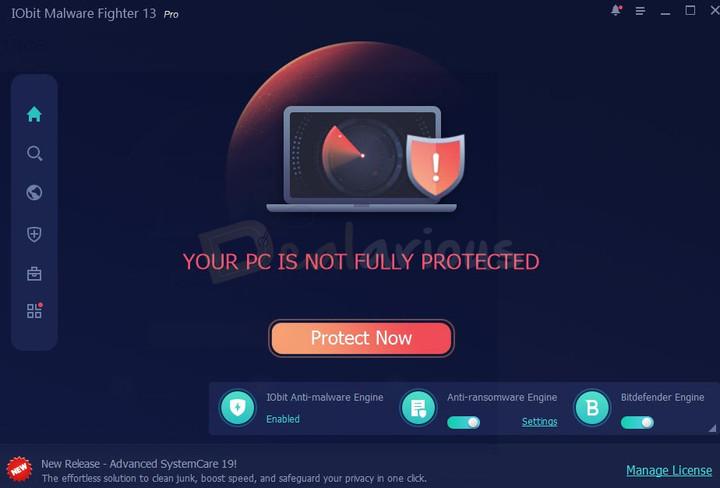
Despite its advanced capabilities, IObit Malware Fighter PRO features an intuitive, easy-to-navigate interface that makes security accessible to users of all skill levels. The main dashboard provides a clear overview of your protection status, with color-coded indicators showing whether your system is fully protected or if attention is needed.
Common tasks like running scans, updating definitions, and checking protection status are just one click away. Advanced settings are available for users who want fine-grained control, but the default configuration works excellently for most users, providing strong protection without requiring technical expertise.
The software's ease of use extends to installation and setup. IObit Malware Fighter is very easy to use, with straightforward installation and configuration processes that get you protected in minutes.
Privacy and Data Protection
In an era where privacy violations are increasingly common, IObit Malware Fighter PRO goes beyond traditional malware protection to safeguard your personal information. The software's privacy features prevent unauthorized access to your webcam, block tracking cookies, secure your browser passwords, and protect sensitive files through encryption.
These privacy protections are essential for maintaining control over your personal data in an interconnected world. By automatically erasing tracking cookies and hiding your online activities, the software helps you maintain anonymity and prevents companies from building detailed profiles of your behavior.
Cost-Effective Security
IObit Malware Fighter PRO offers exceptional value compared to competing security solutions. With pricing starting at just $19.95 per year for one PC and $23.95 per year for three PCs, you get enterprise-grade protection at a fraction of the cost of premium antivirus suites.
The software's comprehensive feature set eliminates the need for multiple security products, further reducing costs. Instead of purchasing separate solutions for antivirus, anti-ransomware, privacy protection, and browser security, you get everything in one affordable package.
The 60-day money-back guarantee allows you to try the software risk-free, ensuring that you're completely satisfied with your purchase. If IObit Malware Fighter PRO doesn't meet your expectations, you can request a full refund within 60 days, no questions asked.
Reliable and Trusted
IObit has over 15 years of experience in PC security and optimization, with products trusted by millions of users worldwide. IObit Malware Fighter has been OPSWAT certified and has received numerous awards for its effectiveness and performance.
The software's reputation is built on consistent performance and reliable protection. Users report that IObit Malware Fighter has detected and removed threats that other security programs missed, providing peace of mind and preventing potential disasters.
Regular updates and continuous development ensure that the software evolves to meet emerging threats. IObit's security research team monitors the threat landscape around the clock, updating detection capabilities as new threats are discovered.
💡 Pro Tip
For maximum protection, enable all real-time protection modules and schedule weekly full system scans. Combine IObit Malware Fighter PRO with regular Windows updates and safe browsing practices for comprehensive security. The software works excellently alongside Advanced SystemCare Pro for complete PC health and security management.
Step-by-Step Usage Guide
This comprehensive guide will walk you through installing, configuring, and using IObit Malware Fighter PRO to protect your computer effectively.
Step 1: Download and Installation
Click on the "Download Free Trial Now!" button at the top of this page. This will initiate the download of the IObit Malware Fighter installer. Save the file to a convenient location on your computer, such as your Downloads folder or Desktop.
Once the download completes, locate the installer file (typically named something like "IMF-Setup.exe") and double-click it to begin installation. If Windows prompts you with a User Account Control dialog asking for permission to make changes, click "Yes" to proceed.
The installation wizard will guide you through the setup process. You'll be presented with options to:
- Accept the license agreement
- Choose the installation directory (the default location works well for most users)
- Select additional components or features to install
- Configure initial settings
During installation, you may be offered additional IObit products or features. Review these offers carefully and select only the components you want. After confirming your choices, click "Install" to complete the installation process.
Once installation finishes, IObit Malware Fighter will launch automatically. If you've purchased a Pro license, you'll need to activate it to access all premium features.
Step 2: Activation (For Pro Users)
If you've purchased IObit Malware Fighter PRO, you'll need to activate your license to unlock all premium features:
- Click on the "Enter Code" or "Upgrade to Pro" button, typically located in the lower-right corner of the main window or in the menu.
- Enter your license code exactly as it appears in your purchase confirmation email. The code is typically a combination of letters and numbers.
- Click "Activate" or "Register Now" to complete the activation process.
- The software will connect to IObit's servers to verify your license. Ensure you have an active internet connection.
- Once activation is successful, you'll have full access to all Pro features, including the Bitdefender engine, ransomware protection, and premium technical support.
If you're using the free trial, you can activate it later by following the same process once you decide to upgrade.
Step 3: Initial Configuration
After installation and activation, take a few minutes to configure the software for optimal protection:
- Update Malware Database: The software should automatically check for updates upon first launch, but you can manually trigger an update by clicking the "Update" button. This ensures you have the latest malware signatures.
- Enable Real-Time Protection: Navigate to the "Protection" section and verify that all real-time protection modules are enabled. These include File Guard, Network Guard, Startup Guard, Process Guard, USB Disk Guard, MBR Guard, and Camera Guard. Each module provides a specific layer of defense.
- Configure Scanning Engines: In the settings, ensure that both the IObit engine and Bitdefender engine are enabled for maximum detection rates. You can configure which engine to use for different types of scans.
- Set Up Ransomware Protection: Navigate to the ransomware protection settings and enable the anti-ransomware engine. Consider adding important folders to the protected list to prevent unauthorized encryption.
- Configure Browser Protection: Enable browsing protection features including Download Protection, Surfing Protection, Anti-Tracking, and DNS Protect. These features work with your web browsers to prevent online threats.
- Set Scan Schedule: Configure automatic scans to run regularly. A weekly full scan is recommended for most users. You can set the scan to run at a convenient time when your computer is typically on but not in active use.
Step 4: Performing Your First Scan
Now that the software is configured, it's time to perform your first scan to check your system for existing threats:
- Choose Scan Type: On the main screen, you'll see several scan options:
- Smart Scan: Quick scan of critical system areas (recommended for regular checks)
- Full Scan: Comprehensive scan of your entire system (recommended for initial scan)
- Custom Scan: Scan specific files or folders you select
- Start the Scan: For your first scan, we recommend running a Full Scan to thoroughly check your entire system. Click the "Full Scan" button to begin.
- Monitor Progress: The scan will display progress information, including the number of files scanned, threats detected, and estimated time remaining. You can continue using your computer during the scan, though it may run slightly slower.
- Review Results: When the scan completes, you'll see a summary of detected threats. Each threat will be categorized by severity (High, Medium, Low) and type (virus, trojan, spyware, etc.).
- Take Action: For detected threats, you have several options:
- Remove: Delete the threat permanently (recommended for confirmed malware)
- Quarantine: Move the file to a secure location where it cannot execute (safer option if you're unsure)
- Ignore: Exclude the file from future scans (only use if you're certain it's a false positive)
- Complete Cleanup: After taking action on all detected threats, the software may prompt you to restart your computer to complete the removal process. Save any open work and restart if prompted.
Step 5: Enabling and Configuring Real-Time Protection
Real-time protection is your first line of defense against malware. Here's how to ensure it's properly configured:
- Navigate to the "Protection" tab or section in the main interface.
- You'll see a list of protection modules with toggle switches. Ensure the following are enabled:
- File Guard: Scans files as they are accessed
- Network Guard: Monitors network traffic for threats
- Startup Guard: Prevents malicious programs from loading at startup
- Process Guard: Monitors running processes for suspicious behavior
- USB Disk Guard: Scans USB drives when connected
- MBR Guard: Protects the Master Boot Record
- Camera Guard: Controls webcam access
- Anti-Ransomware: Blocks ransomware encryption attempts
- Click on individual protection modules to access advanced settings where you can:
- Configure what actions to take when threats are detected (automatic removal, quarantine, or prompt)
- Set exclusions for trusted files or folders
- Adjust sensitivity levels
- View protection logs
- Test your protection by visiting the EICAR test file website (a safe test file recognized by all antivirus programs) to verify that real-time protection is working correctly.
Step 6: Configuring Browser Protection
To protect your online browsing activities:
- Navigate to the "Browser Protection" or "Privacy" section.
- Enable the following features:
- Download Protection: Scans downloaded files for malware
- Surfing Protection: Blocks malicious websites
- Anti-Tracking: Blocks tracking cookies (Pro feature)
- DNS Protect: Prevents DNS hijacking
- Homepage Advisor: Prevents unauthorized homepage changes
- Configure your preferred browsers (Chrome, Firefox, Edge, etc.) to work with IObit Malware Fighter's protection features.
- Review the list of blocked tracking cookies and malicious sites periodically to understand what threats are being prevented.
Step 7: Setting Up Ransomware Protection
Ransomware protection requires specific configuration to safeguard your important files:
- Navigate to the "Ransomware Protection" section.
- Enable the "Anti-Ransomware Engine" if it's not already active.
- Protect Important Folders:
- Click "Add Folder" or "Protect Folders"
- Navigate to and select folders containing important documents, photos, and data
- Common folders to protect include Documents, Pictures, Desktop, and any custom data folders
- Click "Add" or "Protect" to add them to the protected list
- Configure Ransomware Behavior Detection:
- Enable "Monitor suspicious encryption activities"
- Set the sensitivity level (High, Medium, or Low)
- High sensitivity may catch more threats but could occasionally flag legitimate programs
- Review Protection Logs: Periodically check the ransomware protection logs to see if any suspicious activities have been blocked.
Step 8: Configuring Webcam Protection
To prevent unauthorized webcam access:
- Navigate to "Privacy Protection" or "Camera Guard" settings.
- Enable "Camera Guard" or "Webcam Protection".
- Choose your preferred access control mode:
- Block All: No application can access the webcam without explicit permission
- Ask for Permission: You'll be prompted whenever an application tries to use the camera
- Allow Trusted Apps: Only pre-approved applications can access the webcam
- Review the list of applications that have requested camera access and approve or deny each one.
- Enable notifications so you're alerted whenever the webcam is accessed.
Step 9: Scheduling Automatic Scans
Regular scans ensure ongoing protection even when you forget to run them manually:
- Navigate to "Settings" or "Scan Settings".
- Find the "Scheduled Scan" or "Auto Scan" section.
- Click "Enable Scheduled Scan" or similar option.
- Configure the schedule:
- Frequency: Choose daily, weekly, or monthly (weekly is recommended for most users)
- Day and Time: Select a day and time when your computer is typically on but not in heavy use (e.g., Sunday at 2:00 AM)
- Scan Type: Choose Smart Scan for quick regular checks or Full Scan for thorough weekly scans
- Set additional options:
- Automatically remove or quarantine detected threats
- Shut down computer after scan completes (useful for overnight scans)
- Send notification when scan completes
- Save your settings.
Step 10: Managing Quarantine
When threats are detected, they're often moved to quarantine rather than immediately deleted:
- Navigate to the "Quarantine" section.
- You'll see a list of quarantined files with information about:
- File name and location
- Threat type
- Date quarantined
- Severity level
- For each quarantined file, you can:
- Delete: Permanently remove the file (recommended for confirmed malware)
- Restore: Return the file to its original location (only if you're certain it's a false positive)
- Submit for Analysis: Send the file to IObit for further analysis if you're unsure
- Regularly review your quarantine and delete confirmed threats to free up disk space.
- Configure automatic quarantine cleanup to delete files older than a specified period (e.g., 30 days).
Step 11: Using Privacy Protection Tools
To protect your personal data and privacy:
- Create Password-Protected Folders:
- Navigate to "Privacy Protection" or "Protected Folder"
- Click "Create Protected Folder"
- Choose a location and name for the folder
- Set a strong password (use a combination of letters, numbers, and symbols)
- Move sensitive files into this folder to encrypt and protect them
- Clean Tracking Cookies:
- Navigate to "Privacy Clean" or "Tracking Protection"
- Click "Scan" to detect tracking cookies
- Review detected cookies
- Click "Clean" to remove them
- Enable automatic cookie cleaning on a regular schedule
- Secure Browser Passwords:
- Enable "Browser Password Protection" in settings
- This prevents malware from stealing passwords saved in your browser
Step 12: Configuring USB Protection
To protect against USB-based threats:
- Navigate to "USB Protection" or "USB Disk Guard" settings.
- Enable "USB Disk Guard".
- Configure automatic scanning:
- Enable "Auto-scan USB drives when connected"
- Choose whether to scan all files or only executable files
- Vaccinate USB Drives:
- Insert your USB drive
- Click "Vaccinate USB" or "Immunize USB"
- Select your USB drive from the list
- Click "Vaccinate" to protect it from autorun malware
- Set the software to automatically block access to infected USB drives until they are cleaned.
Step 13: Updating Malware Definitions
Keeping your malware database current is crucial for effective protection:
- The software typically updates automatically, but you can manually check for updates:
- Click the "Update" button on the main screen
- The software will check for malware database updates and program updates
- Download and install any available updates
- Configure automatic updates:
- Navigate to "Settings" > "Update"
- Enable "Automatically update malware database"
- Set update frequency (multiple times per day is recommended)
- Enable "Automatically update program" to get new features and improvements
- Verify update status regularly by checking the "Last Update" timestamp on the main screen.
Step 14: Reviewing Protection History and Logs
Regularly reviewing logs helps you understand threats and verify protection is working:
- Navigate to "Logs" or "History" section.
- Review different log types:
- Scan History: Shows all scans performed, threats detected, and actions taken
- Protection History: Displays real-time protection events and blocked threats
- Update History: Shows when updates were installed
- Look for patterns such as:
- Repeated attempts to access malicious websites (may indicate malware or unsafe browsing habits)
- USB drives frequently containing threats (may need better USB hygiene)
- Specific applications triggering alerts (may need investigation)
- Export logs if needed for troubleshooting or reporting purposes.
Step 15: Optimizing Performance Settings
To balance security and performance:
- Navigate to "Settings" > "Performance" or "General".
- Configure resource usage:
- Scan Priority: Set to "Low" or "Normal" to minimize impact on system performance during scans
- CPU Usage Limit: Limit maximum CPU usage during scans (50% is a good balance)
- Enable "Game Mode" or "Silent Mode":
- This temporarily suspends non-critical functions during full-screen applications
- Prevents scan notifications and updates from interrupting games or presentations
- You can configure which applications trigger Game Mode
- Exclude trusted large folders from real-time scanning if they cause slowdowns (e.g., video editing projects, game libraries), but ensure they're still included in scheduled full scans.
Step 16: Setting Up Exclusions
Sometimes you need to exclude certain files or folders from scanning:
- Navigate to "Settings" > "Exclusions" or "Ignore List".
- Add exclusions for:
- Trusted applications that are falsely flagged
- Large files that slow down scanning (virtual machine images, database files)
- Development folders with files that resemble malware (security research, programming projects)
- To add an exclusion:
- Click "Add" or "Add Exclusion"
- Browse to the file or folder you want to exclude
- Choose whether to exclude from real-time protection, scheduled scans, or both
- Click "OK" or "Add"
- Review exclusions periodically and remove any that are no longer needed.
- Warning: Only exclude files and folders you absolutely trust. Excluding items from scanning creates potential security gaps.
Step 17: Using Right-Click Context Menu Scanning
For quick on-demand scanning of specific files:
- IObit Malware Fighter integrates with Windows Explorer for convenient scanning.
- To scan a file or folder:
- Navigate to the file or folder in Windows Explorer
- Right-click on it
- Select "Scan with IObit Malware Fighter" from the context menu
- The software will scan the selected item and display results
- This is particularly useful for:
- Checking downloaded files before opening them
- Verifying files received via email or USB drives
- Quick checks of suspicious files without running a full scan
- If the context menu option doesn't appear, enable it in Settings > Integration > "Add to Windows Explorer context menu".
Step 18: Enabling Cloud Protection
Cloud protection provides instant threat detection:
- Navigate to "Settings" > "Cloud Security" or "Cloud Protection".
- Enable "Cloud Security" or "Cloud Scan".
- This allows the software to:
- Query IObit's cloud servers for instant analysis of suspicious files
- Access the latest threat intelligence without waiting for database updates
- Detect zero-day threats and emerging malware
- Cloud protection requires an internet connection to function.
- The feature is privacy-conscious and only sends file hashes (not actual files) for analysis in most cases.
Step 19: Configuring Notifications and Alerts
Customize how the software communicates with you:
- Navigate to "Settings" > "Notifications" or "Alerts".
- Configure notification preferences:
- Threat Detected: Always enable this to be alerted when malware is found
- Scan Complete: Enable to receive notifications when scans finish
- Update Available: Enable to be notified of program updates
- Protection Disabled: Always enable to know if protection is turned off
- Choose notification style:
- Pop-up notifications (visible alerts)
- System tray notifications (subtle icons)
- Sound alerts (audio notifications)
- Adjust notification frequency to avoid alert fatigue while staying informed of important events.
Step 20: Regular Maintenance Routine
Establish a regular maintenance routine for optimal security:
Daily:
- Ensure real-time protection is active (check system tray icon)
- Review any threat alerts or notifications
- Keep the software updated (automatic updates handle this)
Weekly:
- Run a Smart Scan or Full Scan (automated scheduling handles this)
- Review protection history for any blocked threats
- Check quarantine and delete confirmed threats
Monthly:
- Review and update protected folders for ransomware protection
- Clean tracking cookies and browser data
- Review exclusions and remove any that are no longer needed
- Check that all protection modules are still enabled
- Vaccinate USB drives you use regularly
Quarterly:
- Perform a thorough Full Scan with both engines enabled
- Review and update webcam access permissions
- Audit password-protected folders and update passwords if needed
- Check for program updates and new features
📚 Video Tutorials
Visual learners can benefit from watching step-by-step video tutorials that demonstrate IObit Malware Fighter Pro's features and usage. These tutorials cover everything from basic installation to advanced configuration and threat removal.
Video Tutorials and Demonstrations
What Users Are Saying
Software Informer - Professional Review
"The program uses two AV engines, its own and BitDefender, and seems to be effective against malware that cannot be detected by other similar tools so it is good that it can run together with your standard AV software. It can detect a wide array of spyware, ransomware, adware, Trojans, worms, keyloggers and bots."
— Software Informer Editorial Team
Bob Bassett
"We used to use up to a dozen different programs to keep our machines running smoothly and keep the bad guys out. It took hours every week to maintain security and performance. Now, with IObit Malware Fighter Pro and Advanced System Care Pro, everything is in one place and it takes us just a few minutes every couple of days to do the same jobs with much more confidence. We have not had a problem since using your products."
— Bob Bassett
Peter Stoffers
"Some years ago somebody drew my attention to IObit Malware Fighter. First I was sceptic. But after installing it, it became my favourite anti-malware program. It is very easy to use. Through the years it already has detected several threats and removed it. In cooperation with the other IObit programs, like for example ASC, I have a good PC protection. I now recommend these programs to all my friends and family."
— Peter Stoffers
Gelu Batir
"I am very satisfied with your product IObit Malware Fighter. Previously this product came to me I had a lot of troubles with malicious interferences, I was not able to watch an entire movie or concert, which I like very much. Due to your product now every operation is clear, safe and well protected. It scans my laptop without affecting its performance while I also recommended this product to two of my friends."
— Gelu Batir
David Cassidy
"I would like to say a great thanks to all the staff at IObit for working hard to bring us the best programs out. It is great update you have made for your users. It is lot quicker at scanner and easy to use. People who really want a good Malware and ant-virus program which is also good value for money need to look no further than IObit Malware Fighter. I would recommend that they forget the rest and get the best which is IObit Malware Fighter."
— David Cassidy
Adrian
"I have used many malware fighters but none has come near the efficiency and accuracy of IObit Malware Fighter. It is easy to set up, easy to use and easy to feel relaxed that your computer is not to be invaded by maleficent invaders set upon infecting your communications with viruses and program destroying malware."
— Adrian
IObit Malware Fighter PRO vs. The Competition
IObit Malware Fighter PRO vs. Windows Defender
Windows Defender (Built-in Windows Antivirus):
- Basic malware protection included with Windows
- Single-engine detection
- Limited ransomware protection
- No browser protection features
- No webcam protection
- Minimal privacy tools
- Can slow down system during scans
- Basic real-time protection only
IObit Malware Fighter PRO:
- Dual-engine detection (IObit + Bitdefender)
- Over 200 million malware signatures
- Advanced ransomware protection with behavior monitoring
- Comprehensive browser protection (anti-tracking, download protection, surfing protection)
- Webcam security and privacy protection
- Password-protected folders and data encryption
- USB drive protection and vaccination
- Faster scanning with 50% performance improvement
- Multiple specialized protection guards
- Privacy tools including tracking cookie removal
- Can run alongside Windows Defender for extra protection
Verdict: IObit Malware Fighter PRO provides significantly more comprehensive protection than Windows Defender, with advanced features specifically designed to combat modern threats like ransomware, webcam hacking, and privacy invasion. While Windows Defender offers basic protection, IObit Malware Fighter PRO delivers enterprise-grade security at a consumer price point.
IObit Malware Fighter PRO vs. Malwarebytes Premium
Malwarebytes Premium:
- Strong malware detection capabilities
- Good ransomware protection
- Limited browser protection
- No webcam protection
- Single-engine architecture
- Higher price point
- Focused primarily on malware removal
- Fewer privacy and data protection features
IObit Malware Fighter PRO:
- Dual-engine detection for superior threat detection
- Advanced ransomware protection with folder shielding
- Comprehensive browser protection suite
- Webcam security and access control
- More affordable pricing ($23.95 for 3 PCs vs. Malwarebytes' higher cost)
- Complete privacy protection tools
- USB drive protection
- Additional features like password-protected folders
- Better value with more comprehensive feature set
Verdict: While Malwarebytes is a respected security solution, IObit Malware Fighter PRO offers more comprehensive protection at a better price point. The dual-engine architecture, webcam protection, and extensive privacy tools give IObit Malware Fighter PRO a significant advantage for users seeking complete security.
IObit Malware Fighter PRO vs. Norton Antivirus
Norton Antivirus Plus:
- Well-known brand with good detection rates
- Comprehensive protection features
- Significantly more expensive ($49.99+/year for 1 PC)
- Can be resource-heavy and slow down systems
- Complex interface with many features
- Aggressive upselling of additional products
- Cloud-based features require constant internet connection
IObit Malware Fighter PRO:
- Competitive detection rates with dual-engine technology
- Similar comprehensive protection at lower cost ($19.95/year for 1 PC, $23.95 for 3 PCs)
- Lighter on system resources with optimized performance
- Intuitive, easy-to-use interface
- Focuses on essential security without bloat
- Better value for money
- Works effectively both online and offline
- Can run alongside other antivirus software
Verdict: IObit Malware Fighter PRO delivers comparable protection to Norton at a fraction of the cost, with better performance and a more user-friendly experience. For users who want effective security without paying premium prices or sacrificing system performance, IObit Malware Fighter PRO is the superior choice.
Frequently Asked Questions
Q1: Is IObit Malware Fighter PRO safe to use?
A: Yes, IObit Malware Fighter PRO is completely safe to use. The software has been OPSWAT certified and has received numerous awards for its effectiveness and reliability. IObit has over 15 years of experience in PC security, and Malware Fighter is trusted by millions of users worldwide. The software undergoes rigorous testing to ensure it doesn't interfere with legitimate programs or cause system instability.
Q2: Can I run IObit Malware Fighter PRO alongside my existing antivirus?
A: Yes, IObit Malware Fighter PRO is designed to run alongside other antivirus software without conflicts. This makes it an excellent choice as a secondary scanner to complement your primary antivirus. The software's real-time protection can work in conjunction with other security solutions, providing an extra layer of defense. However, if you choose to use IObit Malware Fighter PRO as your primary antivirus, you should disable real-time protection in your other antivirus to avoid performance issues.
Q3: What's the difference between the Free and Pro versions?
A: The Free version includes basic malware scanning and removal capabilities with the IObit engine. The Pro version adds:
- Bitdefender antivirus engine for dual-engine protection
- Real-time protection with multiple specialized guards
- Advanced ransomware protection
- Browser protection (anti-tracking, download protection, surfing protection)
- Webcam security
- USB drive protection
- Privacy protection tools
- Behavior monitoring
- Premium technical support
- Automatic updates
Q4: How much does IObit Malware Fighter PRO cost?
A: IObit Malware Fighter PRO is available in two plans:
- 1 PC Plan: $19.95/year (50% off regular price of $39.95)
- 3 PCs Plan: $23.95/year (56% off regular price of $54.95)
Both plans include a 60-day money-back guarantee, allowing you to try the software risk-free.
Q5: Does IObit Malware Fighter PRO slow down my computer?
A: No, IObit Malware Fighter PRO is optimized for performance and runs efficiently in the background. The software has been engineered to minimize resource usage, and scanning speeds have been accelerated by up to 50% compared to previous versions. Real-time protection operates silently without noticeable impact on system performance. The software also includes a Game Mode that temporarily suspends non-critical functions during full-screen applications to prevent interruptions.
Q6: Can IObit Malware Fighter PRO remove ransomware?
A: Yes, IObit Malware Fighter PRO is highly effective at preventing and removing ransomware. The software includes a specialized anti-ransomware engine that monitors for suspicious encryption activities and blocks ransomware attacks in real-time. It provides specific protection against well-known ransomware families including WannaCry, CryptoLocker, Locky, and hundreds of other variants. The software also allows you to protect important folders from unauthorized encryption, ensuring your critical files remain safe.
Q7: How often should I scan my computer?
A: We recommend the following scanning schedule:
- Smart Scan: Daily or every few days (quick scan of critical areas)
- Full Scan: Weekly or monthly (comprehensive system scan)
- Custom Scan: As needed (for specific files or folders)
You can configure automatic scheduled scans so you don't have to remember to run them manually. Real-time protection provides continuous monitoring between scans.
Q8: Does IObit Malware Fighter PRO protect against zero-day threats?
A: Yes, IObit Malware Fighter PRO employs multiple techniques to detect zero-day (previously unknown) threats:
- Behavior monitoring that identifies suspicious activities regardless of signatures
- Cloud-based scanning that queries real-time threat intelligence
- Heuristic analysis that detects malware based on characteristics and behaviors
- Dual-engine architecture that combines multiple detection methods
These proactive defenses allow the software to catch emerging threats before signature updates are available.
Q9: Can I use IObit Malware Fighter PRO on multiple computers?
A: This depends on your license type. The 1 PC Plan allows installation on one computer, while the 3 PCs Plan covers up to three computers. Each license is valid for one year and includes free updates during that period. The 3 PCs Plan offers exceptional value, protecting all your computers for less than the cost of a single PC license from many competitors.
Q10: What operating systems are supported?
A: IObit Malware Fighter PRO is compatible with:
- Windows 11
- Windows 10 (all versions)
- Windows 8.1
- Windows 8
- Windows 7 (SP1 or later)
- Windows Vista
- Windows XP (32-bit and 64-bit)
The software supports both 32-bit and 64-bit versions of Windows.
Q11: How do I update IObit Malware Fighter PRO?
A: The software updates automatically by default. Malware database updates are downloaded multiple times per day to ensure you have the latest protection. You can also manually check for updates by clicking the "Update" button on the main screen. Program updates that add new features or improvements are also delivered automatically, though you can configure the software to notify you before installing program updates.
Q12: Does IObit Malware Fighter PRO offer a money-back guarantee?
A: Yes, IObit offers a 60-day money-back guarantee for IObit Malware Fighter PRO. If you're not satisfied with the software for any reason within 60 days of purchase, you can request a full refund with no questions asked. This risk-free trial period allows you to thoroughly test all Pro features and ensure the software meets your needs.
Q13: Can IObit Malware Fighter PRO protect my webcam from hackers?
A: Yes, IObit Malware Fighter PRO includes specialized Camera Guard functionality that protects your webcam from unauthorized access. The feature monitors all attempts to access your camera and can block unauthorized applications from using your webcam. You can configure it to prompt you for permission each time an application requests camera access or to automatically block all unknown applications. This prevents hackers from secretly activating your webcam to spy on you.
Q14: How effective is IObit Malware Fighter PRO compared to other antivirus software?
A: IObit Malware Fighter PRO has proven highly effective in detecting and removing malware. The program uses two AV engines (IObit and BitDefender) and seems to be effective against malware that cannot be detected by other similar tools. It can detect a wide array of spyware, ransomware, adware, Trojans, worms, keyloggers, and bots. Independent testing and user reports consistently show that IObit Malware Fighter detects threats that other security programs miss, making it an excellent choice for comprehensive protection.
Q15: Does IObit Malware Fighter PRO include a firewall?
A: IObit Malware Fighter PRO includes network protection features that monitor and control network traffic, but it does not include a full traditional firewall. The software's Network Guard monitors for suspicious network activity and blocks connections to known malware servers. For comprehensive firewall protection, you can use Windows Firewall alongside IObit Malware Fighter PRO, or consider IObit's Advanced SystemCare Ultimate, which includes a firewall component.
System Requirements
Minimum System Requirements
- Operating System: Windows 11, Windows 10, Windows 8.1, Windows 8, Windows 7, Windows Vista, Windows XP (32-bit and 64-bit)
- Processor: Intel Pentium 4 or AMD equivalent, 1 GHz or faster
- RAM: 512 MB (1 GB recommended)
- Hard Disk Space: 300 MB free space for installation
- Screen Resolution: 1024 x 768 or higher
- Internet Connection: Required for updates, cloud scanning, and activation (broadband recommended)
Recommended System Requirements
- Operating System: Windows 11 or Windows 10 (64-bit)
- Processor: Intel Core i3 or AMD equivalent, 2 GHz or faster
- RAM: 2 GB or more
- Hard Disk Space: 1 GB free space (for quarantine and temporary files)
- Screen Resolution: 1280 x 800 or higher
- Internet Connection: Broadband connection for faster updates and cloud scanning
Pricing and Licensing
IObit Malware Fighter PRO offers flexible, affordable licensing options to meet different needs:
1 PC Plan
Price: $19.95/year (50% off regular price of $39.95)
Includes:
- License for 1 computer
- All Pro features (dual-engine protection, ransomware protection, browser protection, webcam security, etc.)
- Free updates for 1 year
- Premium technical support
- 60-day money-back guarantee
3 PCs Plan (Best Value)
Price: $23.95/year (56% off regular price of $54.95)
Includes:
- License for up to 3 computers
- All Pro features on each computer
- Free updates for 1 year
- Premium technical support
- 60-day money-back guarantee
The 3 PCs Plan offers exceptional value, protecting all your computers for less than $8 per PC per year—significantly less than most competing antivirus solutions.
💰 Special Offers
IObit frequently offers additional discounts and bundle deals. Check the official website for current promotions, which may include:
- Multi-year licenses at discounted rates (2-year or 3-year subscriptions)
- Bundle packages with other IObit products (Advanced SystemCare, Driver Booster, IObit Uninstaller)
- Seasonal sales (Black Friday, New Year, Back to School)
- Loyalty discounts for renewing customers
- Free gifts and bonuses with purchase
Getting Started Today
Ready to protect your computer with award-winning antivirus technology? Join millions of satisfied users who trust IObit Malware Fighter PRO to keep their systems secure, their data private, and their online activities safe.
Start with the free version to experience basic protection, or upgrade to Pro to unlock comprehensive security features including the powerful Bitdefender engine, advanced ransomware protection, webcam security, and privacy tools. With our 60-day money-back guarantee, you can try IObit Malware Fighter PRO risk-free and experience the difference professional-grade security makes.
Click the "Download Free Trial Now!" button at the top of this page to begin your journey to complete PC protection. In just minutes, you'll have IObit Malware Fighter PRO installed and actively defending your computer against malware, ransomware, spyware, and all forms of cyber threats.
Don't wait until it's too late. With cyber threats evolving every day, the time to secure your computer is now. IObit Malware Fighter PRO provides the comprehensive, real-time protection you need to browse, work, and play with complete confidence.
Conclusion
IObit Malware Fighter PRO 13 represents the pinnacle of accessible, effective cybersecurity for Windows users. By combining the power of dual scanning engines (IObit and Bitdefender), advanced ransomware protection, comprehensive privacy tools, and real-time defense mechanisms, this software delivers enterprise-grade security at a consumer-friendly price point.
The software's ability to detect and remove over 200 million types of malware, combined with its proactive behavior monitoring and cloud-based threat intelligence, ensures that you're protected against both known threats and emerging zero-day attacks. Specialized features like webcam security, browser protection, USB drive vaccination, and password-protected folders address the full spectrum of modern cybersecurity challenges, going far beyond traditional antivirus functionality.
What truly sets IObit Malware Fighter PRO apart is its balance of power and usability. Despite its sophisticated capabilities, the software remains accessible to users of all skill levels, with an intuitive interface and straightforward configuration options. At the same time, advanced users appreciate the granular control available through detailed settings and customization options.
The overwhelmingly positive user testimonials speak to IObit Malware Fighter PRO's effectiveness and reliability. Users consistently praise the software's ability to detect threats that other security programs miss, its ease of use, and its minimal impact on system performance. Many users report that after switching to IObit Malware Fighter PRO, they no longer experience the malware infections, privacy violations, or performance issues that plagued them with other security solutions.
At just $19.95 per year for one PC or $23.95 per year for three PCs, IObit Malware Fighter PRO offers exceptional value compared to competing antivirus solutions that often cost two to three times as much while providing fewer features. The 60-day money-back guarantee eliminates any risk, allowing you to thoroughly test the software and verify its effectiveness before committing to a purchase.
In an era where cyber threats are increasingly sophisticated and pervasive, comprehensive security is not a luxury—it's a necessity. Whether you're protecting personal files, financial information, business data, or simply your privacy, IObit Malware Fighter PRO provides the robust, multi-layered defense you need.
Don't leave your computer vulnerable to malware, ransomware, spyware, and privacy invasions. Take control of your cybersecurity today with IObit Malware Fighter PRO—the award-winning antivirus solution that millions trust to keep their digital lives safe, secure, and private.
Protect Your Digital Life Today
Download IObit Malware Fighter PRO and experience award-winning protection that keeps you safe from evolving cyber threats.
60-Day Money-Back Guarantee • 24/7 Premium Support • Trusted by Millions Worldwide
Over 200 Million Malware Signatures • Dual-Engine Protection • Real-Time Defense