|
|
Home : Security & Privacy : Password Managers
Logon Automator Details:
| Publisher:
|
Ivertech |
| Version:
|
1.0 |
| License:
|
Shareware |
| Trial Limitations:
|
7 Days |
| Price:
|
$30.00 |
| Operating Systems:
|
Win2000,Win7 x32,Win7 x64,Win98,WinServer,WinVista,WinVista x64,WinXP |
| System Requirements:
|
.Net Framework 2.0 |
| File Size:
|
0.93 MB |
| Total Views:
|
9416 |
| Total Downloads:
|
106 |
| Rating:
|
(5 out of 5 Stars) |
| Release Date:
|
6/1/2009 |
| Last Update:
|
2/22/2010 |
|
|
|
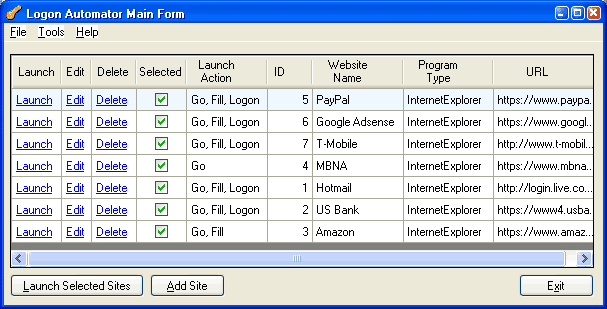
Screenshot:
|
Please click to display full view of
Logon Automator screenshot.
|
Logon Automator Short Description:
Logon Automator automatically logs on to multiple Web sites simultaneously.
|
Logon Automator Long Description:

Each time you sign up for a new account online, don’t you wish you had a way to securely store the user name and password, and automatically retrieve them when you visit the site in the future? You don’t want to have to write down the logon information for all your web-based e-mail accounts, credit card accounts, bank accounts, utilities accounts, stock trading accounts, etc. on a piece of paper because you might misplace it. And you don’t want to save them to a text file on your computer because the file might be viewed by someone who has access to your computer. Wouldn’t it be nice to be able to encrypt the sensitive logon information and retrieve it with a mouse click? Better yet, how about logging on to multiple web sites simultaneously without having to remember your user name and password?
Let us introduce you to Logon Automator. Logon Automator does all of the above and more! You will have no more trouble keeping track of your user names and passwords. Your logon process to different web sites will be reduced to a click of the mouse. Here are some highlights of what Logon Automator can do for you:
- Automatically logs on to multiple web sites simultaneously with a click of a button. All you need to remember is the master password to log on to Logon Automator. It will remember all your user names and passwords, and log on for you.
- Encrypts your passwords using US-Government-approved Triple DES (Data Encryption Standard) encryption algorithm so that no one will be able to view your passwords without your permission.
- Stores and organizes all your user names and passwords in one single secured location on your computer.
- Prevents key logger spyware from recording your key strokes since logon is performed with a mouse click.
- Remembers not just the user names and passwords on the logon page, but any options selected as well.
- Replaces all the links in your "Favorites" folder in Internet Explorer. You can move the links from "Favorite" folder to Logon Automator and it will click on all the links for you with one click of the button.
- Has the ability to automatically run any Windows programs on your computer.
- Provides a password generator to generate strong and difficult-to-guess passwords.
- Prints out all your logon information on screen or to paper when needed.
- Does not clutter up your Internet Explorer’s toolbars since it is not a plug-in to your browser.
|
Logon Automator Keywords:
Password Manager, Logon Automation, Launcher, Password Organizer, Auto Logon
|
Other Software Products by Ivertech:
1) Batch Watermarker
2) ImageCycler
3) QuickResizerAPI
4) EZStoredProc
5) QuickResizer
|
We deliver articles like below right to your inbox for free:
How the Hell Do I Watch Television Programs on My Computer
by Claude Herrera
Watching Television Programs On My ComputerJust a decade ago most people would have thought you were pulling their leg if you had of told them that watching television programs on my computer was possible, but now it's 10 years later and everyone is using satellite television on the computers.Ages later, this has become a realism when software developers came up with PC satellite TV software that allows you to watch satellite TV on your PC.A lot of folks own at least one...
How to Solve Non-database file or corrupted database Error in Exchange Server Error?
by Axel Culver
Microsoft Exchange Server databases suffer from two type of inconsistencies: Logical and Physical. Logical database corruption is caused due to reasons like deletion of Edb.log file and write-back caching, which generally introduce errors in B-trees and other logical structures. On the other hand, physical database corruption root from hardware failure like reasons that usually affect the database pages. Logical database corruption is hard to be detected by database administrator when compared t...
Resolving Error Message "disc damaged or illegible"
by Mnk Stllr
Hard disk partitioning is operation of dividing your hard drive's formattable space into smaller parts. Once the hard drive partitions are created, you can store files and folders of varied categories in those as per your preference. Corruption in hard drive partitions mainly occurs due to partition table damage, MFT (Master File Table) corruption, metadata structure corruption, malicious software like virus and more. In most of the cases of hard drive partition corruption, you encounter...
Killing INSERT ... SELECT Can Corrupt MySQL Table on MyISAM
by Naveen Kadian
The MySQL INSERT ... SELECT command allows you to insert several rows into a table from various tables. But at times, when you kill the command on MyISAM, you observe that the table gets corrupt. Such type of errors usually occur with large data sets. When you run CHECK TABLE command to check the table for consistency, it reports that the table is unusable as it is corrupt. The table thus corrupted should be restored from backup or you can alternatively use <a href="http://www.repair-mysql-datab...
NTBackup Verification Pass Might Fail to Detect BKF Corruption
by Naveen Kadian
NTBackup is a Windows backup utility that allows you to perform backup of important data using a proprietary format-BKF. The file thus created as backup can be used to restore lost files and folders after data loss. BKF files might get corrupt due to several reasons including incomplete backup, interruptions while backup, storage media errors and more. Thus, it is suggested to verify your backup after each stage of performing backup. But if you are using NtBackup verification pass to detect erro...
|
Recommended Products:
|
|
|
|
|